





The average professional sends and receives 120 emails a day, and almost none of them confirm whether they were actually read. Five methods can close that gap, though none is perfect.
In this article, I’ll walk you through exactly how to track whether your email has been opened and why it matters, without becoming a pesky stalker. Whether you’re following up on an important pitch or ensuring your team stays on track with emails, this guide will help you get the answers you need.
Key Takeaways:
- No method is 100% accurate — every email tracking technique has blind spots
- Read receipts work in Outlook and paid Google Workspace, but recipients can decline them
- Tracking pixels (via Chrome extensions) embed an invisible image, but image-blocking breaks them
- Apple Mail Privacy Protection auto-loads images, causing false "opens" and inflating your data
- Reply rates and click-throughs are more reliable engagement signals than open rates
- For bulk senders, email automation platforms track opens at scale — but the same privacy limits apply
What Is Open Rate?
Before we dive into the specifics, let’s start with the concept of "open rate." It’s a metric most email marketers use to measure how successful their email campaigns are. In simple terms, it’s the percentage of recipients who open your email compared to how many you sent out.
An email open rate gives you a quick look at how your email is performing. It tells you if your subject line is doing its job or if you need to work on that next time. However, there’s a catch—open rates have become less reliable. Let me explain why.
When Email Tracking Matters Most
While tracking whether someone opens your email sounds like a simple task, it actually has more importance than you might think. It’s crucial in scenarios where timing is everything—like sales, legal matters, or sensitive business communications. Let’s break down when tracking your email opens really counts:
- Sales & Marketing: If you're in sales, knowing when a prospect opens your email lets you time your follow-ups perfectly — assuming the email reached their inbox in the first place. A clean, validated email list is the foundation of every reliable open-tracking workflow. Agencies running outbound campaigns and email marketing teams often use this data to follow up at the right time.
- Time-Sensitive Proposals: Whether you're sending a proposal or a contract, it’s essential to know if your email has been opened so you can keep the process moving. Once the terms are finalized, you can send a contract for signature to move the agreement to the next step.
- Compliance & Legal: For legal documents or compliance-related matters, tracking who opens your email ensures accountability and makes sure you're covering your bases.
- Networking: You’re trying to build relationships, right? A simple "Did they open my email?" helps you plan your next step in reaching out.
So, let’s dive into how you can track all of this!
5 Effective Ways to Know If Someone Opened Your Email
Tracking email opens isn't as hard as it might seem. Here are five ways you can keep tabs on whether someone has read your email.
1. Request a Read Receipt
The most straightforward way to find out if your email has been read is by requesting a read receipt. It’s like a little pop-up notification that asks the recipient to confirm they’ve opened your email. It’s a simple method, but it has its pros and cons.
Requesting a Read Receipt in Outlook
In Outlook, here's how to ask for a read receipt:
- Compose a new email.
- Go to the Options tab.
- Under Tracking, check Request a Read Receipt.
- Hit send!
When the recipient opens your email, you’ll get a confirmation.
Requesting a Read Receipt in Gmail
For Gmail, it’s pretty easy as well:
- Open Gmail and click Compose to start a new email.
- In the compose window, click the three vertical dots in the bottom right (more options).
- Select Request Read Receipt.
- Complete your email and send it off!
Just a heads-up—read receipts only work for paid G Suite accounts, so if you’re using a free Gmail account, you won’t have this option.
Limitations of Read Receipts
There's also a hidden failure mode: if your email lands in the spam folder, the recipient never opens it — and no tracking method will help. Run your draft through a free email spam checker before you send to catch spam-trigger words and formatting issues that hurt inbox placement. So, while it’s useful, it’s not always reliable.
Note: Read receipts only work for paid G Suite accounts. If you are using a free account, you may need to look into professional email address examples for better business features.
2. Use an Email Tracking Chrome Extension
Another great way to track your emails is by using a Chrome extension. These tools automatically embed a tracking pixel in your email, and when the email is opened, you get a notification.
Some popular extensions include:
- Mailtrack: This simple tool adds a checkmark to your sent emails. One check means your email was sent; two checks mean it was opened.
- Free Email Tracker by cloudHQ: This extension tracks opens and provides real-time notifications in Gmail.
- Mailtag: This extension offers tracking and lets you see who opened your email and when.
Advantages of Email Tracking Extensions
- No pop-up notifications for your recipients, so it’s less intrusive.
- Easy to use and set up—just install and track.
- You can see exactly when your email was opened.
But, remember, some recipients may block these trackers, so it's not foolproof.
3. Add an HTML Image Tag to Your Emails
For those of you who know a little HTML, you can add an invisible image tag to your email. When the recipient opens the email, the image is downloaded, notifying you that the email was opened.
You can make this image tag invisible by setting it to a tiny, 0x0 pixel size, so it doesn’t affect your email’s design.
4. Use Email Clients That Track Opens
Some email clients come with built-in open tracking features. For instance, Mailbird automatically adds a tracking pixel to each email, so you can track opens without using extensions or coding.
5. Let Email Automation Tools Track Your Open Rate
If you’re sending lots of emails—say for a marketing campaign—email automation tools can track everything for you. You can monitor how many leads received your emails, how many opened them, clicked, or even replied!
These tools not only track open rates but also give you insights into other important metrics, such as bounces, unsubscribes, and more.
Comparison table (Outlook vs Gmail vs Chrome ext. vs HTML pixel vs automation)
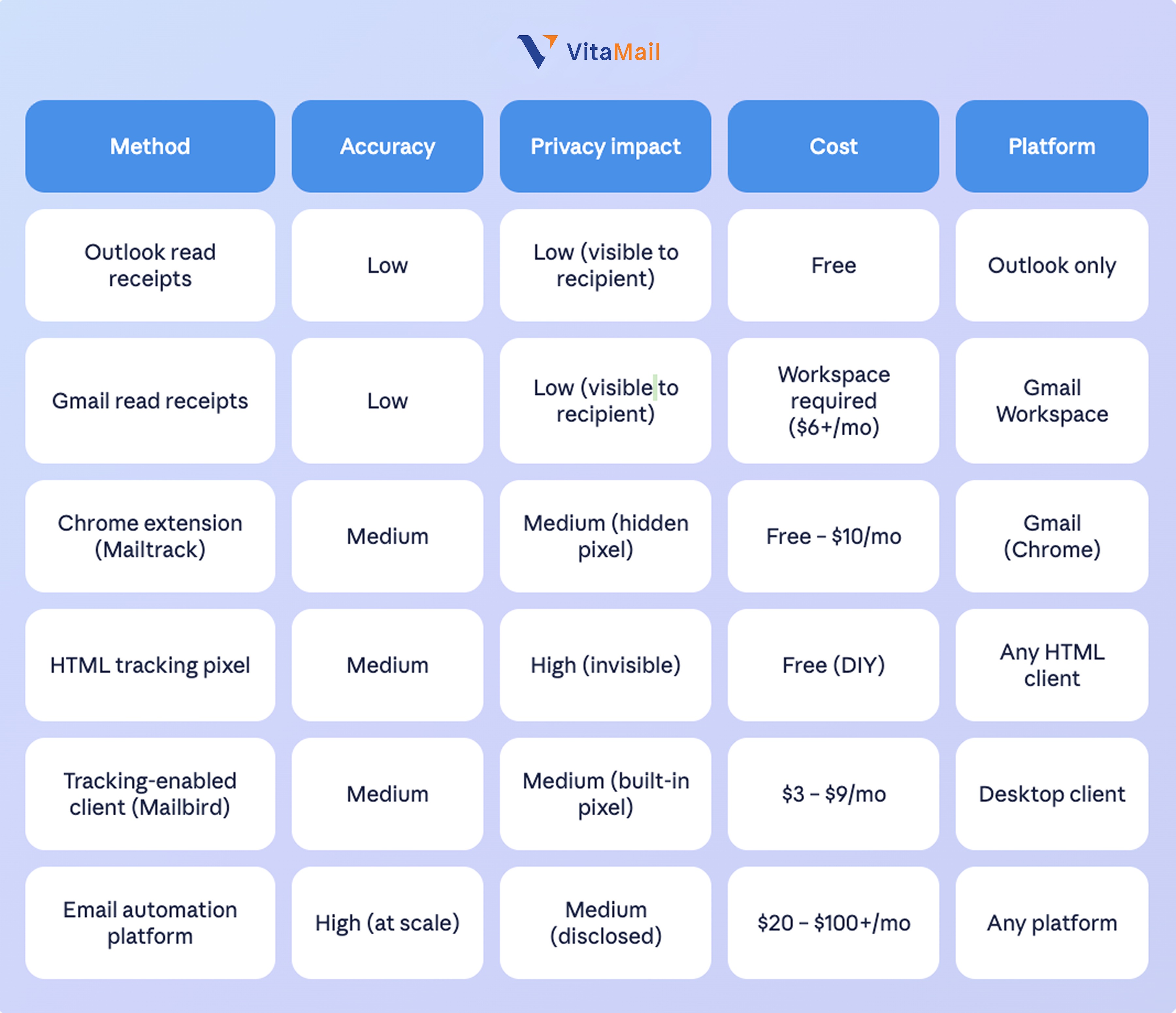
Open Rates Are Inaccurate, Now What!?
Let’s be real: Open rates are no longer the gold standard for measuring email success. With recent privacy changes from Apple, Gmail, and others, email tracking has become more difficult. For example, Apple’s Mail Privacy Protection preloads emails, causing false open rates. Gmail has started blocking images, which includes tracking pixels, so even if someone opens your email, you might not see it.
Beyond tracking limits, deliverability itself is often the silent killer — if your emails land in spam, no tracking method will help. Verify your sender authentication with a free SPF record checker to make sure receiving servers actually trust your domain.
- Reply Rates: A great indicator of engagement. If you’re getting replies, you’re doing something right.
- Click-Through Rates: If people are clicking on links in your email, that’s a strong signal of interest.
- Conversions: Ultimately, the best metric is the outcome, whether it’s a meeting booked, a sale made, or whatever your goal is.
What You Should Look at Next
If tracking opens has become a bit of a struggle, don’t worry! There are plenty of other metrics to keep an eye on, like reply rates and link clicks. But if you still want to monitor your emails' performance, tools like email tracking Chrome extensions are great options.
Here’s where email validation also comes into play. If you’re not sure whether your emails are reaching their intended recipients or if they’re even deliverable, it’s worth checking the health of your email list. This is where VitaMail V4 comes in.
VitaMail's Email Validator is an affordable validation service that ensures your emails actually land in the inboxes of valid and engaged recipients. It's simple and cost-effective, offering 1,000 free credits to get started. By using VitaMail, you can make sure that your email outreach is as effective as possible, minimizing bounces and increasing your open rates.
So, next time you hit send, you’ll know not only how to check if your email has been read, but also that it’s being delivered to the right inbox!

