




Creating a full email campaign can take a lot of time choosing the topic, writing the content, finding the right subject line, and keeping everything consistent. That’s why many businesses are now using AI tools that make the process simpler and faster. The VitaMail AI Email Generator does exactly that by helping you build complete campaigns in just minutes. With ready strategies, subject lines, and fully written emails, it removes the pressure of starting from scratch and lets you focus on sending clear, effective messages.
Why Creating Email Campaigns Feels Hard for Most Businesses
The usual problems: ideas, time, and consistency
For most businesses, the real challenge is keeping up with email work week after week.
Running out of ideas. Finding fresh topics every week becomes harder, and campaigns get delayed.
Writing takes too long. Drafting, editing, and finalizing even one email can take hours.
Tone becomes inconsistent. When multiple people write, the brand voice starts to shift.
It's hard to stay consistent. When the team gets busy, emails are the first thing to be postponed.
No one likes starting from a blank page. This is exactly where an AI email generator takes the pressure off.
Why manual email marketing no longer scales
Manual writing works at first, but it quickly becomes too slow as the audience grows.
A bigger audience means more work. As your list grows, so does the number of emails you need.
More campaigns pile up quickly. Every product, update, or holiday requires new messages.
Testing becomes impossible. A/B testing is rarely done when everything is written manually.
One person can’t handle it all. Without support, growth slows down.
Efficiency drops fast. At this point, many turn to an ai email generator free tool just to keep up.
Time becomes the biggest limitation. This is why businesses eventually adopt an email campaign generator to automate the heavy lifting.
What Is an AI Email Generator?
How AI helps with writing and planning
An AI email generator is a tool that helps you write emails and plan campaigns without starting from scratch. Instead of spending hours thinking about ideas, subject lines, or the right structure, you enter your topic and the tool suggests clear, ready-to-use options. It can draft full emails, offer different versions, and help you organize your message so you stay consistent. For many teams, it works like a writing assistant that speeds up the process and removes the pressure of doing everything manually.
Why AI email tools are becoming essential in 2026
As businesses grow, the demand for faster and more frequent email content grows with them. That’s why tools powered by smart automation like an AI email generator or even an email campaign generator are becoming part of everyday marketing. Teams want to save time, keep a steady sending schedule, and avoid burnout. In 2026, when marketing cycles move quickly, having a tool that can generate ideas, write copy, and support your planning is no longer just helpful, it's becoming a standard part of the workflow. While AI can support strategy and execution, strong fundamentals still matter. These effective email marketing examples show how successful campaigns combine smart tools with proven practices.
Meet the VitaMail Campaign Generator
What makes VitaMail different
VitaMail keeps everything in one place. Instead of jumping between tools or staring at a blank screen, you choose your topic and your style, and the platform gives you clear ideas, subject line options, and a draft you can quickly shape into your own voice. It’s simple, direct, and built for people who want to stay consistent without spending hours on every email.
Who this tool is made for
This tool is built for anyone who wants to send emails without wasting time on the writing process. Small business owners, freelancers, marketers, agencies, and even beginners can use it to stay consistent. If you want clear ideas, quick drafts, and an easier way to keep your email campaigns running, this tool fits perfectly.
Build Your Full Email Campaign in Minutes (Step-by-Step)
Step 1 - Generate your campaign strategy
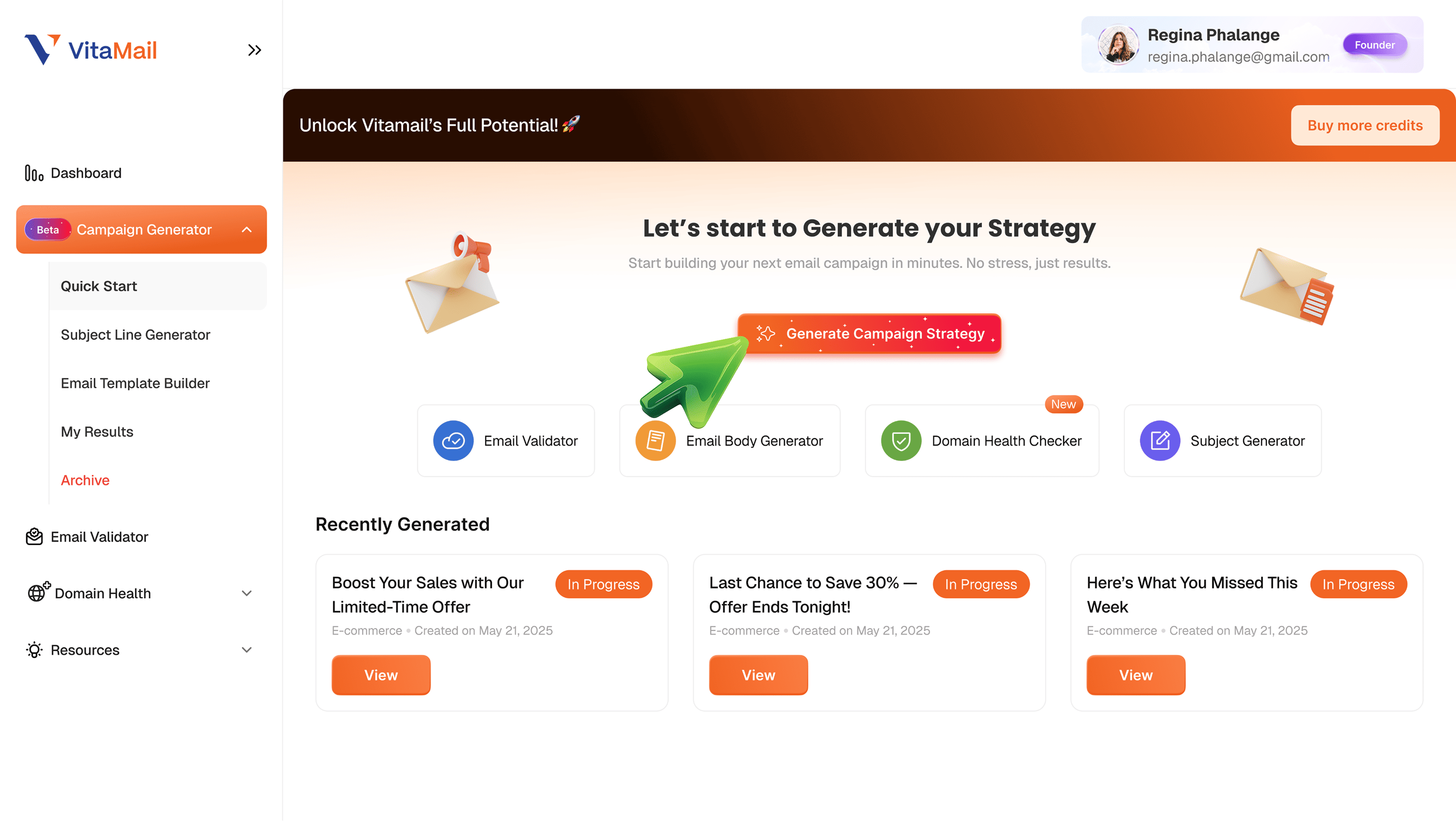
Your journey begins on the Campaign Generator dashboard.Click “Generate Campaign Strategy” to let the tool guide you through creating a full email campaign step by step. No guesswork, no confusion.
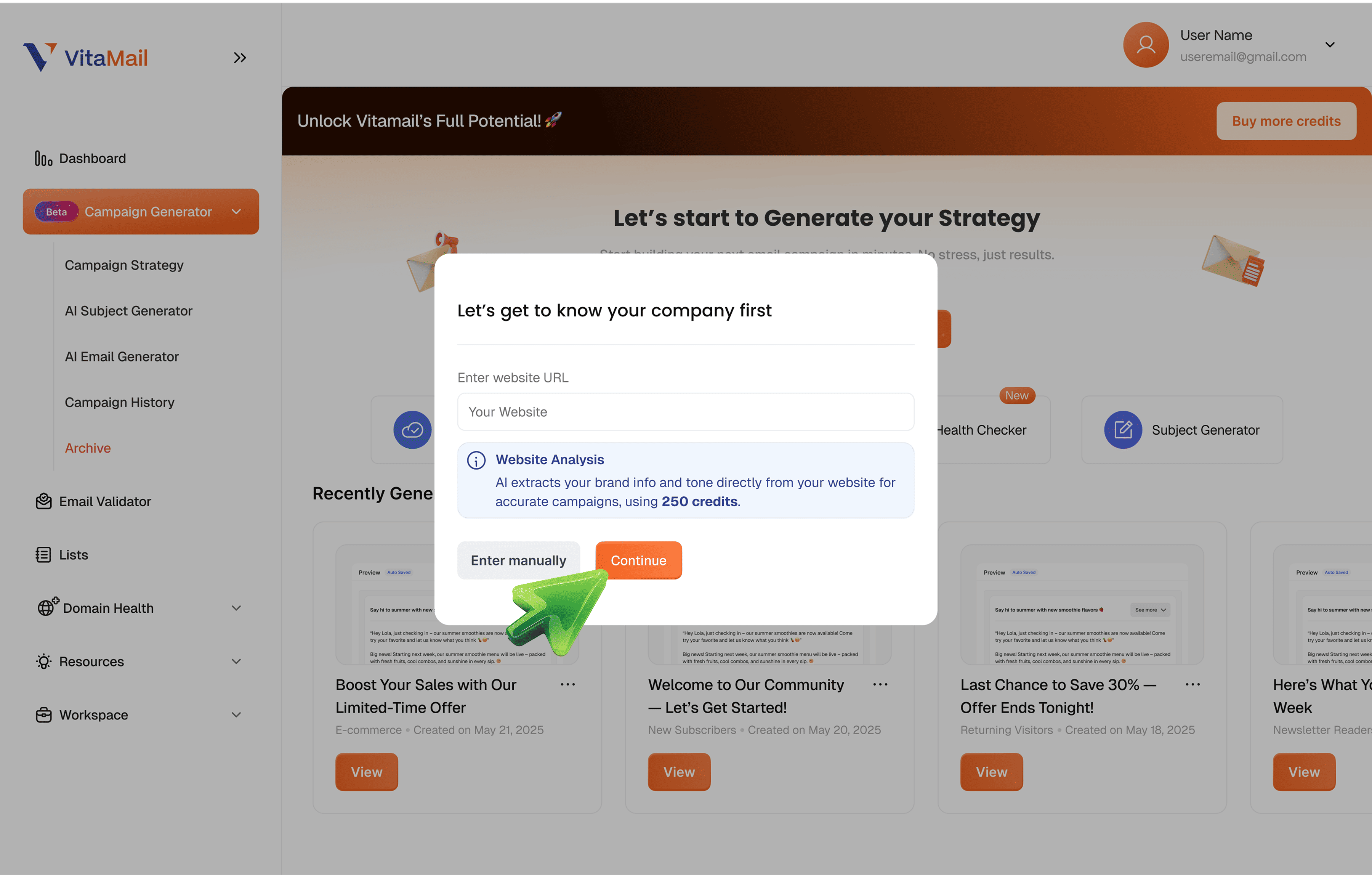
 You can either paste your website URL for instant AI brand analysis,or choose “Enter manually” to input your brand details yourself.This helps the system understand your tone, niche, product, and audience.
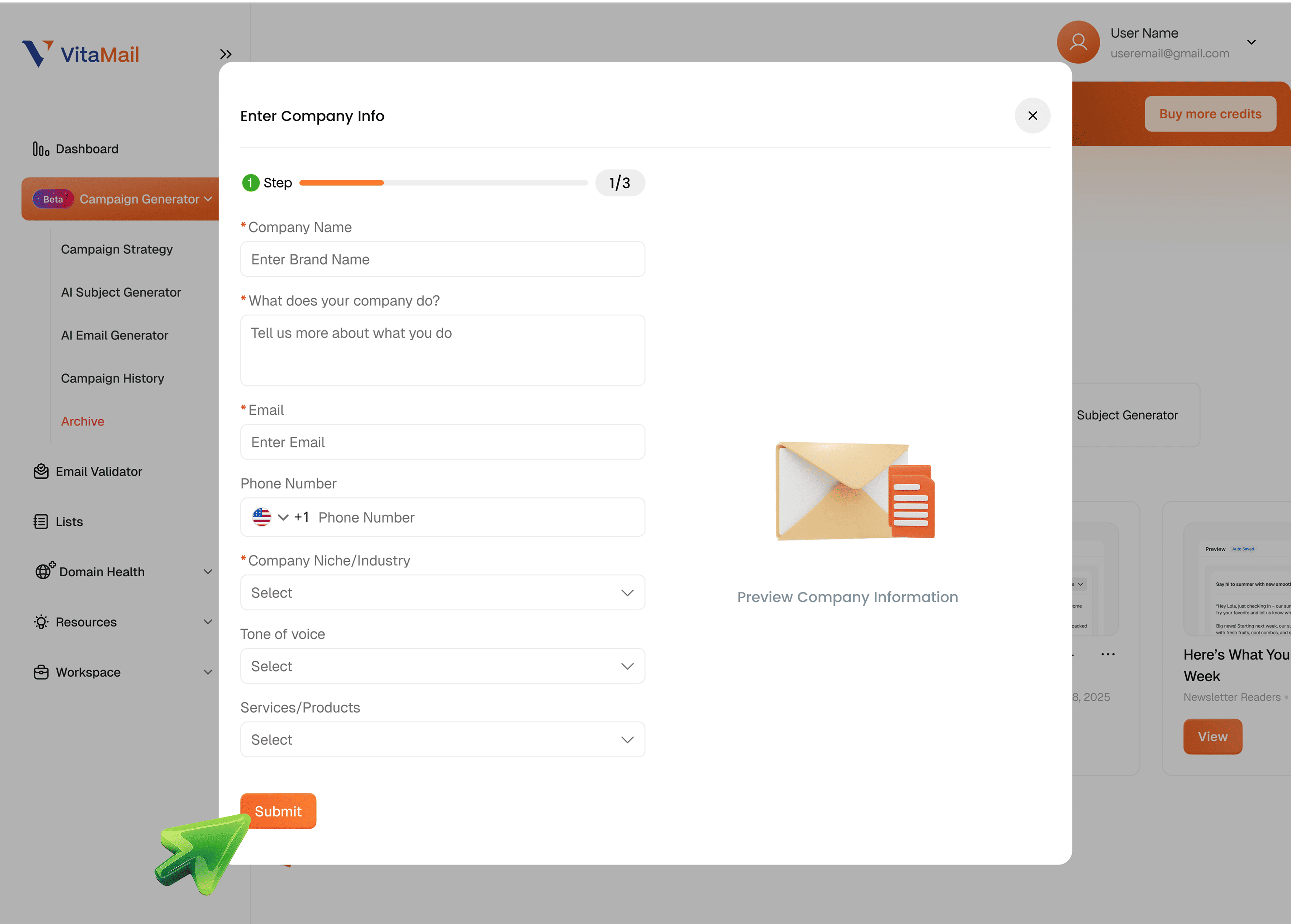
 Add your company name, what you do, your email, phone number, niche, tone of voice, and the services you offer.This information is used to personalize your content so everything feels aligned with your brand.
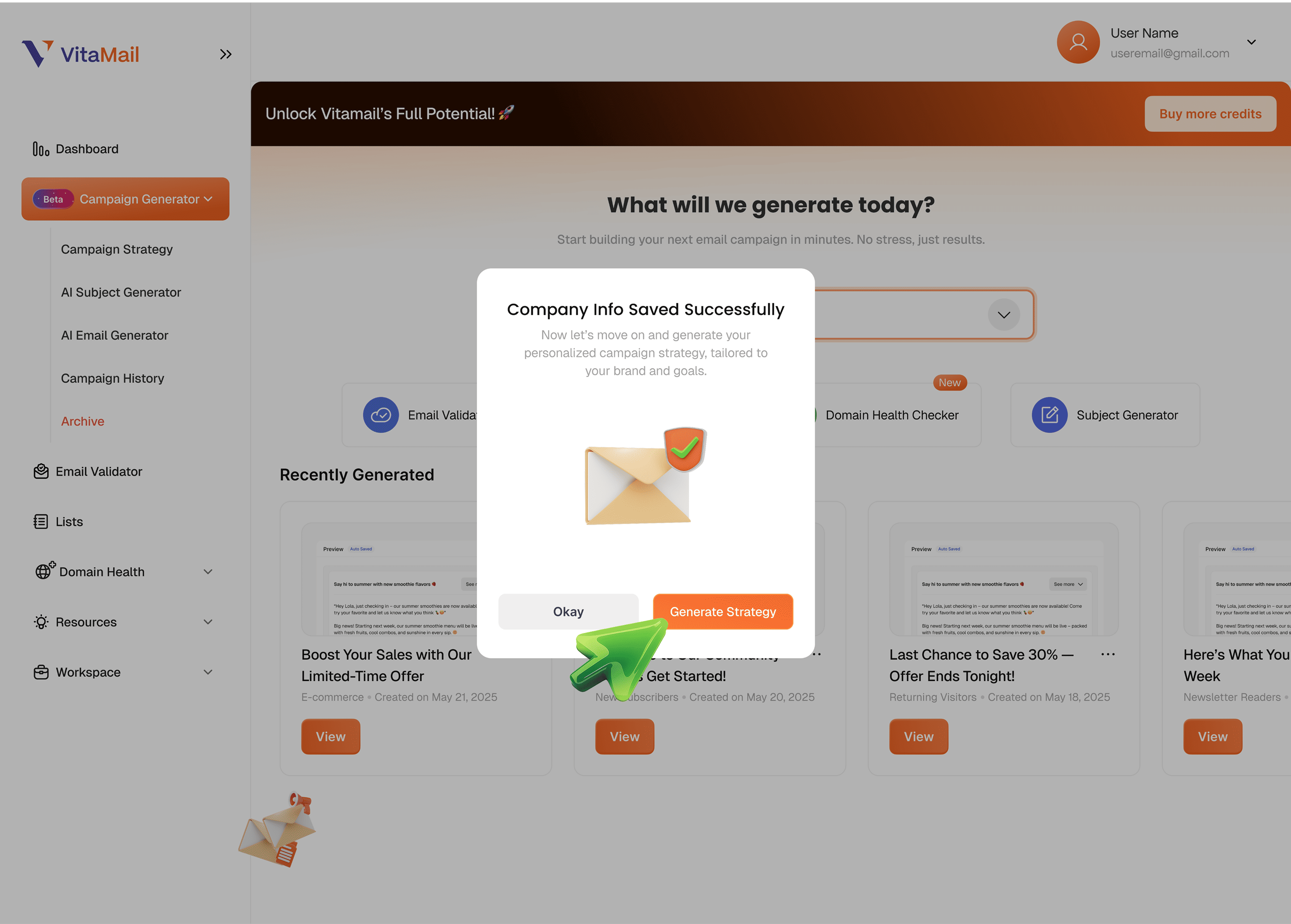
 Once your company info is saved, click “Generate Strategy” to continue.The system now tailors your entire campaign to your brand and goals.
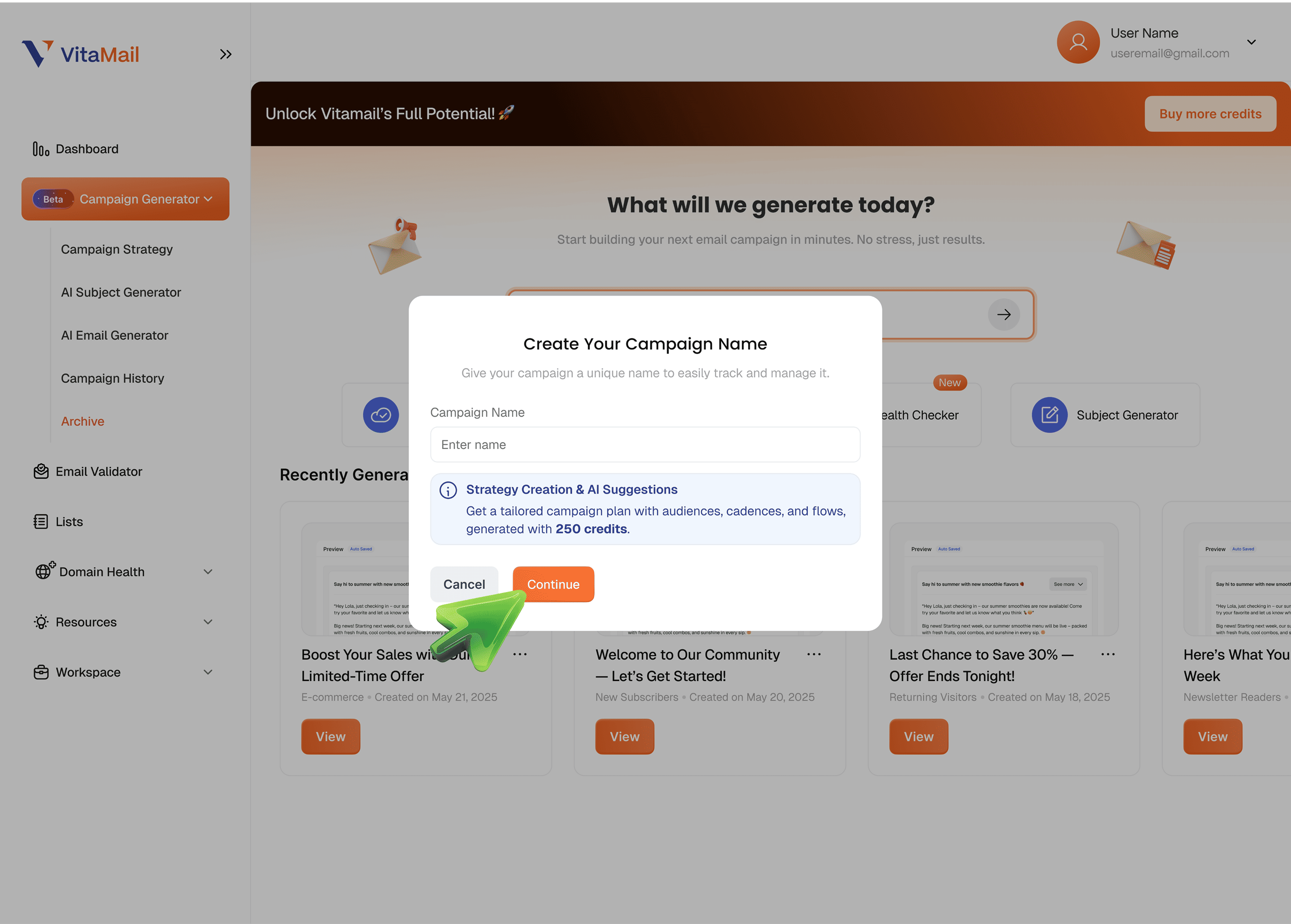
 Give your campaign a clear, easy-to-recognize name.You can also enable AI Strategy Creation to get suggestions for audience segments, cadence types, and objectives.
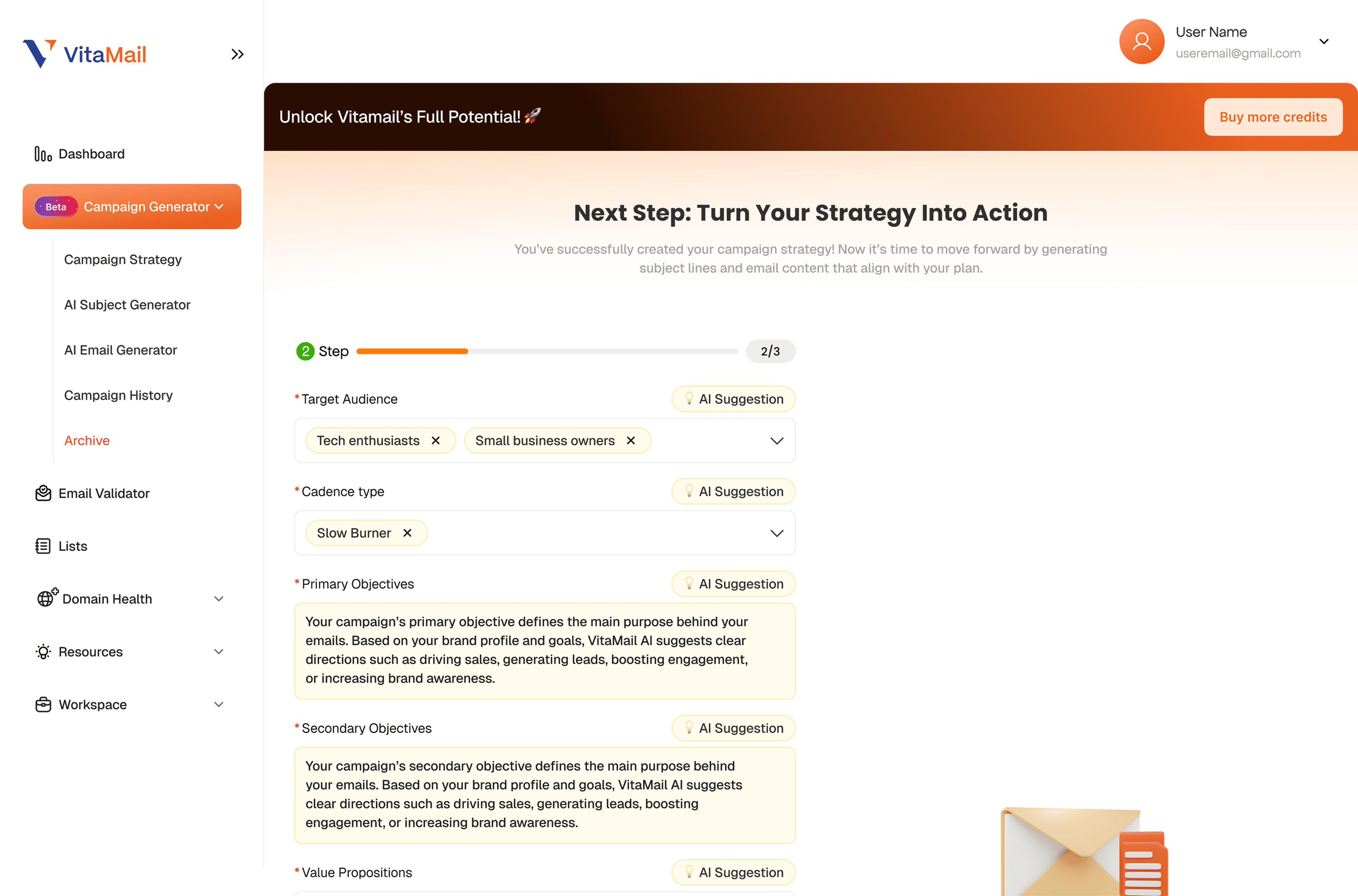
 Choose your target audience, cadence type, primary and secondary objectives, and value propositions.If you're not sure what to pick, click “AI Suggestion” next to any field the system will recommend the best option based on your brand and goals.
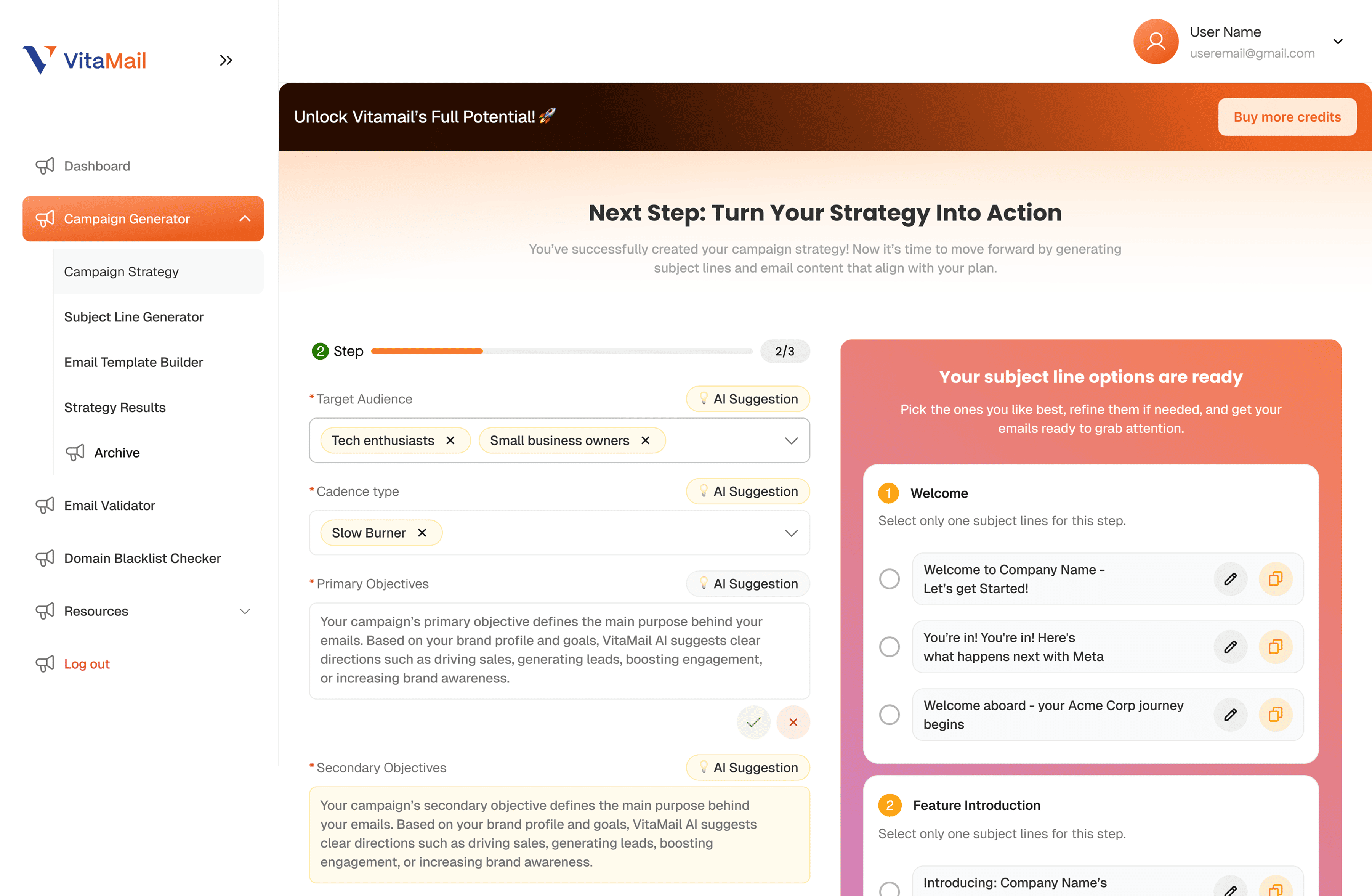
Based on your strategy, the tool provides ready-to-use subject lines for each email in your sequence.Pick the options you like or edit them before moving forward.Each subject line is crafted to improve opens, clicks, and engagement.
Step 2 - Generate subject lines
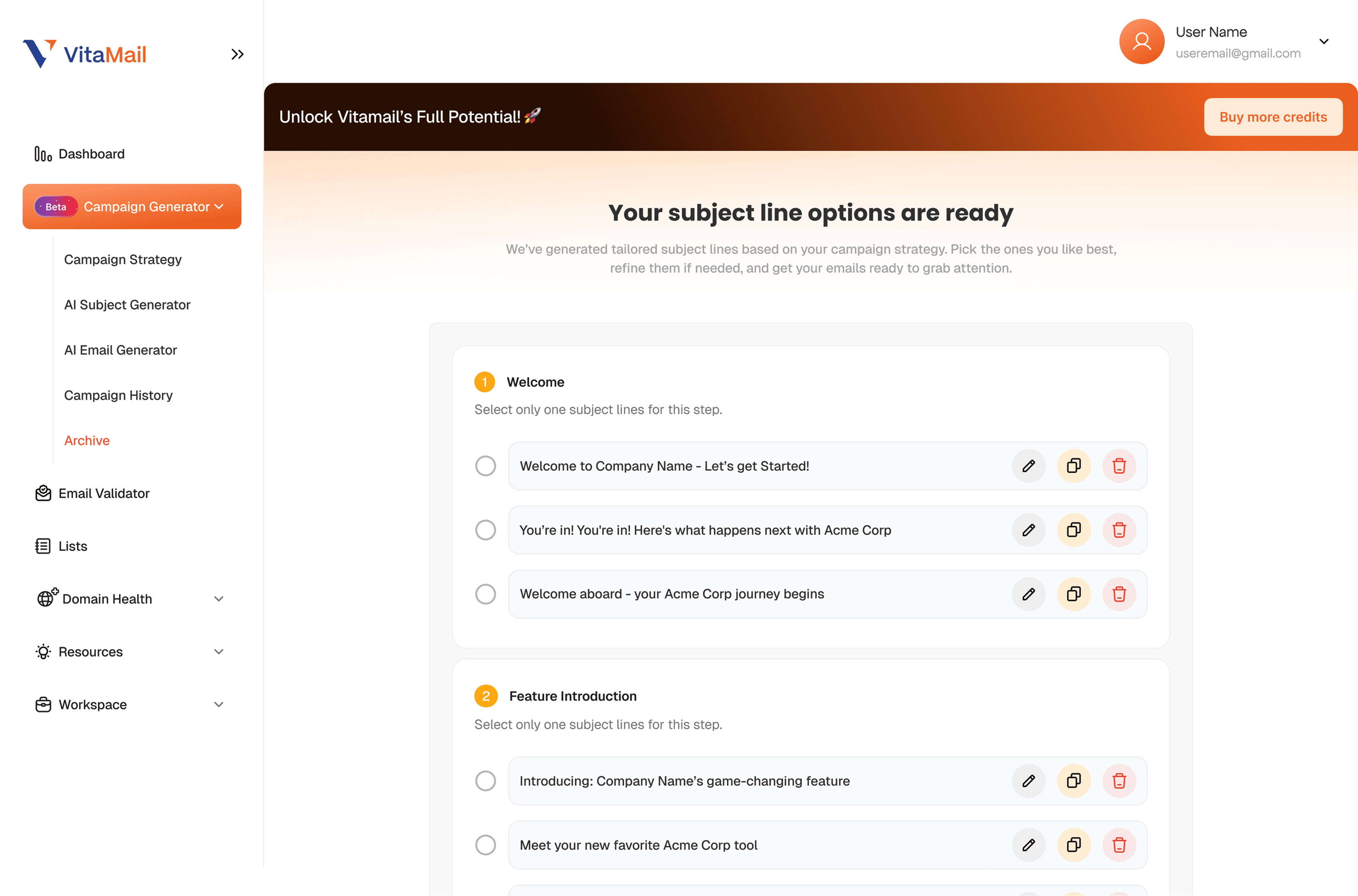
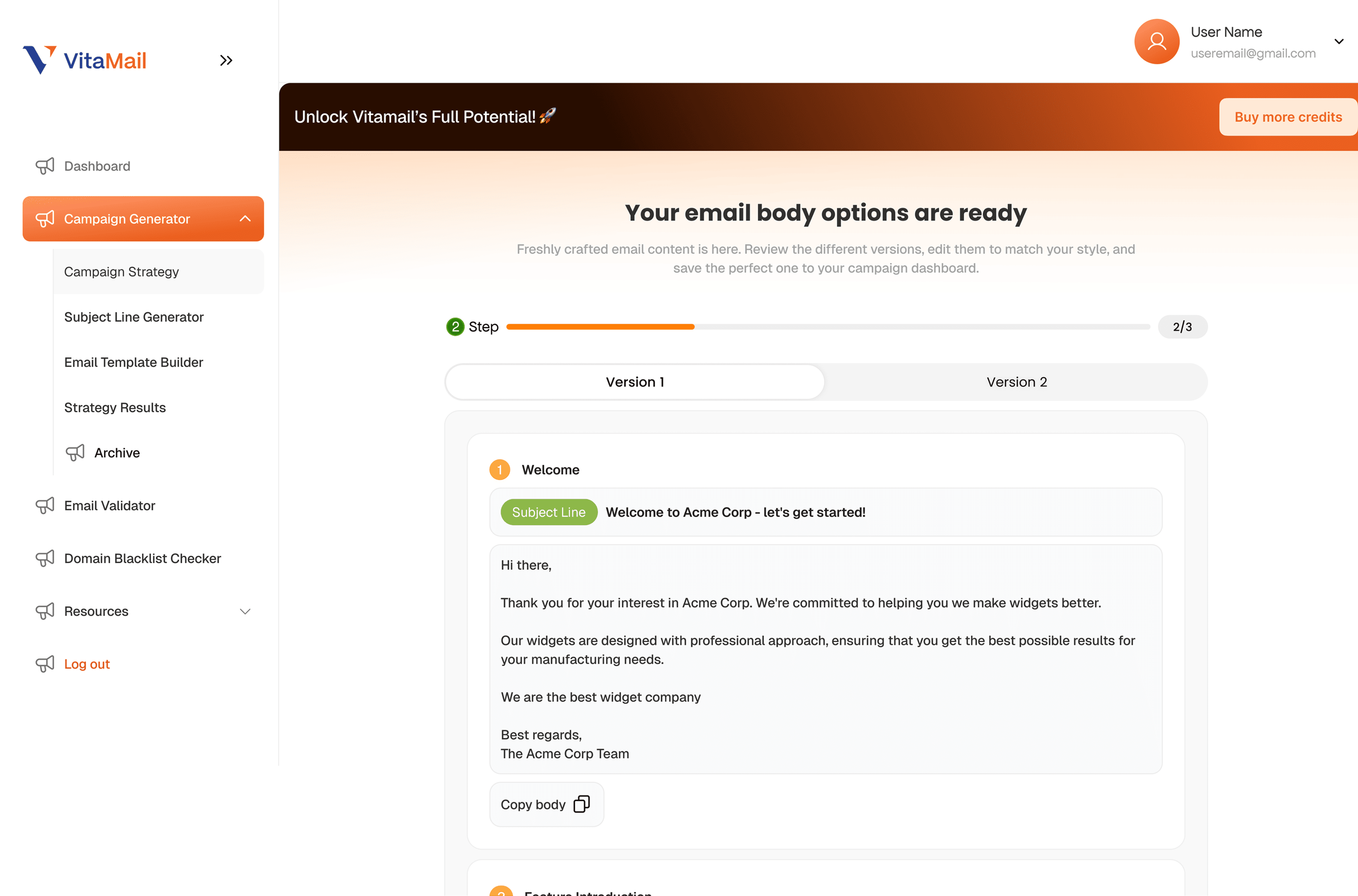
Next, you get complete email body versions for every email in your campaign.You can switch between versions, choose the one you prefer, or adjust the text directly.
Step 3 - Generate the full email content
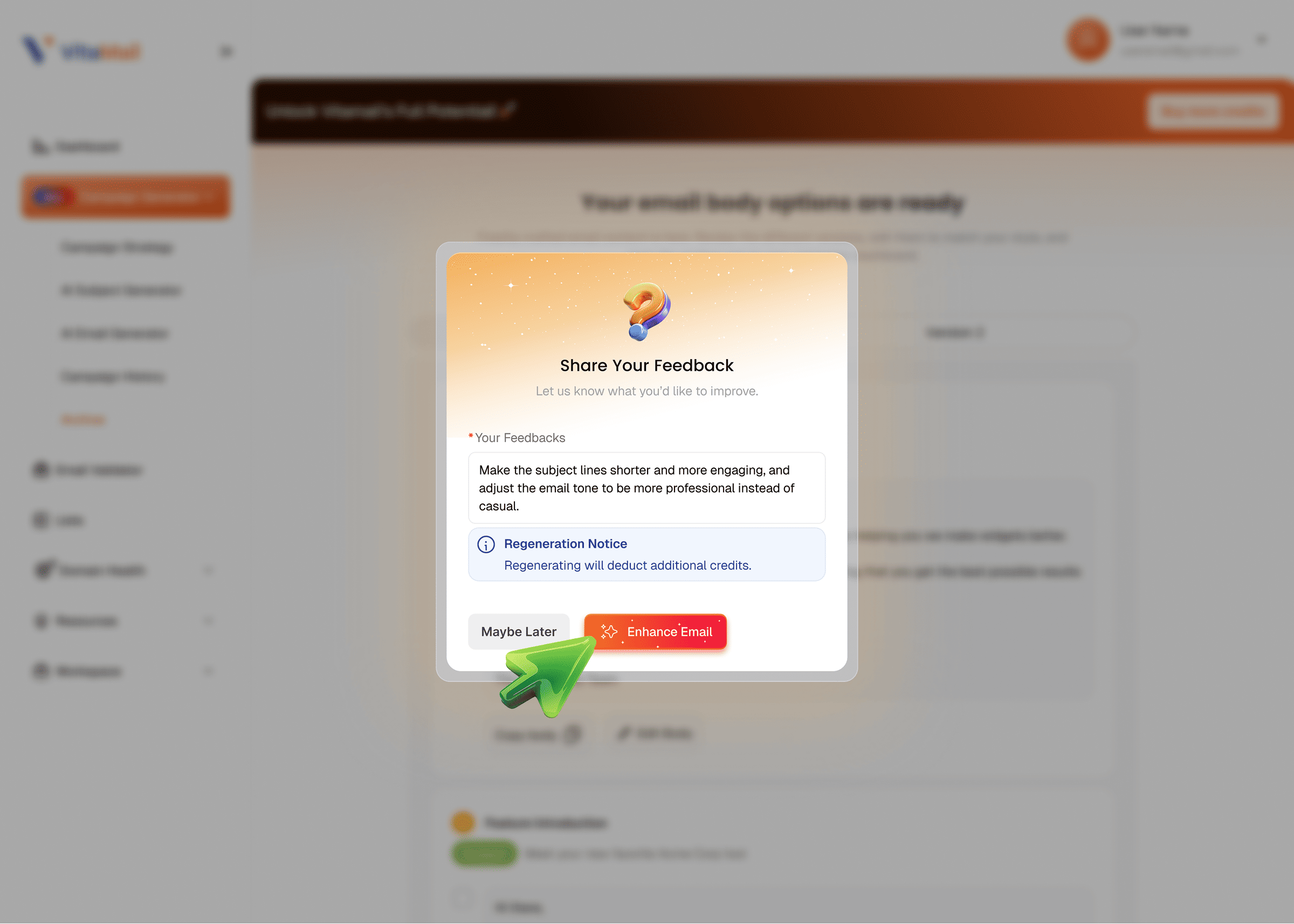
Before finalizing your campaign, you can leave feedback on what you’d like to improve.Click “Enhance Email” if you'd like the tool to regenerate improved versions based on your notes.
Step 4 - Review, edit, and save with Campaign History
All emails, subject lines, and strategy details are saved in your Campaign History,so you can come back anytime to edit, download, or use them in future campaigns.
Related Topic: To better understand how AI is reshaping email marketing at scale, it helps to look at real-world use cases and limitations discussed by industry experts. This overview of AI in email marketing use cases and challenges highlights where AI delivers value and where teams still face obstacles.
Key Features of the VitaMail AI Email Generator
Automated campaign strategy
You choose your topic, and VitaMail instantly gives you a clear plan of what to write, how to say it, and which angle fits best. No more guessing where to start.
Subject line generator
The tool creates multiple subject line options based on your campaign, so you can pick the one that fits your tone and audience without getting stuck on the headline.
Full email writer
VitaMail prepares ready-to-use email drafts for your campaign. You get several variations, and you simply choose the version that feels right and make small edits if needed.
History & organization
Every strategy, subject line, and email you generate is saved in one place, making it easy to revisit past ideas or reuse content anytime.
Built-in deliverability support (validator + domain health)
With email validation and domain checks built in, you send cleaner campaigns and avoid common deliverability issues that hurt performance.
Benefits of Using AI for Email Campaigns
Faster workflow
You spend less time writing and more time sending. Ideas, subject lines, and drafts appear in seconds.
Consistent quality
Every email follows the same tone and structure, even if different people are working on the campaign.
Better engagement
Well-structured emails and strong subject lines naturally improve opens and clicks.
Zero writing pressure
No blank pages, no stress. The tool gives you a starting point, and you only refine it.
Ideal for beginners and small teams
You don’t need a copywriter to stay consistent. Anyone can create good emails quickly using simple inputs.
Tips: AI brings clear advantages, but it also comes with limitations. This review of the pros and cons of AI in marketing helps put both sides into perspective.
Who Should Use the VitaMail Campaign Generator?
Small businesses
Small businesses often don’t have the time or team to write emails every week. VitaMail helps them stay consistent by turning simple ideas into ready-to-send campaigns.
Freelancers
Freelancers working alone can use the tool to save hours on writing, keep their clients updated, and maintain a professional email presence without extra effort.
Agencies
Agencies handle multiple clients and multiple deadlines. VitaMail speeds up their workflow by giving them fast strategies, clear subject lines, and clean drafts they can refine.
E-commerce stores
E-commerce brands need frequent emails offers, product updates, seasonal campaigns. VitaMail helps them produce these messages quickly so they never miss a sales moment.
Creators and coaches
Creators and coaches rely on newsletters and engagement emails. VitaMail makes it easier to share updates, insights, and announcements without spending hours writing each message.
Related Topic: One of the most common ways marketers apply AI is in writing and testing subject lines. This guide on AI in email subject lines explains how AI helps improve open rates without relying on guesswork.
Try Building Your First Campaign Today

It takes less than one minute
You only need a few seconds to get started. Pick your topic, choose your style, and the tool instantly builds the main parts of your campaign for you.
No writing skills needed
You don’t have to be a copywriter. The tool gives you clear ideas, drafts, and subject lines you can use right away, even if writing isn’t your thing.
Start with one topic and watch AI do the work
Type in a simple topic an update, an offer, or an announcement and the tool turns it into a complete email flow. You just choose the version you like and send it.

