





You can have a strong offer, a clean prospect list, and well-written cold emails, but none of that matters if your messages consistently land in spam.
That is where email inbox warm-up comes in.
When you create a new mailbox such as alex@company.com, email providers have little or no history showing how that inbox behaves. Sending a large number of outreach emails immediately can create suspicious sending patterns and make it harder to establish healthy deliverability.
Inbox warm-up helps you gradually build a normal sending history before increasing cold outreach volume.
In this guide, you will learn what email inbox warm-up is, how it differs from domain warm-up, how to warm up a new mailbox, what sending schedule to follow, which metrics to monitor, and how to know when your inbox is ready for outreach.
Key Takeaways:
- Inbox warm-up focuses on an individual email account or mailbox, not your entire sending domain.
- New or inactive inboxes should generally begin with low sending volume and increase gradually.
- Positive engagement signals such as replies can help establish healthier sending behavior.
- Domain authentication should already be configured before you begin warming individual inboxes.
- Manual and automated warm-up methods can both be used depending on your outreach setup.
- Inbox health should be monitored continuously even after the initial warm-up period.
- A warmed inbox does not guarantee inbox placement. List quality, content, authentication, sending behavior, and recipient engagement still matter.
What Is Email Inbox Warm-Up?
Email inbox warm-up is the process of gradually establishing sending activity and engagement history for an individual email account before using it for larger-scale outreach.
For example, imagine your company creates three new outreach inboxes:
Even if company.com already has its email infrastructure configured, each new mailbox begins with little or no individual sending history.
Instead of immediately sending dozens or hundreds of cold emails from each account, inbox warm-up introduces sending activity gradually.
The objective is to establish consistent behavior around:
- sending volume
- replies
- recipient engagement
- bounce rates
- spam placement
- daily sending patterns
This helps create a more stable foundation before you scale outreach.
Inbox Warm-Up vs Domain Warm-Up
Inbox warm-up and domain warm-up are closely related, but they are not the same process.
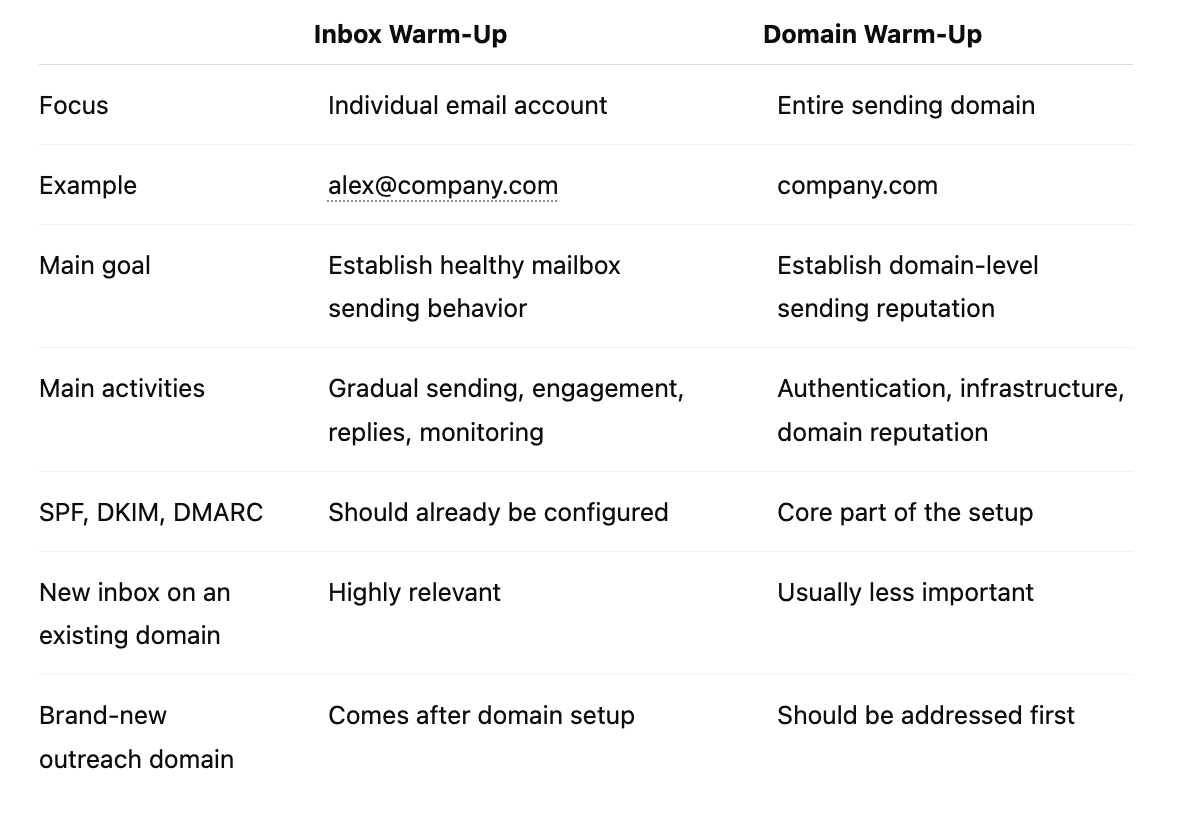
If you are starting with a completely new sending domain, do not treat mailbox warm-up as your first step.
Start with the technical and domain-level foundation first.
Read next: How to Warm Up a New Email Domain
Once the domain is properly configured, you can begin warming the individual inboxes connected to it.
When Does an Email Inbox Need Warm-Up?
Not every mailbox is in the same situation.
Inbox warm-up is especially relevant when you are dealing with the following scenarios.
A Brand-New Email Account
If you have just created an inbox through Google Workspace, Microsoft 365, or another business email provider, it has little sending history.
Starting slowly allows you to establish consistent behavior before adding cold outreach.
A New Outreach Inbox on an Existing Domain
You may already have a healthy company domain but want to add additional sales inboxes.
For example:
The domain may have an established history, but these specific mailboxes are still new.
An Inbox That Has Been Inactive
An inbox that has not sent email regularly for a long period should not necessarily jump immediately into high-volume outreach.
A gradual return to normal activity is safer than a sudden sending spike.
A Mailbox Being Added to a Cold Email Campaign
If an account has mostly been used for normal one-to-one communication and you now plan to use it for outbound prospecting, increasing its volume gradually can help avoid abrupt changes in sending behavior.
An Inbox Recovering From Deliverability Problems
If an inbox has recently experienced:
- increased spam placement
- declining engagement
- high bounce rates
- unusual sending spikes
you may need to reduce activity, diagnose the underlying problem, and rebuild sending volume gradually.
Warm-up should not be used to hide serious deliverability problems. Fix the root cause first.
How Does Inbox Warm-Up Work?
The basic idea is simple.
Instead of moving from almost no activity to a large number of cold emails overnight, you increase activity gradually while maintaining healthy signals.
A typical warm-up process includes:
- Starting with a small daily sending volume
- Sending messages that resemble normal human communication
- Generating legitimate engagement and replies
- Keeping sending patterns consistent
- Monitoring bounce and spam-related signals
- Increasing volume gradually
- Introducing real outreach slowly
The goal is not simply to send more emails.
The goal is to establish predictable, sustainable mailbox activity.
Manual vs Automated Email Inbox Warm-Up
There are two main ways to warm up an inbox.
Manual Inbox Warm-Up
Manual warm-up means using the mailbox for real communication with people who are likely to interact with you.
This may include:
- colleagues
- existing customers
- business partners
- team members
- professional contacts
You send a small number of emails and gradually increase activity over time.
Advantages
- Interactions are real
- Replies occur naturally
- You maintain complete control over sending
- There is no dependency on a warm-up network
Disadvantages
- Difficult to maintain across many inboxes
- Time-consuming
- Harder to create consistent daily activity
- Not practical for large outbound teams
Manual warm-up may work well when you only operate one or two mailboxes.
For teams managing many outbound accounts, maintaining it manually becomes difficult.
Automated Inbox Warm-Up
Automated warm-up tools are designed to create regular sending and engagement activity without requiring your team to manually manage every conversation.
Depending on the platform, these systems may help automate:
- warm-up email sending
- receiving emails
- opening messages
- replying
- maintaining daily sending activity
- monitoring warm-up progress
Automated warm-up is generally easier to manage when you operate multiple inboxes.
However, automation should not replace the fundamentals of deliverability.
You still need:
- properly configured email infrastructure
- clean prospect lists
- controlled outreach volume
- low bounce rates
- relevant content
- responsible sending practices
A warm-up tool cannot compensate for poor list quality or a broken email setup.
How to Warm Up a New Email Inbox Step by Step
Here is a practical framework for warming a mailbox before scaling cold outreach.
Step 1: Confirm That Your Domain Is Ready
Before warming an individual inbox, make sure the domain-level setup has already been completed.
At minimum, your email infrastructure should include correctly configured:
- SPF
- DKIM
- DMARC
These authentication protocols help email providers verify that messages are legitimately being sent from your domain.
Inbox warm-up should not be used as a substitute for proper authentication.
If the domain itself is completely new, follow our email domain warm-up guide first.
You can also check your SPF setup using VitaMail's SPF Checker.
Step 2: Start With Low Daily Sending Volume
A new mailbox should not immediately begin sending high volumes.
Start with a small number of messages per day.
The exact volume depends on your provider, infrastructure, previous activity, recipient quality, and outreach model, so there is no universal number that guarantees deliverability.
The important principle is:
Start small, stay consistent, and increase gradually.
Avoid patterns such as:
- 5 emails Monday
- 0 emails Tuesday
- 100 emails Wednesday
- 10 emails Thursday
Sudden volume changes create a much less natural sending pattern than steady growth.
Step 3: Prioritize Real Engagement
Replies are particularly valuable during early mailbox activity because they demonstrate that conversations are taking place between real people.
During manual warm-up, prioritize contacts who are genuinely likely to interact with you.
You can:
- ask natural questions
- continue existing conversations
- communicate with colleagues
- email existing business relationships
Do not manufacture fake customer activity.
The objective should be to establish normal mailbox usage.
Step 4: Keep Early Emails Simple
During the initial warm-up phase, keep messages straightforward.
Use:
- natural language
- short email bodies
- simple formatting
- clear sender identity
Avoid unnecessary complexity such as:
- image-heavy templates
- multiple tracking links
- large attachments
- excessive formatting
- aggressive promotional language
A warm-up email should look more like ordinary person-to-person communication than a marketing blast.
Step 5: Increase Volume Gradually
If your early activity remains healthy, gradually increase sending volume.
Do not interpret warm-up as a race toward the highest possible daily sending limit.
Your objective is sustainable outreach.
If you observe:
- rising bounce rates
- increasing spam placement
- sudden engagement declines
- provider warnings
slow down and investigate before increasing volume further.
Step 6: Introduce Real Cold Outreach Slowly
Once your inbox has established some sending history, you can gradually introduce cold outreach.
Start with a small number of highly targeted prospects rather than immediately launching a large campaign.
Your first real campaigns should use:
- verified email addresses
- highly relevant targeting
- personalized messaging
- simple formatting
- clear opt-out handling
- conservative sending volume
Your prospect list becomes especially important at this stage.
Sending to invalid addresses can create hard bounces that damage your deliverability.
Before launching a campaign, verify your contacts using VitaMail's Bulk Email Verifier.
Example Inbox Warm-Up Schedule
There is no single sending schedule that works for every provider or use case.
However, the following example illustrates what a gradual ramp can look like for a new mailbox.
PeriodWarm-Up ActivityReal Outreach
Days 1 to 5
5 to 10 emails/day
0
Days 6 to 10
10 to 20 emails/day
0 to 5/day
Days 11 to 15
20 to 30 emails/day
5 to 10/day
Days 16 to 21
30 to 40 emails/day
10 to 20/day
Week 4+
Maintain stable activity
Increase gradually
Treat this as a framework rather than a guaranteed formula.
A mailbox with strong engagement and clean recipients may behave differently from one sending primarily to cold prospects.
Always respond to your actual deliverability metrics.
Which Metrics Should You Monitor During Inbox Warm-Up?
Warm-up should never be completely blind.
Monitor the health of each inbox as you increase volume.
Bounce Rate
A bounce occurs when an email cannot be delivered.
Hard bounces are particularly problematic because they usually indicate an invalid or nonexistent address.
A rising bounce rate is often a sign that your prospect data needs attention.
Verify contacts before sending and remove invalid addresses quickly.
Spam Complaints
Spam complaints are one of the clearest negative signals a sender can generate.
If recipients repeatedly mark your messages as spam, adding more warm-up activity will not solve the problem.
Instead, review:
- targeting
- message relevance
- consent and outreach practices
- frequency
- list sources
- unsubscribe handling
Inbox Placement
Delivery and inbox placement are not the same thing.
An email may technically be delivered while still being filtered into spam.
Inbox placement testing can help determine whether your emails consistently reach the inbox across different providers.
Reply Rate
Replies are useful both as an engagement indicator and as a business metric for cold outreach.
A mailbox sending large volumes but generating almost no replies may have problems with:
- targeting
- messaging
- sender reputation
- offer relevance
- deliverability
Do not evaluate replies in isolation, but track them alongside other health indicators.
Sudden Engagement Changes
Sharp declines in normal campaign performance can sometimes indicate a deliverability problem.
If an inbox that previously performed consistently suddenly stops receiving engagement, investigate before continuing to scale.
How Do You Know When an Inbox Is Warmed Up?
There is no universal moment when an inbox becomes officially "warmed."
Instead, look for stability.
A healthier mailbox usually shows:
- consistent sending activity
- controlled sending volume
- low bounce rates
- limited spam placement
- normal reply activity
- no major provider warnings
- stable performance as outreach is introduced
The important word is stable.
Warm-up is not complete simply because a certain number of days have passed.
A mailbox should demonstrate that it can handle your intended sending behavior without deliverability deteriorating.
How Long Does Email Inbox Warm-Up Take?
Warm-up duration depends on:
- how new the inbox is
- whether the domain already has sending history
- your email provider
- daily volume target
- quality of recipients
- engagement
- sending consistency
- previous mailbox activity
A gradual multi-week approach is commonly used for new outbound inboxes.
If you plan to operate at higher volumes, increasing activity more slowly is generally more prudent than trying to reach target volume immediately.
The goal is not to finish warm-up as quickly as possible.
The goal is to establish a mailbox that can support sustainable outreach.
Should You Keep Inbox Warm-Up Running After You Start Outreach?
Warm-up is often treated as something that happens only before the first campaign.
In reality, mailbox reputation is influenced continuously by sending behavior.
After you introduce cold outreach, continue monitoring:
- bounce rates
- complaint signals
- replies
- inbox placement
- sending volume
- engagement trends
If an inbox becomes inactive for a significant period, do not assume that immediately returning to previous high volume is always appropriate.
Increase activity gradually again.
Likewise, if deliverability deteriorates, simply increasing warm-up traffic is not enough.
Identify the cause first.
Common Email Inbox Warm-Up Mistakes
Scaling Too Quickly
One of the most common mistakes is moving from almost no sending activity to large campaigns within a few days.
Gradual growth creates a more stable sending pattern.
Sending Cold Outreach on Day One
A brand-new mailbox is not the best place to launch a large prospecting campaign immediately.
Establish normal activity first.
Warming an Inbox Before Fixing Domain Authentication
Warm-up cannot compensate for misconfigured SPF, DKIM, or DMARC.
Fix your infrastructure first.
Using Unverified Prospect Lists
Invalid addresses create hard bounces.
Warm-up does little good if your real outreach immediately introduces poor-quality recipient data.
Run prospect lists through an email verification tool before sending.
Treating Warm-Up as a Deliverability Guarantee
A warmed inbox can still land in spam.
Deliverability depends on several factors, including:
- sender reputation
- domain reputation
- list quality
- recipient engagement
- content
- authentication
- complaint rates
- sending behavior
Warm-up is one part of a broader deliverability strategy.
Ignoring Individual Inbox Performance
If you operate ten outbound mailboxes, do not assume they all have identical health.
Monitor accounts individually.
One mailbox may experience problems while the others remain stable.
Best Practices for Protecting a Warmed Inbox
Once your mailbox is ready for outreach, protect the progress you have made.
Verify Your Email Lists
Do not send campaigns to large unverified lists.
Remove:
- invalid addresses
- malformed emails
- inactive mailboxes where detectable
- disposable addresses where relevant
VitaMail's Bulk Email Verifier can help clean prospect lists before campaign launch.
Keep Sending Volume Consistent
Try to avoid extreme changes in activity.
If you normally send a controlled number of outreach emails daily, suddenly multiplying volume can create unnecessary risk.
Scale capacity through a planned infrastructure strategy rather than pushing one mailbox indefinitely.
Use Relevant Outreach
Deliverability and campaign quality are connected.
Highly irrelevant outreach can lead to:
- low replies
- deletes
- unsubscribes
- spam complaints
Better targeting helps both campaign performance and sender health.
Avoid Overloading Messages
Cold outreach generally does not need:
- several images
- multiple CTAs
- numerous tracking links
- large attachments
- heavy HTML formatting
Simple messages are easier to manage and often better suited to person-to-person outbound communication.
Respect Opt-Out Requests
If someone asks not to receive additional outreach, suppress them from future campaigns.
Continuing to contact uninterested recipients increases the likelihood of complaints.
Monitor Every Inbox Separately
For teams using multiple sending accounts, maintain visibility into individual mailbox performance.
Do not judge your infrastructure solely by aggregate campaign metrics.
Can You Warm Up Multiple Email Inboxes at the Same Time?
Yes.
Outbound teams often prepare multiple mailboxes simultaneously.
For example:
outreach.company.com
Each mailbox should still be treated as an individual sending account.
Avoid assuming that one healthy inbox automatically means every new inbox can immediately send at the same volume.
If you are scaling many mailboxes across a new domain, domain-level architecture becomes increasingly important.
For that scenario, see our guide to warming up a new email domain.
Email Inbox Warm-Up Checklist
Before scaling a new mailbox, check the following:
✅ SPF, DKIM, and DMARC are configured at the domain level
✅ The mailbox has started with low sending activity
✅ Volume is increasing gradually
✅ Early messages are simple and natural
✅ Sending patterns are consistent
✅ Engagement and replies are being monitored
✅ Prospect lists are verified before outreach
✅ Bounce rates remain controlled
✅ Spam placement is being monitored
✅ Real outreach is introduced gradually
✅ Individual inbox performance is reviewed regularly
If several of these conditions are missing, fix them before increasing sending volume.
Final Thoughts
Email inbox warm-up is not about generating activity for the sake of activity.
It is about giving a new mailbox time to establish a consistent sending pattern before you depend on it for cold outreach.
Start small.
Keep activity consistent.
Prioritize real engagement.
Verify your contacts.
Introduce outreach gradually.
And continue monitoring mailbox health after the initial warm-up period.
If you want to automate this process, VitaMail lets you find fresh, real-time leads that match your ICP, warm up your inboxes, and send campaigns to those leads in one workflow. Instead of managing prospect research, inbox warm-up, campaign preparation, and sending across separate tools, you can use VitaMail to discover relevant prospects, prepare your inboxes, and reach out to them from the same platform. Find your ICP, warm up your inboxes, and send campaigns with VitaMail.
Most importantly, remember the distinction between inbox warm-up and domain warm-up.
If your domain infrastructure is already established and you are adding a new mailbox, inbox warm-up is the relevant process.
If you are launching an entirely new sending domain, start with our step-by-step email domain warm-up guide before warming individual accounts.
A healthy outreach system needs both a strong domain foundation and well-managed inboxes.

