





Launching a new domain for cold email is not as simple as creating a few inboxes and starting a campaign.
A new sending domain has little or no reputation with Gmail, Outlook, Yahoo, and other mailbox providers. If you immediately create multiple accounts and start sending large volumes, you can create risky sending patterns before the domain has had a chance to establish trust.
That is why email domain warm-up starts before individual inboxes begin scaling.
You need the right domain architecture, authentication, mailbox setup, sending patterns, list quality, and monitoring strategy working together.
This guide explains how to warm up a new email domain step by step, how domain warm-up differs from inbox warm-up, how to structure multiple sending accounts, and how SaaS companies and agencies can scale cold email infrastructure without putting their primary domain at unnecessary risk.
Key Takeaways:
- Domain warm-up focuses on the reputation and infrastructure of the entire sending domain, not just one mailbox.
- SPF, DKIM, and DMARC should be configured before you scale email activity.
- A new domain should build sending history gradually instead of experiencing sudden domain-wide volume spikes.
- Each inbox on the domain also needs appropriate sending behavior, but inbox-level warm-up is a separate process.
- Total activity across all inboxes matters when evaluating how aggressively a new domain is being scaled.
- Separate outreach domains can help isolate cold email activity from business-critical corporate email.
What Is Email Domain Warm-Up?
Email domain warm-up is the process of gradually establishing a positive sending history and reputation for a new domain before scaling email outreach.
Consider a company using:
company.com
for employees, customer support, invoices, product notifications, and everyday business communication.
The sales team decides to build a separate outbound infrastructure using:
getcompany.com
They then create several inboxes:
The individual inboxes matter, but all three are also sending under the same domain.
That means the infrastructure needs to be considered at two levels:
Domain level
getcompany.com
and:
Mailbox level
alex@getcompany.com
alex@getcompany.com may need inbox warm-up, but getcompany.com also needs a stable technical foundation and controlled domain-wide sending activity.
That distinction is important when you are building cold email infrastructure at scale.
Domain Warm-Up vs Inbox Warm-Up
Domain warm-up and inbox warm-up are closely connected, but they solve different problems.
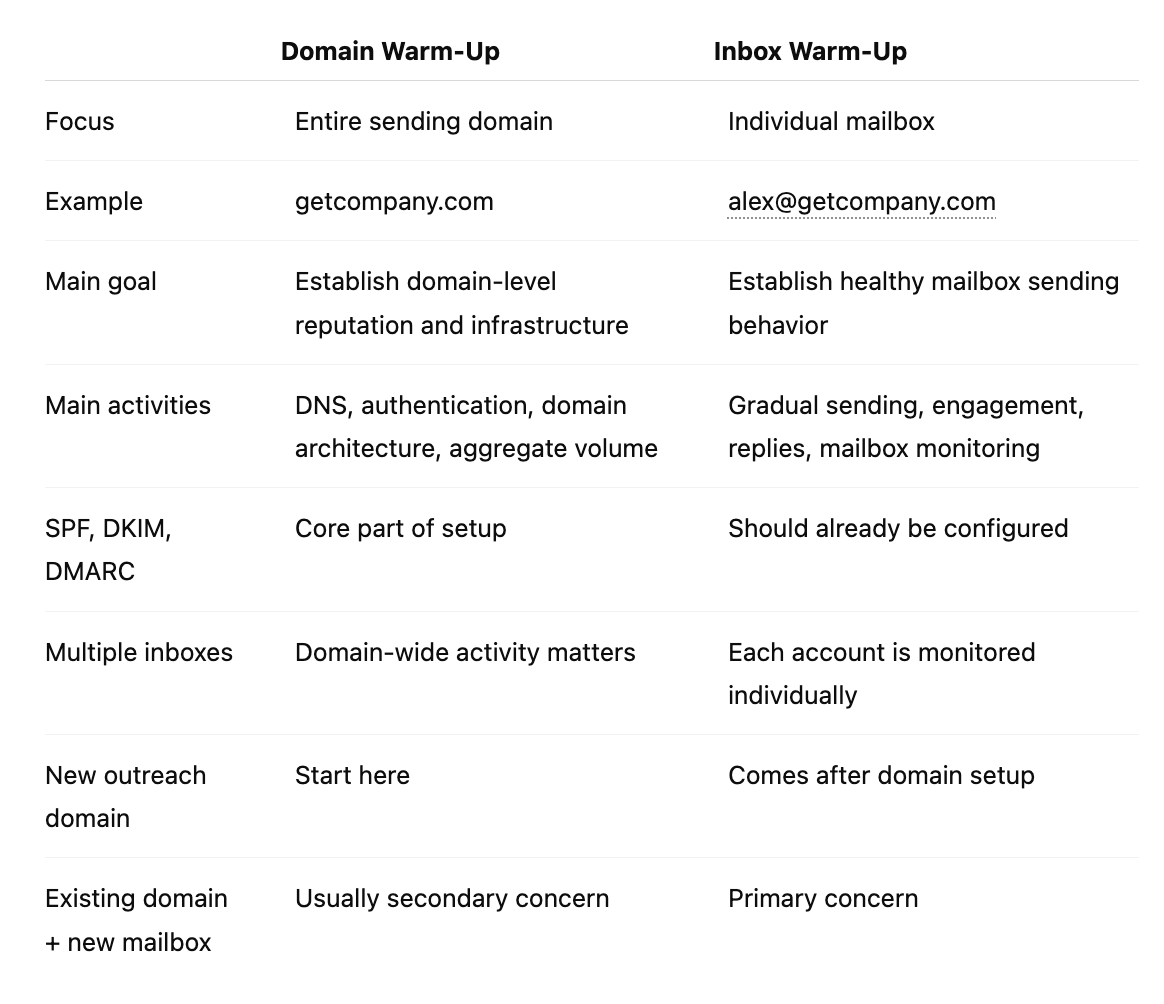
If your domain already has a healthy history and you are simply adding a new mailbox, you probably do not need another complete domain setup process.
Instead, follow our Email Inbox Warm-Up Guide.
If the domain itself is new, continue with the domain-level process below.
Why Does a New Email Domain Need Warm-Up?
Email providers continuously evaluate senders to decide whether messages should reach the inbox, spam folder, or be rejected.
A new domain gives them very little historical information.
They do not yet have a long-term picture of:
- your typical sending volume
- recipient reactions
- complaint behavior
- bounce patterns
- authentication history
- sending consistency
- overall domain reputation
Problems occur when a completely new domain suddenly behaves like an established high-volume sender.
For example, imagine this pattern:
Day 1: 0 messagesDay 2: 20 messagesDay 3: 500 messagesDay 4: 800 messages
That sudden increase creates a very different pattern from a domain that gradually builds activity.
Domain warm-up gives you time to establish infrastructure and sending behavior before the domain becomes responsible for larger campaigns.
Before You Warm Up a Domain: Build the Right Infrastructure
The warm-up process should not begin with sending.
It should begin with infrastructure.
1. Decide Whether to Use Your Primary Domain or a Separate Outreach Domain
Your primary company domain may support important communication such as:
- employee email
- customer support
- invoices
- account notifications
- password resets
- client communication
- partnerships
Cold outreach introduces additional deliverability risk because recipients may ignore messages, unsubscribe, or report unwanted email.
For organizations running significant outbound campaigns, separating cold outreach infrastructure from critical corporate communication can reduce the operational impact if the outbound domain develops deliverability problems.
For example:
Primary domain
company.com
Possible outreach domain
getcompany.com
or
trycompany.com
The outreach domain should still clearly relate to the real business. Avoid domains that appear misleading, disposable, or designed to impersonate another company.
2. Create a Real Business Presence
A sending domain should not look disconnected from the organization using it.
Depending on your setup, consider:
- redirecting the domain to your primary website
- using a real sender identity
- creating functioning reply addresses
- maintaining consistent company information
- avoiding deceptive sender names or headers
The goal is to build legitimate infrastructure, not simply create disposable domains for short-term campaigns.
3. Choose Your Email Provider
Before creating sending accounts, decide where the mailboxes will be hosted.
Common options include business email providers such as:
- Google Workspace
- Microsoft 365
- other professional email hosting services
Your provider affects mailbox configuration, authentication procedures, sending controls, and operational management.
Once the provider is selected, configure the domain correctly before introducing meaningful sending volume.
Set Up SPF, DKIM, and DMARC Before Scaling
Authentication is one of the most important parts of email domain infrastructure.
In 2026, major mailbox providers have increasingly strict authentication expectations.
Google requires SPF or DKIM for all senders to Gmail and requires both SPF and DKIM plus DMARC for senders exceeding its bulk-sender threshold. Yahoo similarly requires SPF and DKIM plus DMARC for bulk senders. Microsoft has also introduced SPF, DKIM, and DMARC requirements for high-volume senders to Outlook consumer domains.
SPF
SPF, or Sender Policy Framework, identifies which servers are authorized to send email on behalf of your domain.
Your SPF record should accurately include the services that legitimately send your email.
Poor SPF configuration can cause authentication failures and make the rest of your deliverability setup harder to manage.
You can inspect your current configuration using VitaMail's SPF Checker.
DKIM
DKIM, or DomainKeys Identified Mail, adds a cryptographic signature to outgoing messages.
Receiving servers can use that signature to confirm that the message was sent by an authorized system and was not modified in transit.
Enable DKIM through your email provider and confirm that the corresponding DNS records have been published correctly.
DMARC
DMARC, or Domain-based Message Authentication, Reporting, and Conformance, builds on SPF and DKIM.
It helps receiving systems evaluate whether the visible From domain aligns with authenticated sending infrastructure and gives domain owners a policy for handling authentication failures.
A new domain may begin with a monitoring-oriented policy such as p=none while the organization verifies that legitimate mail streams authenticate correctly.
Do not move aggressively toward enforcement without understanding which services are sending on behalf of the domain.
Why Authentication Comes Before Warm-Up
Warm-up should never be used to compensate for broken authentication.
If SPF, DKIM, or DMARC is missing or misconfigured, sending more messages will not fix the underlying technical problem.
The order should be:
- Configure the domain
- Authenticate legitimate mail streams
- Verify DNS records
- Create sending inboxes
- Begin controlled activity
- Scale gradually
Not the other way around.
Additional Technical Checks Before Sending
Authentication is the foundation, but it is not the only technical consideration.
Before scaling a new sending domain, confirm that:
- sending addresses can receive replies
- DNS is configured correctly
- your email provider is fully activated
- messages use legitimate From addresses
- tracking infrastructure is configured intentionally
- unsubscribe processes work when applicable
- your website and sender identity are consistent
- mailing lists are verified before outreach
For higher-volume sending, Google and Yahoo also expect valid forward and reverse DNS for sending infrastructure and low spam complaint rates. Google additionally requires TLS for mail transmission under its sender guidelines.
How to Warm Up a New Email Domain Step by Step
Once the infrastructure is ready, you can begin building a controlled sending history.
Step 1: Configure and Verify the Domain
Before sending cold email, verify:
- SPF
- DKIM
- DMARC
- email provider setup
- sending identities
- reply functionality
- DNS configuration
Do not create a large group of mailboxes and begin outreach before this foundation is complete.
Step 2: Create Your Initial Inboxes
Next, create the first group of individual sending accounts.
For example:
alex@getcompany.com
sarah@getcompany.com
james@getcompany.com
Avoid treating these inboxes as independent islands.
All of them contribute activity under the same sending domain.
A domain containing five inboxes each sending 30 emails per day is generating different aggregate activity from one inbox sending 30 emails per day.
That means your scaling plan should consider both:
Per-inbox volume
and
Total domain-wide volume
Step 3: Warm Up the Individual Inboxes
Once the domain is configured, individual mailboxes can begin establishing their own normal sending activity.
This is where inbox warm-up begins.
Because inbox warm-up has a different search intent and operating process, we cover it separately in our Email Inbox Warm-Up Guide.
At the mailbox level, the general principles include:
- starting with limited activity
- increasing volume gradually
- encouraging legitimate engagement
- monitoring each account independently
- introducing real outreach slowly
Do not duplicate the complete inbox procedure at the domain level.
The important domain-level point is that every new mailbox contributes to total domain activity.
Step 4: Introduce Real Outreach Gradually
Once your infrastructure and inboxes have established initial activity, begin introducing real outreach conservatively.
Start with contacts that are:
- relevant
- well targeted
- recently sourced
- verified
- appropriate for your offer
Sending to invalid addresses immediately after warming your infrastructure undermines the work you have done.
Before launching a campaign, verify your list using VitaMail's Bulk Email Verifier.
Step 5: Control Total Domain Volume
This is one of the most important differences between domain warm-up and inbox warm-up.
Suppose you operate five mailboxes.
If every mailbox increases from 10 to 50 emails per day at the same time, total domain activity moves from:
50 emails per day
to:
250 emails per day
Even though each individual inbox increased by only 40 emails, the domain experienced a fivefold increase.
That is why you should monitor scaling at two levels:
Mailbox level
How quickly is each sender increasing?
Domain level
How quickly is total activity across all senders increasing?
Avoid focusing only on individual mailbox limits while ignoring the combined sending pattern of the domain.
Step 6: Monitor Domain-Level Reputation
Once real campaigns are running, continue monitoring signals that can indicate deteriorating domain health.
Depending on your provider and sending setup, these may include:
- authentication failures
- spam complaint rates
- bounce rates
- delivery errors
- inbox placement
- domain reputation
- blocklist events
- sudden campaign performance changes
For Gmail traffic, Google Postmaster Tools can provide information about authentication, spam rates, delivery errors, and domain or IP reputation when enough data is available.
Step 7: Add More Inboxes Only After Stability
Do not assume that scaling cold email simply means creating more accounts.
First determine whether the current domain is healthy.
Before adding another group of mailboxes, review:
- existing inbox performance
- aggregate sending activity
- bounce rates
- spam complaints
- campaign quality
- authentication
- provider warnings
- domain reputation indicators
If the domain is already experiencing problems, adding more senders usually increases complexity rather than solving the issue.
Domain-Level Volume vs Inbox-Level Volume
This distinction deserves special attention.
Imagine two setups.
Setup A
One domain with one inbox:
alex@brand.com
30 emails per day.
Setup B
One domain with six inboxes:
Each sends 30 emails per day.
The individual mailbox volume is identical.
But total domain activity is:
Setup A: 30 emails/day
Setup B: 180 emails/day
That is why infrastructure planning should never be based only on a "safe number of emails per inbox."
There is no universal number that guarantees deliverability anyway.
You need to consider:
- total domain volume
- number of senders
- recipient quality
- complaint rates
- engagement
- historical domain activity
- provider behavior
- campaign type
Domain reputation is influenced by the overall sending ecosystem.
How Many Inboxes Should You Add to a New Domain?
There is no universal number that applies to every organization.
The correct number depends on your:
- campaign volume
- email provider
- business model
- targeting quality
- infrastructure
- risk tolerance
- management capacity
What matters more than choosing a magic number is avoiding unnecessary concentration or aggressive scaling.
If you need dramatically more capacity, evaluate the complete architecture rather than continually pushing additional volume through the same small group of accounts.
Think in terms of:
Domains → inboxes → campaigns → recipients
rather than simply:
How many emails can one inbox send?
Should You Use a Separate Domain for Cold Email?
For teams running meaningful cold outreach volume, a separate sending domain may be worth considering.
The main reason is risk isolation.
Your primary corporate domain may handle:
- internal email
- customer conversations
- sales replies
- billing
- support
- partnership communication
- account notifications
If high-volume outbound activity produces complaints or deliverability problems, you do not want those issues unnecessarily affecting mission-critical communication.
A separate domain creates operational separation.
However, this does not mean outreach domains should be treated as disposable.
A good outreach domain still needs:
- proper authentication
- legitimate company identity
- controlled volume
- clean recipient data
- monitoring
- responsible campaigns
Buying large numbers of low-quality domains and burning through them is not a sustainable deliverability strategy.
Primary Domain vs Outreach Domain vs Subdomain
Organizations sometimes consider three common approaches.
Primary Domain
Example:
company.com
This is usually the most valuable email identity associated with the business.
Using it for outbound outreach may simplify branding, but it also means promotional and cold email activity shares infrastructure with critical corporate communication.
Separate Outreach Domain
Example:
getcompany.com
This gives outbound operations more separation from the core corporate domain.
The tradeoff is that the new domain starts without the established history of your primary domain and needs to be configured and managed properly.
Outreach Subdomain
Example:
outreach.company.com
A subdomain can help separate certain sending streams operationally.
However, do not assume that subdomains provide complete reputation isolation in every provider's systems.
For example, Gmail's bulk-sender classification can consider messages from the same primary domain together when determining whether a sender crosses its bulk-sender threshold.
Choose architecture based on your actual sending use case rather than assuming a subdomain automatically solves deliverability risk.
How SaaS Companies Should Structure Domain Warm-Up
SaaS companies frequently use outbound email for:
- booking demos
- generating qualified opportunities
- reaching target accounts
- founder-led sales
- partnership outreach
The most important consideration is protecting business-critical communication while building a repeatable outbound system.
A simple architecture might look like:
Corporate domain
company.com
Used for:
- employees
- customers
- support
- product communication
Outbound domain
getcompany.com
Used for:
- prospecting
- SDR outreach
- selected outbound campaigns
SaaS Domain Warm-Up Priorities
- Keep customer and transactional communication protected
- Authenticate the outreach domain correctly
- Create a limited initial group of inboxes
- Warm individual accounts gradually
- Begin with highly targeted prospects
- Monitor aggregate domain activity
- Add capacity only after stable performance
- Keep prospect data verified
SaaS teams should prioritize lead relevance over raw sending volume.
A campaign targeting 500 highly relevant decision-makers can be more valuable than a campaign sending thousands of poorly targeted emails that create complaints and damage reputation.
How Agencies and Lead Generation Teams Should Structure Domain Warm-Up
Agencies often face a different infrastructure challenge.
They may manage:
- multiple campaigns
- multiple offers
- multiple industries
- many inboxes
- higher outbound volumes
This makes domain architecture particularly important.
Instead of placing all outbound activity under one domain, an agency may need separate infrastructure for different operational purposes.
For example:
Domain A
Campaign group 1
Domain B
Campaign group 2
Domain C
Separate business unit or use case
The exact setup will depend on client ownership, compliance requirements, provider policies, and how the agency manages sending.
Agency Domain Warm-Up Priorities
- Avoid concentrating excessive activity on a single domain
- Authenticate every domain independently
- Track performance by domain and inbox
- Verify prospect lists before campaigns
- Avoid scaling every inbox simultaneously
- Monitor aggregate volume
- Maintain clear ownership of each domain
- Separate unhealthy campaigns before they affect wider infrastructure
Agencies should also avoid treating domain rotation as a replacement for good sending practices.
If poor targeting, invalid lists, or irrelevant messaging are causing deliverability problems, creating another domain does not fix the root cause.
Why List Verification Matters During Domain Warm-Up
Your sending infrastructure is only as healthy as the recipient data you feed into it.
Even a well-configured new domain can develop problems if you immediately begin sending to:
- nonexistent addresses
- malformed addresses
- old databases
- abandoned accounts
- poorly sourced lists
Hard bounces create unnecessary negative signals during a period when your domain has very little history.
That makes list verification especially important when launching a new sending domain.
Before uploading a campaign, use VitaMail's Bulk Email Verifier to identify risky or invalid addresses before they become part of your sending history.
Spam Complaints Matter More Than Raw Sending Capacity
One of the biggest mistakes in outbound infrastructure planning is asking only:
How many emails can this domain send?
The more important question is:
How much relevant email can this domain send while maintaining healthy recipient signals?
Google recommends keeping Gmail spam rates below 0.1% and avoiding reaching 0.3% or higher. Its formal sender requirement is to remain below 0.3%. Yahoo also requires senders to keep spam complaint rates below 0.3%.
Increasing volume while recipient complaints are rising is not successful scaling.
It is a warning sign.
Review:
- targeting
- offer relevance
- frequency
- list sources
- sender identity
- opt-out process
- campaign content
before adding more volume.
Scaling a Warmed Domain Safely
A warmed domain should not be treated as permanently protected.
Reputation continues to change based on future behavior.
When you scale, do it in stages.
Scale Existing Inboxes Gradually
Do not suddenly multiply sending volume because an initial warm-up period has ended.
Increase activity while monitoring individual inbox performance.
Add New Inboxes Gradually
Adding new mailboxes also increases aggregate domain activity.
Avoid creating large groups of accounts and activating all of them at maximum campaign volume simultaneously.
Keep Recipient Quality High
As campaigns expand, list quality often declines because teams begin sourcing broader audiences.
Maintain verification and targeting standards as volume increases.
Monitor Domain-Level Signals
Keep watching:
- authentication
- complaints
- bounces
- delivery failures
- provider warnings
- inbox placement
- aggregate volume
Pause Scaling When Health Declines
If performance begins to deteriorate, do not automatically add more domains or inboxes.
Diagnose the issue first.
Scaling a broken system simply creates a larger broken system.
Common Email Domain Warm-Up Mistakes
Sending at High Volume Immediately
A brand-new domain should not behave like a domain with years of established sending history from day one.
Build activity gradually.
Skipping SPF, DKIM, or DMARC
Authentication is a foundational part of modern email infrastructure.
Do not begin serious outreach until it is configured correctly.
Confusing Domain Warm-Up With Inbox Warm-Up
Warming one mailbox does not mean you have completed every domain-level task.
Likewise, a properly configured domain does not mean a brand-new mailbox should immediately send aggressively.
Both layers need attention.
Creating Too Many Inboxes at Once
Five new inboxes may each look conservative individually while creating a large combined increase in domain activity.
Monitor the total.
Using the Primary Corporate Domain Without Considering Risk
Cold outreach can introduce different recipient behavior from normal business communication.
Evaluate whether separating infrastructure makes sense before scaling.
Treating Outreach Domains as Disposable
Constantly abandoning damaged domains instead of improving targeting and sending practices does not create sustainable deliverability.
Protect each domain you use.
Sending to Unverified Lists
High bounce rates can undermine a new sending domain quickly.
Verify your contacts before campaigns.
Ignoring Spam Complaints
A low bounce rate does not mean a campaign is healthy if recipients are repeatedly reporting messages as spam.
Complaint behavior must be monitored separately.
Increasing All Inboxes Simultaneously
A small per-inbox increase can become a large domain-level volume spike when multiplied across many accounts.
Scale in controlled stages.
How Long Does It Take to Warm Up an Email Domain?
There is no universal number of days that guarantees a domain is ready.
The timeline depends on:
- how new the domain is
- how many inboxes it contains
- your target sending volume
- your email provider
- recipient quality
- engagement
- complaint behavior
- infrastructure quality
- consistency
A lower-volume setup may establish stable activity sooner than an infrastructure intended to support multiple senders and larger campaigns.
The correct objective is not:
Finish warm-up in X days.
It is:
Reach your intended sending pattern without creating deteriorating deliverability signals.
A domain is better judged by stability than by age alone.
How Do You Know When a Domain Is Ready to Scale?
Look for a combination of signals.
A healthier sending domain typically has:
- SPF, DKIM, and DMARC working correctly
- stable sending activity
- controlled aggregate volume
- low bounce rates
- low spam complaints
- functioning inboxes
- normal recipient engagement
- no major provider warnings
- stable performance as real outreach increases
No single metric proves that a domain is permanently safe.
Domain health is an ongoing process.
Email Domain Warm-Up Checklist
Before scaling a new sending domain, confirm:
✅ The domain is intentionally selected for its sending purpose✅ SPF is configured correctly✅ DKIM is enabled and passing✅ DMARC is published and monitored✅ Legitimate sending services are authenticated✅ Sending addresses can receive replies✅ Initial mailboxes have been created carefully✅ Individual inboxes are warming gradually✅ Aggregate domain volume is being monitored✅ Real outreach is being introduced slowly✅ Prospect lists are verified✅ Bounce rates are monitored✅ Spam complaints remain low✅ Authentication failures are monitored✅ New inboxes are added only after stable performance✅ Scaling decisions consider total domain activity, not just per-inbox limits
If several of these elements are missing, fix the infrastructure before increasing campaign volume.
Build Your Cold Email Infrastructure With VitaMail
Domain warm-up is only one part of launching successful outbound campaigns.
After your infrastructure is ready, you still need to:
- find relevant prospects
- verify email addresses
- prepare your inboxes
- create campaigns
- manage sending
- monitor outreach activity
VitaMail brings these workflows together.
You can find fresh leads that match your ICP, verify contact data, prepare your inboxes, and launch outreach campaigns without stitching together multiple disconnected tools.
Find leads, prepare your outreach infrastructure, and run campaigns with VitaMail.
Final Thoughts
Learning how to warm up an email domain is really about learning how to build sustainable sending infrastructure.
Do not think of domain warm-up as a trick that makes spam filters trust you.
Think of it as a controlled launch process.
Start with the right domain.
Configure authentication.
Create your initial inboxes.
Warm those inboxes gradually.
Monitor total domain volume.
Send only to relevant, verified prospects.
Scale after the infrastructure demonstrates stable performance.
And continue protecting domain reputation after the initial warm-up phase is complete.
The distinction between domain-level and inbox-level warm-up is especially important.
If you are launching a completely new sending domain, the domain infrastructure comes first.
If your domain is already established and you are adding a new mailbox, follow our Email Inbox Warm-Up Guide for the mailbox-level process.
A strong outbound system requires both.

