




Most senders find out their emails are being filtered the wrong way — by looking at open rates that make no sense, or by testing their own inbox and finding nothing there. By that point, the damage is already done: reputation dented, campaign wasted.
There's a simpler way to handle this. An email checker lets you run your message through the same logic spam filters use — before it ever leaves your outbox. You see what gets flagged, fix it, and send knowing your email has a real shot at landing where it should.
This guide covers what these tools actually check, how to use one properly, and what to do when something gets flagged.
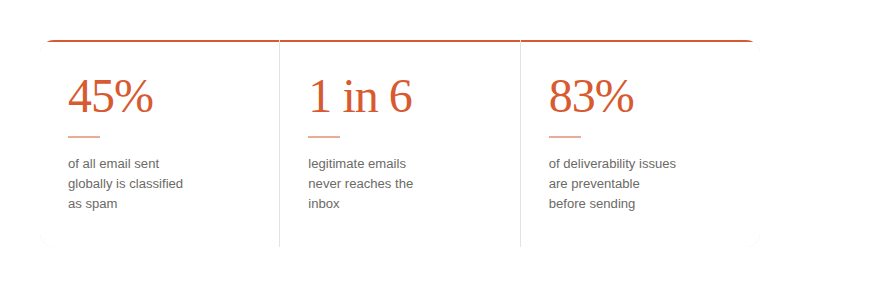
What makes an email look like a spam email to a filter
Here's something most guides get wrong: spam filters don't just scan for bad words. They build a composite picture of your email across multiple dimensions. A single trigger word probably won't get you filtered. But a message with weak authentication, a new domain, promotional phrasing, and no plain-text version? That's a different story.
Filters evaluate four things simultaneously:
- Identity — Is your domain properly authenticated? Can receiving servers verify you sent this?
- Reputation — What's your sending history? How does your IP score with major providers?
- Content — Does the language, structure, or formatting pattern match known spam profiles?
- Engagement signals — Have your past recipients been interacting or ignoring?
A good email spam checker maps to all four of these — not just content. That's the difference between a tool that's actually useful and one that gives you a false sense of security.
What an email spam checker tool actually evaluates
Before you run your message through any tool, it helps to know what you're looking at. Here are the five core checks a reliable email spam checker tool performs:
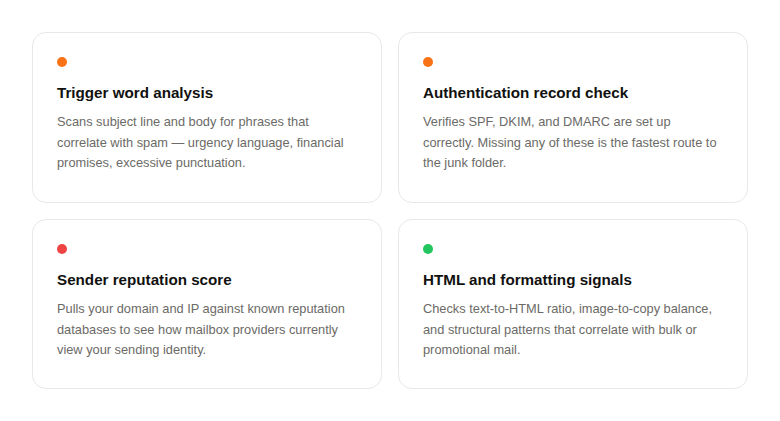
Worth knowing: Content-only checkers miss the authentication and reputation layer entirely. If your tool only scans for trigger words, you're only seeing part of the picture.
How to use an email checker — the actual process
The workflow is straightforward, but the order matters. Here's how to run a proper pre-send check:
- Write your email without self-censoring. Don't try to guess what filters will flag while you're drafting — you'll end up writing stiff, unnatural copy. Write naturally first, check second.
- Paste subject line and body into your email checker. Use VitaMail's spam checker if you want something fast and free — no login, results in about 30 seconds. It covers both content triggers and authentication status.
Also see → Why Are My Emails Going to Spam? for a deeper look at the underlying causes.
- Read the score, then read the flags. The score tells you where you stand. The individual flags tell you what to fix. Don't just look at the number — work through each item.
- Fix one category at a time. Start with authentication if it's flagged — that's a technical fix with outsized impact. Then address content. Don't rewrite everything at once or you'll lose track of what actually moved the score.
- Re-check until your score is clean. One round is rarely enough if you have multiple issues. Run the check again after changes — some fixes reveal secondary flags that weren't obvious before.
- Send and track what happens. Monitor open rates and bounce rates for the first few hundred sends. This tells you whether the issue was content, list quality, or domain reputation.
When your checker flags something — what to actually do
Most people see a flag and either ignore it or panic-rewrite everything. Neither helps. Here's a practical response to the most common issues:
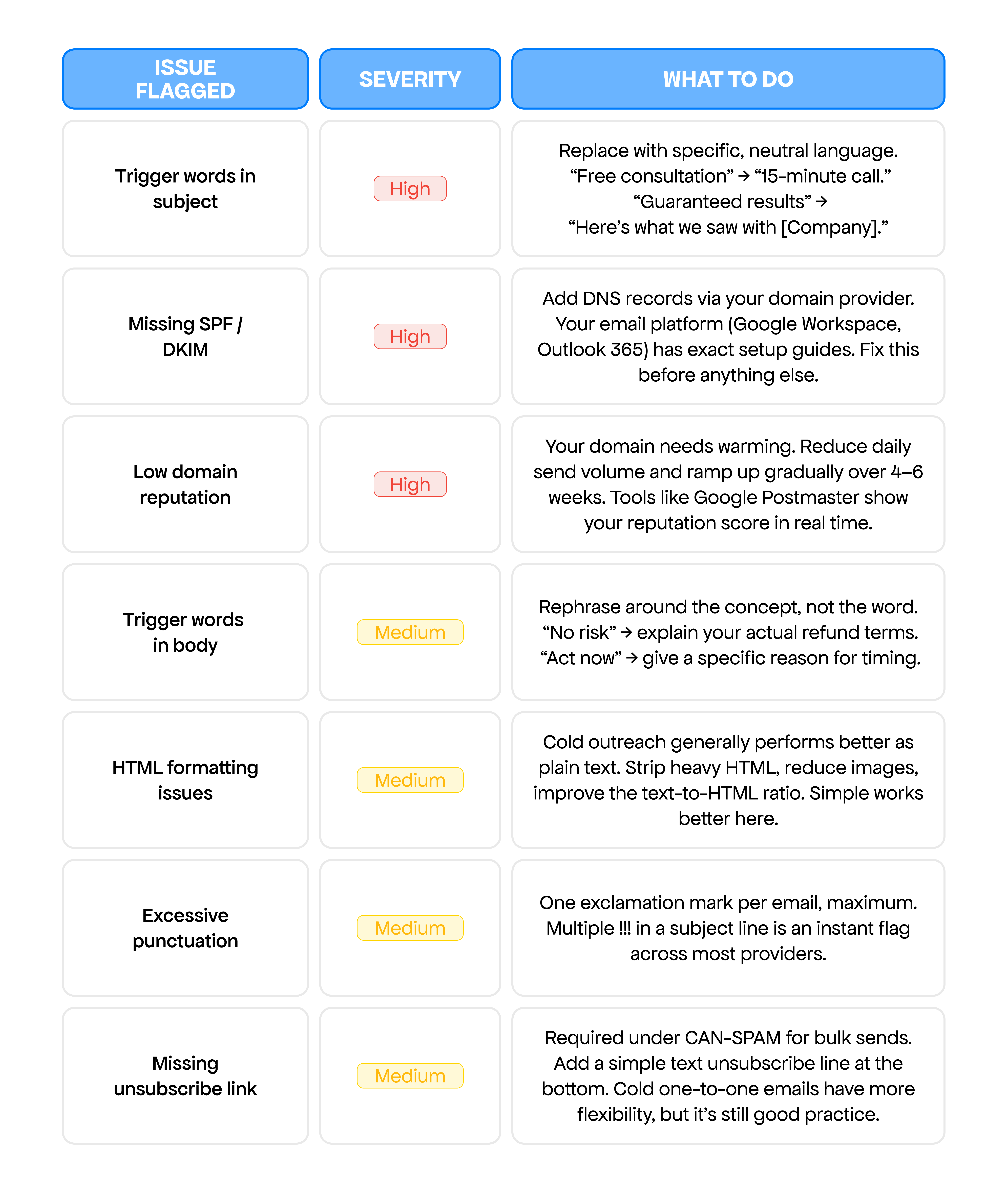
Perspective check: A score of 3–4 out of 10 on most checkers is fine for cold outreach. Aiming for zero flags on every single item can push you toward copy that sounds robotic. Fix the high-severity issues. Use judgment on the rest.
VitaMail's email spam checker — what it does and who it's for
Email Content Checker for Inbox Placement
VitaMail built this specifically for cold email senders — not newsletter marketers. That distinction matters: the thresholds, the flagged patterns, and the fix suggestions are calibrated for one-to-one outreach, not bulk campaigns. Paste your subject and body, get a score and flagged item list in about 30 seconds.

Try it on your next email
Paste your subject and body below. Results come back in about 30 seconds — no account needed.
Conclusion
Running an email through a checker before sending takes under a minute and removes a lot of guesswork. Fix authentication issues first — they have the most impact. Then clean up content flags, especially in the subject line. Re-check, then send.
The goal isn't a perfect score. It's eliminating the issues that reliably get emails filtered, so your actual message has a fair chance of being read.

