




Finding someone's email address is a workflow, not a trick. The people who consistently get it right do not rely on a single tool. They start with public sources, fall back to finder tools, use pattern matching when both fail, and verify every address before they hit send.
To find someone's email address, combine three approaches: search the company's website and social profiles for a published address, use an email finder tool like Hunter, Apollo, or Clearbit to look up addresses by name and domain, and verify any address you collect with a validation tool before sending. Most professional emails follow predictable patterns (firstname.lastname@company.com, first@company.com), which makes pattern-based discovery effective when paired with verification.
This guide walks through 11 methods grouped by reliability. The most reliable methods come first. The least reliable come last, with a verification step that turns guesses into safe-to-send addresses. Skip the verification step and you will burn your domain reputation, no matter how good your finder tool is.
Start with the obvious sources first
Before you open any tool, check whether the address is already published. Self-published addresses are the most reliable category because the owner verified them by putting them online. They cost nothing and they will not bounce.
Method 1: The company website
Check the contact page, the about page, and the team page. Many companies publish team email addresses directly. If only a generic info@ address appears, scroll to the footer and look for press, partnerships, or careers contacts. These often route to specific people.
Method 2: Author bylines and press pages
If your prospect has written articles, contributed to industry publications, or been quoted in press, their byline often includes a direct contact. Press release distribution sites like PR Newswire and Business Wire frequently list a press contact email at the bottom of every release.
Method 3: Social media bios and personal sites
Twitter/X bios, LinkedIn contact info sections, and personal websites are common places people publish a direct address. Founders and senior practitioners are more likely to list one than mid-level employees.
For example, if you are trying to reach Marcus Okafor at Chartline, the team page on chartline.com may list his address directly. If it does not, his LinkedIn profile may show it under the contact info section, or his personal site (linked from his LinkedIn) may have a direct email at the footer. Check these three sources before you use a single credit on a finder tool.
Use a dedicated email finder tool
When public sources do not return a result, an email finder tool is the next step. These tools maintain databases of business email addresses sourced from website crawls, public records, and pattern inference, and they verify addresses against SMTP servers in real time.
Method 4: Hunter.io
Hunter has two core features. Domain Search lists every email address Hunter has found for a company domain. Email Finder takes a name plus a company and returns the most likely address with a confidence score. Hunter offers 25 free searches per month. Accuracy is high for companies with 50+ employees and weaker for very small or very new domains.
Method 5: Apollo.io
Apollo combines a contact database with sales engagement features. Its database covers more than 270 million contacts. The free plan includes a small number of monthly credits. Apollo is strongest for B2B SaaS prospecting because its filtering supports detailed firmographic and technographic queries.
Method 6: Clearbit Connect
A free Gmail extension that surfaces email addresses for any company domain you enter. The data quality is high but the coverage is narrower than Apollo or Hunter. Clearbit also offers paid enrichment products for sales teams.
Method 7: Lusha, RocketReach, and ContactOut.
Lusha emphasizes mobile numbers alongside email. RocketReach has broad coverage including non-tech industries. ContactOut is a LinkedIn-focused extension popular with recruiters.
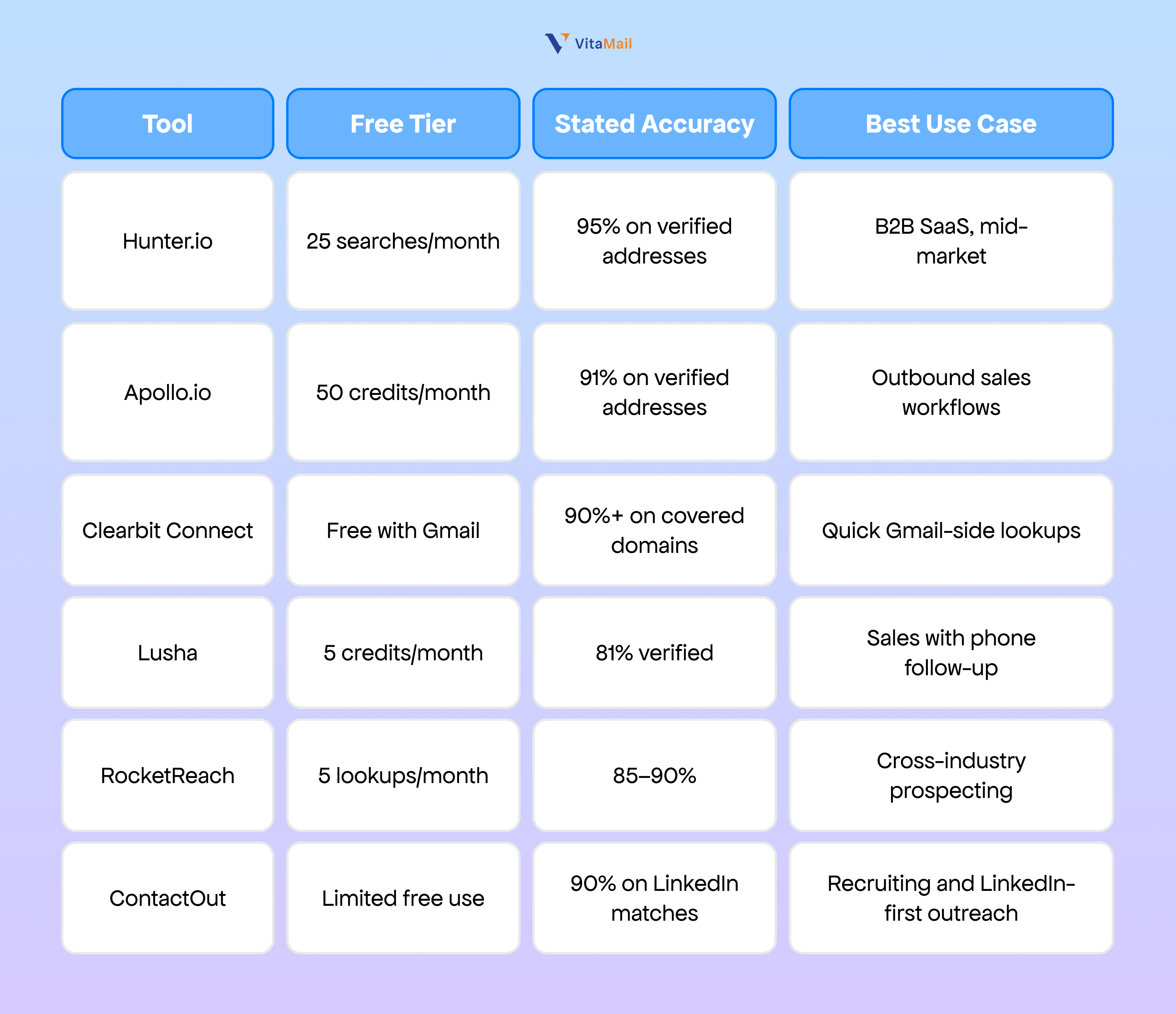
Email finder tool accuracy ranges 70–95% depending on the provider and how fresh the underlying data is (Hunter accuracy report 2024). Treat any tool result as a candidate address that still needs verification, not a confirmed one.
If you are building a list of dozens or hundreds of contacts, manually checking each tool is inefficient. A validated lead list workflow takes ICP criteria and returns matched, verified contacts in a single pass.
Find email addresses on LinkedIn
LinkedIn is the highest-value source of identity data for B2B prospects, but most users do not publish their email address directly on the platform. The methods below extract email from LinkedIn signals rather than from LinkedIn itself.
Method 8: The LinkedIn contact info field
Some users add their email to the contact info section of their LinkedIn profile. Visit the profile, click "Contact info" near the header, and check the email field. This is the most reliable LinkedIn method because the owner added it intentionally.
Method 9: LinkedIn Sales Navigator combined with a finder tool
Sales Navigator filters prospects by industry, company size, role, and other firmographic criteria. Once you have a list, a finder tool with a Sales Navigator integration (Apollo, Hunter, Lusha) pulls email addresses for matched prospects. This is the standard B2B outbound workflow.
Method 10: Browser extensions that surface email from a LinkedIn profile
Tools like ContactOut, Lusha, RocketReach, and Apollo all offer Chrome extensions that overlay the LinkedIn profile and display the inferred email address. Coverage varies. Senior employees at well-known companies have higher hit rates than junior staff at small companies.
For example, suppose you want to reach Priya Mehta, VP Sales at Fidelio. You find her on Sales Navigator using the filter "VP Sales, Project Management SaaS, London, 100–200 employees." Her LinkedIn profile does not list an email. You install the Apollo extension, open her profile, and Apollo displays priya.mehta@fidelio.com with an 89% confidence score. You then verify the address before sending.
Note: LinkedIn's terms of service restrict automated scraping. Browser extensions that read profile data while you are manually viewing a profile are generally permitted. Headless scrapers that pull data programmatically are not. Use tools that operate within LinkedIn's stated terms.
Use an email permutator when tools fail
When public sources do not have the address and finder tools return no result, the fallback is an email permutator. A permutator generates the most common email patterns for a given name and domain, and you verify each candidate to find the live one.
Method 11: The email permutator
Roughly 70% of B2B companies use one of about a dozen common email patterns (Hunter pattern study 2024). Generate the permutations, then run them through a verification tool to find the live address.
The most common business email patterns.
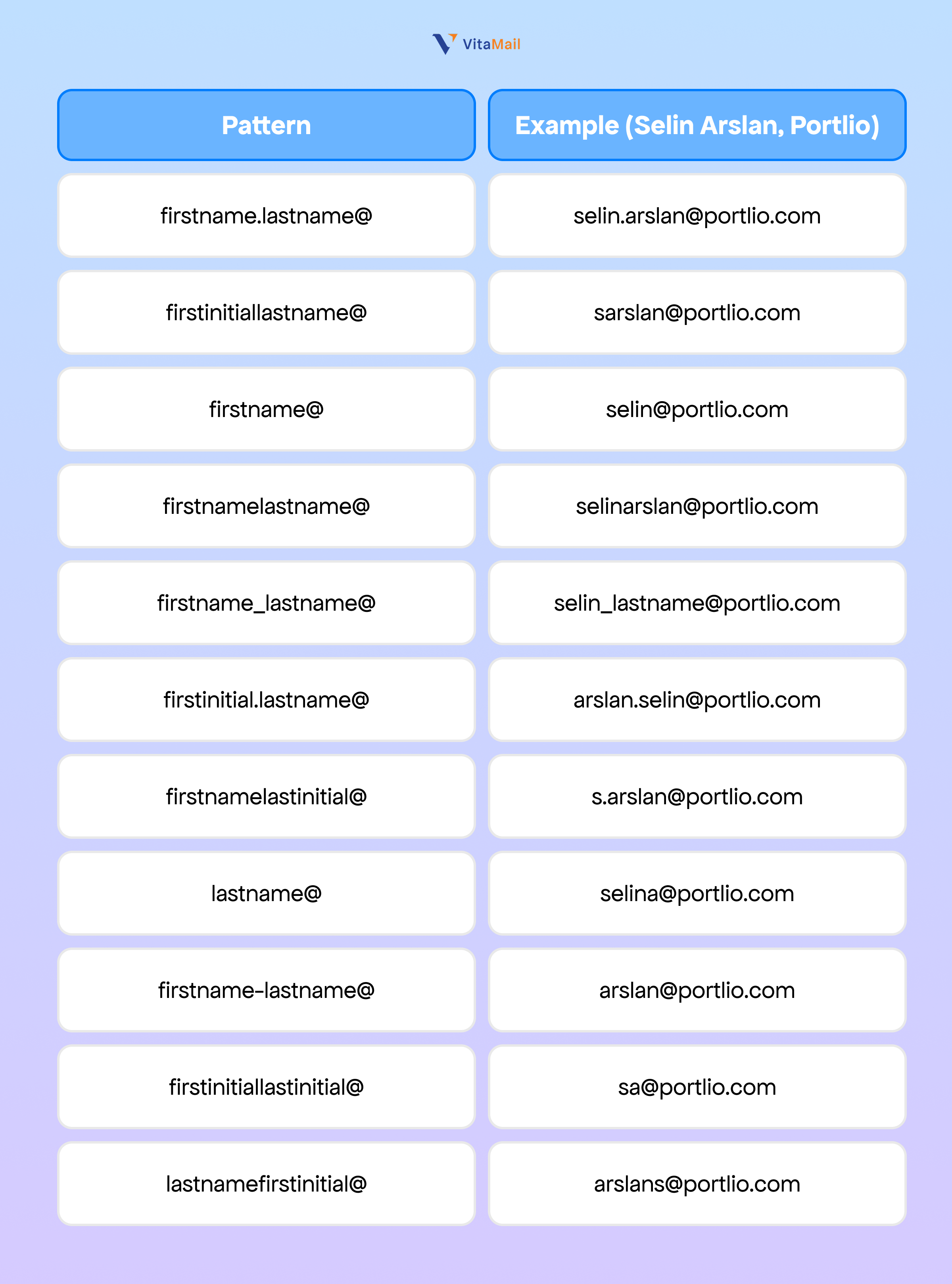
Generate all 12 patterns, then run the list through a verification tool. The pattern that returns "valid" is the live address. Most companies use one consistent pattern across the organization, so once you find the pattern for one employee, you can apply it to every other employee at that company.
This method works best for small companies (under 50 employees) and founder-led startups, where finder tool coverage is weakest. It also works well as a confirmation step when a finder tool returns a low-confidence guess.
What this replaces: The mistake this replaces is sending to a low-confidence finder tool result without verification. A permutator plus verification is more reliable than a 60% confidence score from a tool, because verification gives a binary answer.
Always verify before you send
Verification is the step that separates careful operators from people who burn their domain reputation. A bounce rate above 2% triggers ISP filtering and damages sender reputation across all your future sends (Mailreach deliverability research 2024). One unverified send to a list of bad addresses can put your domain in spam folders for weeks.
Email verification works in three layers:
- Syntax check. Confirms the address follows valid email format rules.
- MX record lookup. Confirms the domain has live mail servers configured.
- SMTP ping. Connects to the recipient mail server and asks whether the mailbox exists, without actually sending a message.
Verification tools return one of three results:
- Valid: The mailbox exists and accepts mail. Safe to send.
- Risky: The mailbox is on a catch-all domain (accepts mail to any address) or the SMTP server returned an ambiguous response. Catch-all domains account for approximately 15–20% of B2B addresses (ZeroBounce 2024). Send with caution; expect a higher bounce rate.
- Invalid: The mailbox does not exist. Do not send.
Common verification tools include NeverBounce, ZeroBounce, Bouncer, Mailreach, and Kickbox. Pricing is typically per-verification, with bulk discounts. Most tools cost $0.001 to $0.008 per verification.
The standard workflow: collect addresses from any source, verify them in bulk before importing to your sending tool, and exclude any address marked Invalid. For Risky addresses on catch-all domains, send only the addresses where the underlying name and pattern match your other research signals.
Email patterns by company size and type
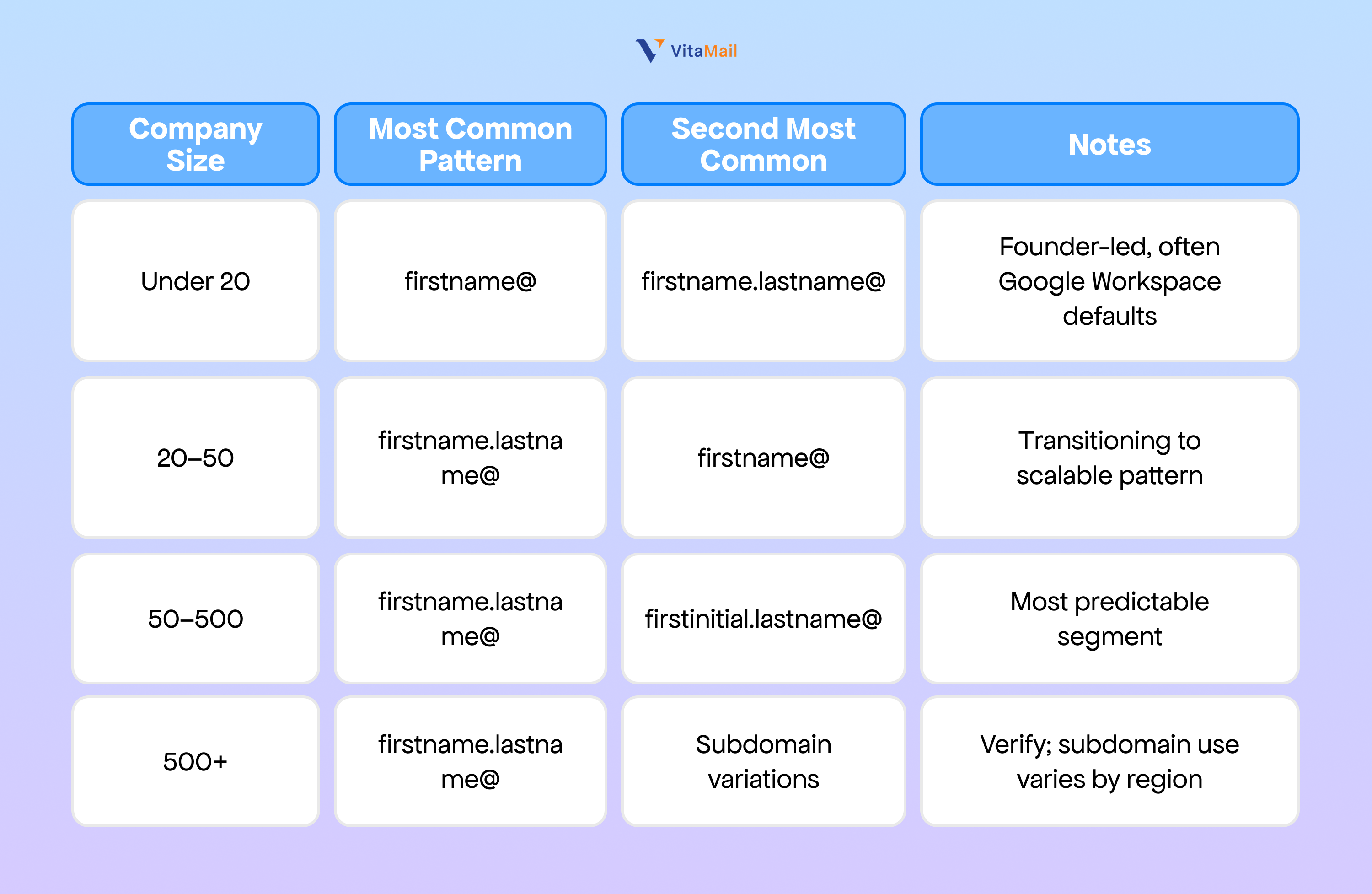
Understanding company-level email patterns lets you predict an address before you spend a tool credit. The pattern is usually consistent across the organization, so finding it once gives you a working formula for every other employee.
Startups under 50 employees. Founder-led startups commonly use firstname@ (e.g., tom@birchvault.com) or firstname.lastname@. The pattern is often set by whoever configured Google Workspace on day one and rarely changes. Tom Bergmann, founder of Birchvault, almost certainly uses tom@birchvault.com.
Mid-market 50–500 employees. firstname.lastname@ dominates this segment because it scales without ambiguity (two people named Tom at a 200-person company need different addresses). Marcus Okafor at Chartline (60 employees) most likely uses marcus.okafor@chartline.com. James Whitfield at Stackr (200 employees) most likely uses james.whitfield@stackr.com.
Enterprise 500+ employees. firstname.lastname@ remains common, but enterprises often add subdomain variations (e.g., firstname.lastname@us.company.com or @sales.company.com). Multinational companies sometimes use country-code subdomains. Verify carefully because pattern guesses are less reliable at this size.
The legal framing for cold outreach
This section is informational and not legal advice. Consult a qualified attorney for your specific situation.
Finding someone's business email address and sending a cold email is legal in most jurisdictions when done correctly. The legal frameworks that apply vary by region.
United States (CAN-SPAM). Cold email to business addresses is legal. The sender must include a valid physical postal address, accurate sender identification, a clear unsubscribe mechanism, and honest subject lines. CAN-SPAM does not require prior consent for B2B outreach.
European Union (GDPR). B2B cold outreach to corporate email addresses (e.g., name@company.com) is generally permitted under the legitimate interest basis, provided the message is relevant to the recipient's professional role and the sender documents the basis. The recipient must have a clear way to opt out and personal data processing must be minimized. Sending to personal addresses (e.g., name@gmail.com) requires explicit consent.
Canada (CASL). Stricter than the US or EU. CASL requires either express consent or implied consent (e.g., an existing business relationship or a publicly published address with no statement against unsolicited mail). The publicly-published-address exception is the basis most cold outreach to Canadian prospects relies on.
Other jurisdictions. Australia (Spam Act), Brazil (LGPD), and the UK (PECR + UK GDPR) have their own rules. Read the email marketing laws by country breakdown for region-specific requirements.
The practical baseline across jurisdictions: send only to professional addresses, identify yourself honestly, include an opt-out, keep your sender domain authenticated, and document the legitimate interest basis for the outreach.
How VitaMail finds and validates prospect emails automatically
For one-off lookups, the methods above are the standard workflow. For ongoing cold outreach where you need dozens or hundreds of verified contacts per week, the manual workflow becomes the bottleneck.
VitaMail handles email discovery as part of its end-to-end outbound workflow. You enter your website URL. VitaMail reads your product and service details, defines your ideal customer profile, and generates a matched lead list with verified email addresses already attached. Each address is verified through SMTP and MX checks before it enters the campaign queue. Catch-all domains are flagged separately so you can decide how to handle them.
VitaMail also monitors deliverability in real time during sending. If bounce rates approach the 2% threshold that damages sender reputation, VitaMail pauses the campaign and surfaces the affected addresses for review.
The platform is built for cold outreach workflows, not for finding a single personal address. If you need to reach one specific person, the manual methods in this article are faster. If you need a continuous stream of verified, ICP-matched contacts feeding into personalized campaigns, VitaMail replaces the multi-tool stack with a single workflow.

The takeaway
Finding someone's email address is the start of the workflow, not the end. The address itself does nothing for your reply rate. What determines whether your cold email lands and gets a response is the combination of accurate discovery, careful verification, relevance to the prospect, and personalization that proves you researched them.
The 11 methods in this article cover discovery. Verification protects your domain reputation. The next step is what you do with the address: a generic template sent to a verified inbox still gets ignored. Personalized cold email reply rates run 15–25% versus 1–5% for generic outreach (Lemlist outbound benchmarks 2024). The leverage is in the message, not the lookup.
VitaMail handles the discovery, verification, and personalization layers as a single workflow built around your ICP and your real prospect data. If you want to see what an end-to-end complete cold outreach system looks like in practice, or how AI cold email personalization works works on top of a verified lead list, those guides walk through the full process.
Start using VitaMail free and turn a verified lead list into running campaigns the same day.

