





Email marketing is precision work. Catch-all addresses look harmless—but they can quietly drain engagement and damage your inbox placement. This guide explains what catch-alls are and shows you how to identify and handle them with VitaMail.
What Is a Catch-All Email Address?

A catch-all address accepts any message sent to a domain when the specific mailbox doesn’t exist (e.g., typo@company.com). It’s like a building’s reception desk that accepts misaddressed mail instead of returning it to the sender.
Domains use them to prevent lost leads from typos or to ensure decommissioned mailboxes still receive important messages.
Why Verification Can't Tell You If a Catch-All Mailbox Is Real
To understand why catch-alls get a special label instead of a clean answer, it helps to see what an email verifier actually does.
A verifier doesn't send your message. It opens an SMTP conversation with the domain's mail server and stops one step short of delivery:
- It looks up the domain's MX records to find the receiving server.
- It opens a connection and identifies itself (
EHLO). - It declares a sender (
MAIL FROM). - It names the recipient (
RCPT TO:) and then listens.
Step 4 is where the answer comes from. A normally configured server checks whether that mailbox exists and replies immediately: a 250 acceptance if it does, a 550 rejection if it doesn't. The verifier disconnects before sending any data. Nothing reaches the recipient, and you get a definitive verdict.
A catch-all domain breaks step 4. It is configured to accept mail for every address at the domain, so it returns 250 no matter what you ask for. Real mailbox, retired mailbox, typo, address invented on the spot: all get an identical response.
That's also how a verifier detects the configuration in the first place. It asks about a control address that could not plausibly exist, something like q7f3k9x2m1@company.com. If the server accepts that, the domain is accept-all, and every result from that domain is now unfalsifiable. The server has told you it will accept anything, which means its acceptance of your specific address carries no information.
This is a limit of the protocol, not a gap in any particular vendor's technology. No verifier can confirm an individual mailbox behind a catch-all domain, because the domain has been configured not to answer the question. Any provider claiming otherwise is either guessing from pattern data or quietly marking catch-alls as valid, which is how you end up with a list that verifies clean at 98% and then bounces at 6%.
Two related behaviors produce the same ambiguity, and are worth recognizing because they're often mistaken for catch-all:
- Deferred rejection. Some providers, Microsoft 365 most commonly, accept at the SMTP layer and decide about the mailbox afterward. The rejection arrives minutes later as a bounce message rather than in the live conversation.
- Greylisting and tarpitting. Anti-spam measures that temporarily refuse or slow-walk unfamiliar senders, producing a soft failure that says nothing about whether the mailbox exists.
In all three cases the honest verdict is the same: unresolved. What you do next is a segmentation and risk decision, not a data problem, which is what the rest of this guide covers.
Why Catch-Alls Are Risky for Senders
Sending to catch-all addresses is a gamble that can seriously damage your email program. Here’s why they are a risk to your email deliverability:
- Lower Engagement: These inboxes are often general, unmonitored, or not managed by your intended contact. This leads to plummeting open and click rates.
- Bounce Ambiguity: A server might initially accept an email sent to a catch-all address, preventing an immediate hard bounce. However, it can later reject it (a soft bounce) or simply discard the message without notifying you. You're left guessing if it was ever delivered.
- Targeting Blindness: You can’t know who, if anyone, reads the message. This makes personalization impossible and weakens the attribution of your campaign results.
- Reputation & Spam-Folder Risk: Persistently emailing low-engagement contacts is a major red flag for mailbox providers like Gmail and Outlook. It hurts your sender reputation and increases the likelihood that your emails—even to valid recipients—land in the spam folder.
Can a Catch-All Be a Spam Trap?
Yes, and the relationship runs deeper than a coincidental overlap.
A spam trap is an address that exists only to catch senders with poor list hygiene. Mailbox providers and blocklist operators like Spamhaus run them, and a hit can move you from the inbox to the spam folder, or onto a blocklist, quickly.
Catch-all domains are entangled with traps in three ways:
They preserve typo traps indefinitely. On a normal domain, jhon@company.com bounces, and your ESP suppresses it. On a catch-all domain it's accepted, so it never bounces and never gets cleaned. Some providers deliberately register common misspellings of major domains and run them as trap networks; every typo becomes a live address.
They hide recycled traps. A recycled trap is an abandoned mailbox that a provider reactivates as a trap after a dormancy period. On a catch-all domain, the mailbox never went "dead" in a way you could detect; the server kept accepting mail throughout. You have no bounce signal to act on.
Entire trap networks run as catch-alls. If you're operating a honeypot domain, accept-all is the efficient configuration: every scraped or guessed address resolves, so anyone mailing garbage identifies themselves on the first send.
This is the strongest argument for the cautious default in the "keep or suppress" section below. The danger of a catch-all isn't only that the mail goes unread. It's that the one channel that normally protects you, the bounce, has been switched off.
How to Verify / Manage Catch-All Emails with VitaMail
You can't stop companies from using catch-alls, but you can stop them from hurting your campaigns. VitaMail makes it easy to identify and segment them.
Step 1 — Check Your List Health
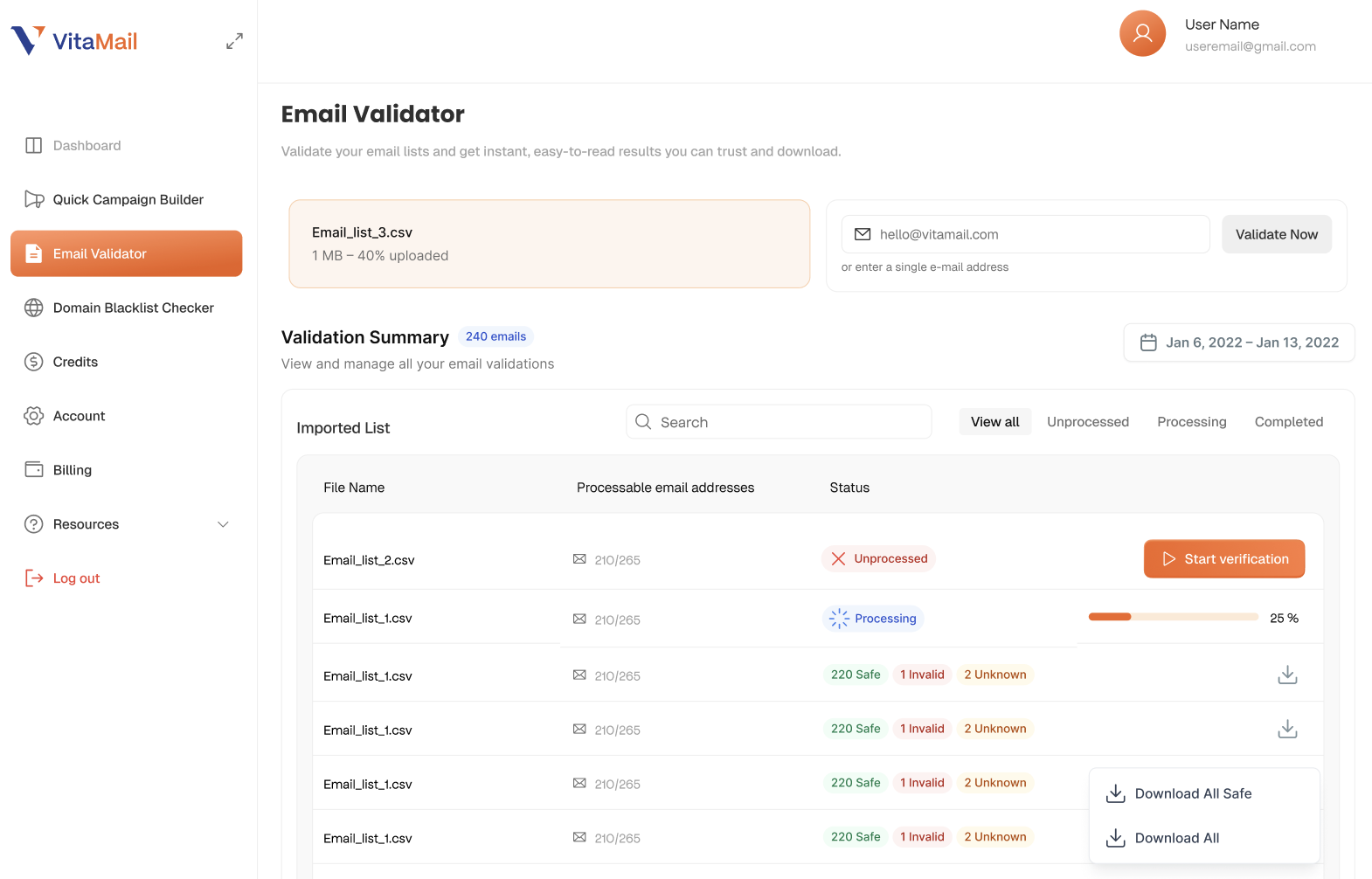
Before sending to catch-all addresses, run your list through VitaMail’s Bulk Email Verifier. Upload your CSV to check your email list and identify addresses that return an Unknown or catch-all status before they enter your campaigns. Catch-alls return "Unknown", and that label means something specific: the address is neither confirmed real nor confirmed dead. The domain accepts everything, so there was no answer to retrieve.
Practically, an address with this status is one of three things:
- A real, monitored mailbox belonging to the person you meant to reach.
- A real address routing to a shared inbox nobody reads closely:
info@,sales@, a decommissioned employee's mail forwarding to a manager. - An address that doesn't exist, which the server will silently discard or bounce back hours later.
You cannot tell which from the verification result alone. You can often tell from your own data, and that's what the next two sections are for.
What not to do: don't treat this status as a soft "valid" and mail it with the rest of the list, and don't delete the records outright. Both throw away information. Segment them.
Step 2 — Monitor & Segment
The best practice for email list hygiene is to move all identified catch-all addresses into a separate segment. If you see no engagement after one or two campaigns, it’s safest to suppress them permanently.
Should You Keep Catch-All Emails?
The default is suppress. Below are the conditions under which that's worth revisiting.
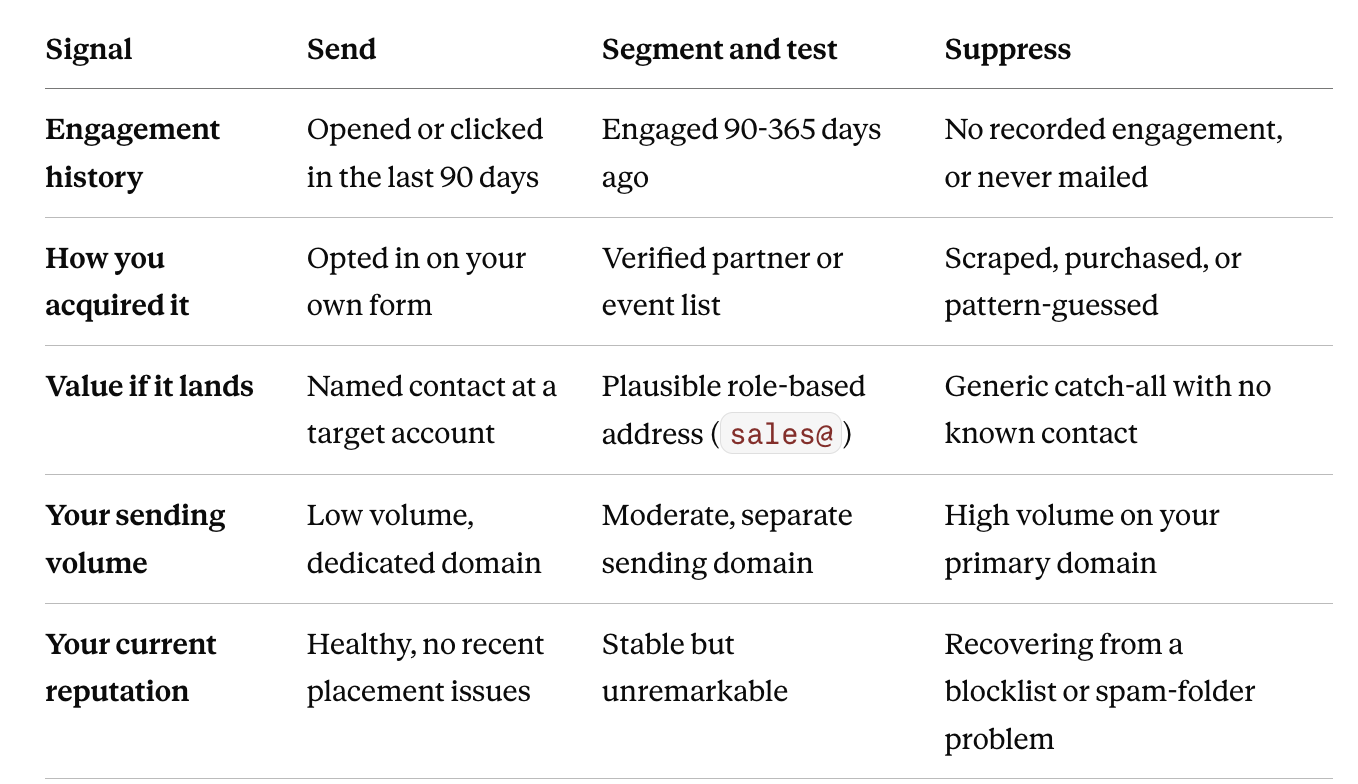
How to read it: the bottom two rows override the top three. A perfect engagement record doesn't justify mailing catch-alls from a domain that's currently in reputation trouble. Repair first, expand later.
If you're testing a segment, do it properly:
- Isolate the catch-alls into their own send. Never blend them into a broader campaign; you'll lose the ability to attribute anything.
- Send from a separate subdomain, not your primary sending domain.
- Cap the batch. A few hundred addresses is enough to read a result.
- Judge on clicks and replies, not opens. Open tracking is unreliable generally and worse on shared or automated inboxes.
- Give it two campaigns. Suppress anything silent after the second.
The exception that survives all of this is the one already in the article: an address with proven, recent engagement. If support@activecustomer.com reliably opens your invoices, it's a working mailbox and the label is a technical artifact. Keep it, and note why in your CRM so a future list clean doesn't strip it out again.
Catch-Alls in Cold Outreach
Cold outreach is where most people meet this problem, and it's the worst context for it. Warm lists have engagement history to fall back on. Cold lists have nothing, no opens, no clicks, no prior sends, so the unresolved status is genuinely all you know.
It compounds: cold lists are frequently built by pattern-guessing (first.last@, f.last@, first@ across a company's employees), and guessed addresses land on catch-all domains precisely because those domains accept anything. A list that's 30% catch-all often isn't describing the market. It's describing your list-building method.
What this means in practice:
- Never mail catch-alls from your primary domain. Cold outreach belongs on a separate sending domain regardless; catch-alls make that non-negotiable. A reputation hit on
outreach-yourbrand.comis recoverable. The same hit on the domain carrying your billing and support mail is not. - Keep them under about 10% of any cold send. Enough to test, not enough to sink the campaign's aggregate engagement.
- Watch for silence, not bounces. In normal cold outreach a bounce rate above roughly 2-3% tells you the list is bad. Catch-alls remove that alarm; mail vanishes without a bounce, so a heavily catch-all campaign can look healthy on paper while landing nowhere. Read reply rate instead, and compare it against the same campaign's non-catch-all segment.
- Find a second signal before sending. If the address is worth pursuing, confirm the person independently: LinkedIn, a company team page, a recent press mention, an org chart. Verification told you the domain accepts mail; you still need evidence the human is there.
- Prefer a different address on the same domain. If a target company's domain is catch-all and your guessed address is unresolvable, a named contact found elsewhere at that company is a better bet than mailing the guess.
The honest framing for a cold campaign: a catch-all address is a lead you haven't finished qualifying. Treat it as research to be completed, not a contact to be mailed.
A Brief Note on Setting Up a Catch-All (For Your Domain)
If you must configure a catch-all for your own domain, do it in your host or email provider’s settings. Ensure you have proper DMARC, DKIM, and SPF records in place so your safety net doesn't become a source of technical errors.

Next Steps
A clean, verified email list is the foundation of successful email marketing. By identifying and strategically managing catch-all addresses, you protect your sender reputation and ensure your message reaches the right people.

