

Quick answer: You can confirm whether an email address is real without sending a message by checking its syntax, looking up the domain's MX records, and running an SMTP handshake that stops right before the message is transmitted (at the RCPT TO step). The receiving server's response code tells you whether the mailbox exists, no email ever leaves the outbox.
Key Takeaways:
- Sending a test email to check validity risks a bounce, and bounces damage your sender reputation.
- Four layers of checking give you real confidence: syntax → domain/DNS → SMTP handshake → risk scoring.
- SMTP verification works by opening a connection and stopping before the DATA command — the step that would actually deliver a message.
- No method is 100% accurate. Catch-all domains and anti-harvesting protections mean verification is a probability, not a guarantee.
- For anything beyond a handful of addresses, a verification tool is faster and more accurate than doing this by hand.

How Email Verification Works Without Sending
Instead of delivering a message, non-sending verification checks for "deliverability signals." Think of it like confirming a physical address: you check the city (domain) and street (MX records) on a map and ask if the post office recognizes the house number (SMTP handshake)—all without mailing a package.
This process confirms an address is structured correctly and that the receiving mail server acknowledges its existence, all without transmitting any email content. The final output is a clear verdict.
Result Taxonomy:
- Valid: The mailbox is confirmed to exist.
- Risky: The mailbox might exist, but the server masks the result. This includes catch-all, disposable, and role-based addresses.
- Invalid: The address is confirmed to be undeliverable (bad syntax, non-existent domain, or user unknown).
Step-by-Step Methods (From Fast to Advanced)
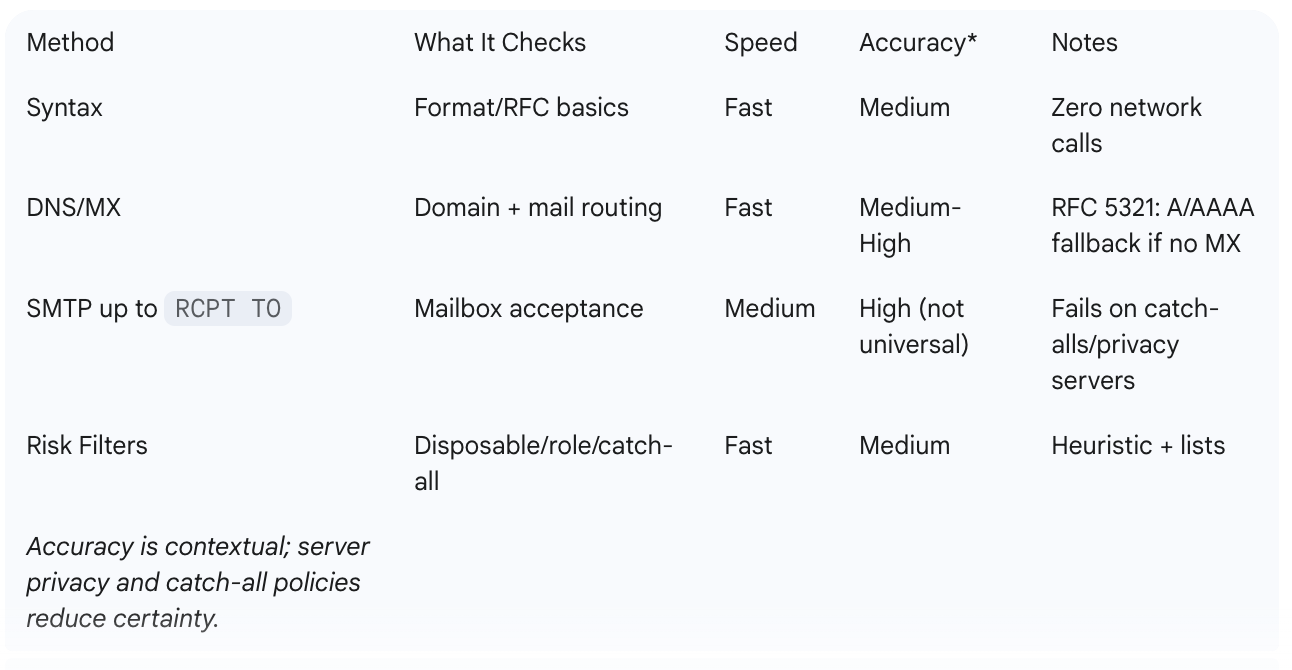
Combining these methods provides the most accurate result. Here’s a quick comparison:
1. Format & Syntax Validation
The first and fastest check is to validate the valid email address format. This catches obvious typos and structural errors before any network calls. An email address must have a local part, an @ symbol, and a domain part.
2. Domain & DNS/MX Lookup
Next, check the domain itself with a DNS (Domain Name System) lookup. This confirms the domain exists and is configured to receive email via Mail Exchange (MX) records — a core part of the domain's email infrastructure. If no MX records are found, per RFC 5321, some servers fall back to the domain's 'A' or 'AAAA' record, but a present MX record is a much stronger signal of deliverability.
3. SMTP Handshake up to RCPT TO (No Content Sent)
This is the core of how to check if an email exists without sending. The SMTP handshake is a conversation with the recipient's mail server where we stop before sending any content.
The process:
- Connect: Open a connection to the mail server found in the MX records.
- HELO/EHLO: Introduce our server.
- MAIL FROM: State a sender's address (e.g., test@mydomain.com).
- RCPT TO: Ask the server, "Do you accept mail for contact@example.com?"
- Analyze & Quit: A 250 OK response means the address is valid; a 550 No such user means it is invalid. We send the QUIT command immediately after the RCPT TO response to close the connection.
Limitations:
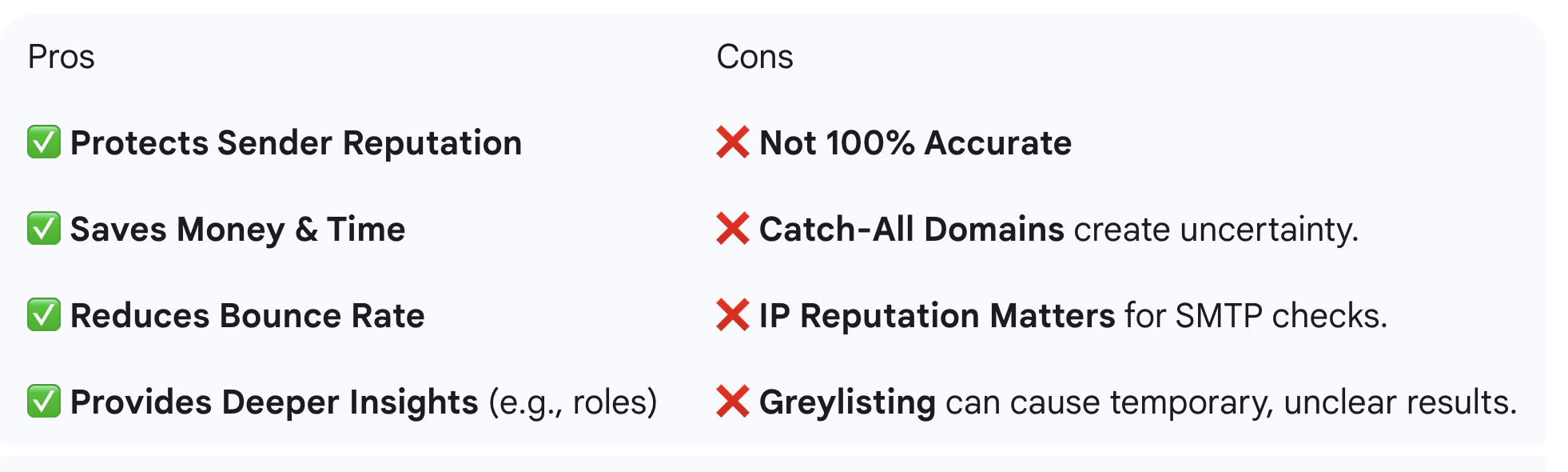
- Privacy Settings: Many servers accept all addresses during the handshake to prevent directory harvesting.
- Catch-All Domains: These domains accept mail for any address, making this check inconclusive.
- Greylisting: Some servers temporarily reject connections from unknown IPs, requiring a retry.
- Rate Limiting: Too many connection attempts can get your IP blocked.
4. Catch-All Detection
A catch-all domain accepts email for any address, valid or not, masking whether a specific mailbox exists. Catch-all domain detection is done by testing a known-invalid address (e.g., asdfqwer1234@domain.com). If it's accepted, the domain is flagged as catch-all, and its emails are marked "risky."
5. Disposable & Role-Based Filters
- Disposable Emails: These are temporary addresses from services designed to be thrown away. A disposable email filter uses blocklists to identify and flag them.
- Role-Based Emails: Addresses like info@, support@, or sales@ are valid but often have lower engagement and higher complaint rates. It's best to segment them.
6. Risk Signals & Scoring
Advanced SMTP mailbox verification also looks for other signals like "mailbox full" or "account disabled" responses, which provide more context than a simple valid/invalid result.
Pros & Cons of Non-Sending Verification
Bulk Verification: Process & Best Practices
When you need to verify emails online in large volumes, a careful approach is essential.
- Batch Your Checks: Run fast syntax and DNS/MX checks on the full list first.
- Throttle Connections: Use respectful timeouts and cooling-off periods to avoid overwhelming servers.
- Use Distributed IPs: Rotate IPs to avoid hitting rate limits on a single mail server.
- Implement Retry Logic: For temporary failures (4xx server codes), schedule a retry. A good practice is to retry in 2–6 hours, with a maximum of 3 attempts.
This methodical approach to bulk email verification is efficient and keeps your IPs off blocklists.
Compliance & Ethics
When you verify an email, you are processing user data. Ensure you have a legitimate interest or user consent. For data hygiene, this is generally acceptable under regulations like GDPR. Store only the verification result and a timestamp to adhere to data minimization principles.
Practical Playbooks (Signup Forms, Newsletters & E-commerce)
For Signup Forms:
Implement a real-time check. Use JavaScript for a client-side format check, then run a server-side DNS/MX and RCPT TO check. If it fails, prompt the user to correct a potential typo.
For Newsletters & E-commerce:
Before a major campaign, run your list through a bulk verifier to remove invalid addresses and reduce your bounce rate. Re-verify your entire list quarterly to remove abandoned addresses.

Accuracy Tips
- Layer Your Checks: Always combine methods. Syntax → DNS/MX → SMTP → Risk Filters.
- Log Verdicts: Store the results (valid, risky, invalid) to track list quality over time.
- Set Risk Thresholds: Decide your mailing policy. For example, mail valid addresses, send re-engagement campaigns to risky ones, and always suppress invalid ones.
- Use a Reputable Tool: Professional services have the infrastructure and algorithms for reliable results.
Conclusion
You don't have to risk your sender reputation to maintain a clean email list. By using a layered approach, you can verify an email address without sending an email. This proactive strategy protects your reputation, improves deliverability, and ensures your message reaches real people.
Verify email address without sending an email. Start a free check now with VitaMail.