




Email performance is getting harder to manage, and small issues can affect deliverability long before they become visible. With VitaMail V4, our goal was to make that entire process clearer and easier for solo marketers, CRM teams and growing businesses.
This update brings a more organized dashboard, smarter visibility into domain health, stronger collaboration tools, and a cleaner way to manage contact lists.
In VitaMail V4, you’ll find:
- Domain Health: see risks early before your campaigns go out
- Monitoring & Domain Doctor: get weekly check-ins and simple fixes
- Workspaces: keep brands and teams organized in one place
- Lists: store, tag, and review contacts without the chaos
- Pricing: choose what fits best, subscription or Pay-Per-Use
Below is a closer look at what’s new in VitaMail V4 and how each update helps you send smarter emails with more confidence.
Domain Health: See Problems Before They Hit Your Inbox
Most teams only notice domain issues when open rates suddenly drop or emails start landing in spam.
VitaMail V4 changes that by giving you a simple Domain Health view that shows what’s going on with your domain before it becomes a problem.
Everything lives in one place:
- Health Checker – quick score and AI summary
- Monitoring – ongoing checks and weekly email reports
- Domain Doctor – guidance to fix what’s not working
It’s built for marketers, CRM managers, and small business owners who don’t want to dig through technical tools just to know if it’s safe to send a campaign.
Health Checker: Your Domain’s Overall Score
When you open Domain Health, the first thing you see is a clear health score for your sending domain (for example, 80% – Excellent).
Right below, VitaMail gives you an AI Summary in plain language, not DNS jargon. It pulls together the key things that affect deliverability:
- SPF, DKIM, and DMARC status
- Blacklist checks
- MX and suffix records
- Domain age
- BIMI and other supporting signals
You can quickly see what’s healthy, what’s at risk, and where you may need to look closer.
This is how the Domain Health dashboard looks in V4:

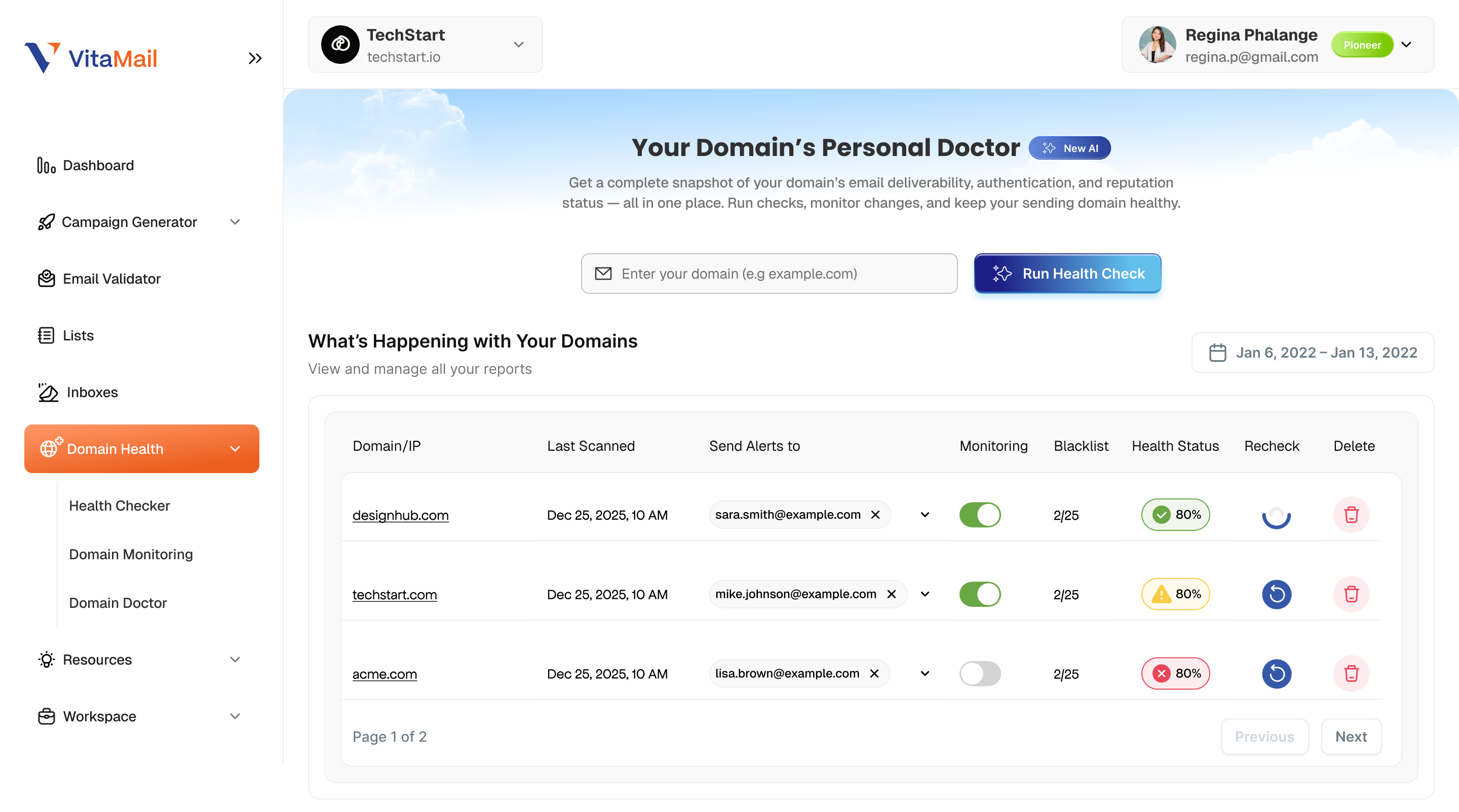
Turn on Monitoring: Weekly Reports
From the same screen, you can switch on Monitoring for your domain.
Once monitoring is ON, VitaMail automatically checks your domain on a regular schedule and sends you a weekly email report that includes:
- Your current Domain Health score
- Summary of SPF, DKIM, and DMARC
- MX, BIMI, suffix record, and domain age status
- Blacklist results
- A quick view of what changed since the last report
This means you don’t have to remember to “go check” your domain. If something important changes, it lands in your inbox.
And here’s the view of your monitored domains:
Domain Doctor: Get Help to Fix Issues
Spotting an issue is one thing. Knowing what to do next is another.
That’s where Domain Doctor comes in.
From the Domain Health screen, you can click Ask Domain Doctor, pick the domain you want to work on, and then choose the specific area you’re worried about:
- SPF
- DKIM
- DMARC
- MX
- BIMI
- Suffix record
- Domain age
Domain Doctor then walks you through what’s wrong and how to fix it in human language. Instead of sifting through forums and documentation, you get focused guidance based on your actual domain data.
Each interactive Domain Doctor session uses credits (as shown in the product), so you only pay for the deep help you really need.This is the first Domain Doctor step, where you choose the domain you want help with:

After selecting a domain, Domain Doctor lets you pick the exact issue you want to fix:

Why Domain Health Matters for Your Everyday Campaigns
With V4, Domain Health is not a separate, “technical” part of VitaMail. It’s built into the way you plan and send campaigns:
- You check your domain health before a big send.
- You monitor it weekly without doing anything manually.
- You fix issues faster with Domain Doctor, even if you’re not technical.
The result: more emails reaching real inboxes, fewer surprises, and more confidence for the whole team, from founders and CRM managers to freelance marketers and agency partners.
Workspaces: Keep Every Brand and Team Organized
As teams grow, managing domains, lists, and campaigns across multiple brands can get messy. VitaMail V4 solves this with Workspaces dedicated environments that keep everything separated and easy to manage.
Each Workspace gives you a clean space for a brand or project. You can:
- Store brand details (name, domain, CTA, tone of voice)
- Add team members with clear roles
- Track activity across all tools
- Keep domains, lists, and settings separated
- Switch between brands without juggling multiple accounts
Screenshot: Workspace Settings
 Team Collaboration: Invite People and Assign Roles Easily
V4 makes it simple to bring teammates into your Workspace.
Admins can:
- Invite teammates via shared link
- Or enter their email to send a direct invite
- Assign Member or Admin roles
- Resend, change role, or remove access
This helps CRM teams, founders, and agencies collaborate without sharing one login.
Screenshot: Invite Team Member

Activity Tracking: See What Your Team Is Working On
The new Activity Log gives you transparent insight into how your team uses VitaMail tools.
From this view, admins can see:
- Which tool each person used
- How many credits they spent
- When the action happened
- A link to view results
- The role of each teammate
This makes collaboration structured and reduces confusion on projects.
Screenshot: Workspace Overview + Activity Log

Why Workspaces Matter in V4
Workspaces make collaboration easier and more structured. They give teams a clear way to keep projects separate, bring new members, and maintain a cleaner workflow.
V4 also makes it easier to understand how credits are used and provides one place to manage brand identity and performance. It’s built for real teams, from solo marketers working with freelancers to agencies handling several client brands at once.
Lists: A Cleaner Way to Organize Your Contacts
Managing contacts can get chaotic as campaigns grow. VitaMail V4 introduces a much clearer and more flexible Lists experience to keep your data organized, whether you’re working with client leads, subscriber lists, or campaign-specific audiences.
Lists now let you store contacts in a structured way, with names, descriptions, and tags that help teams understand where contacts came from and how they should be used.
Create Lists for Any Campaign, Audience, or Client
With the new Create List flow, you can build dedicated lists for different needs, from newsletter signups and event leads to B2B prospect lists and client-specific data.
Each list includes:
- A name
- A short description
- Tags (e.g., “Germany”, “Trade Show”, “High Value”)
- Unlimited contacts
Tags make large accounts easier to navigate, and descriptions help teammates understand the purpose and source of each list.
Screenshot: Create New List Modal

Upload Contacts with Rich Details
V4 also supports structured CSV uploads, allowing you to import contacts with more detail than before, including:
- Name
- Company
- Title
- Phone
- Status (Valid / Invalid)
This makes list management more professional and avoids the limitations of storing email addresses alone. Once uploaded, contacts appear in a clean table view with validation status and additional fields.
Screenshot: Contact Details View
 Why Lists Matter in VitaMail V4
The improved Lists experience gives teams a clearer, more dependable way to manage contact data. It helps keep audiences organized by campaign or source, adds helpful context with descriptions and tags, and makes it easy to import structured information at scale. You can see validation results instantly and work more confidently with large volumes of data.
With every update, V4 makes list management smoother, easier to understand, and more reliable for everyday work.
Subscription & Pay-Per-Use: Flexible Pricing Options
V4 introduces a clearer pricing structure built for different types of teams. You can choose between a simple Pay-Per-Use model or a monthly subscription that includes credits, collaboration features, and Workspace access.
All subscription plans include full access to VitaMail tools, and monthly credits refresh automatically. The comparison table below shows what each plan offers, from credits to workspaces, team seats, and domain monitoring limits.

Pay-Per-Use remains a flexible option for users who only need occasional checks or single-task workflows.
The updated billing dashboard also makes it easier to view credits, invoices, and upgrade options in one place, so account management stays simple and transparent.
Final Thoughts
VitaMail V4 brings everything into a clearer, more organized flow, from checking your domain health to managing contacts and working with your team. The goal was simple: make email outreach easier to manage, especially for small teams, CRM managers, and growing businesses that don’t have time to dig through technical tools.
With smarter monitoring, better collaboration features, and a more flexible pricing structure, V4 gives you a safer and more confident way to run your campaigns. It’s a step toward helping every marketer send emails that actually reach inboxes.


