




A perfectly written cold email sequence does not matter if 30% of the addresses bounce. That is the ugly truth most outbound teams learn the hard way. Your reply rate is bottlenecked by the quality of your B2B contact database, not by the cleverness of your subject lines.
This guide walks through how to build one, what to buy, how to verify it, and how to use it without torching your sender reputation. You will leave with a clear workflow, the tools that hold up in 2026, and the mistakes quietly killing your numbers.
By the end, you will know how to turn a spreadsheet of contacts into a pipeline of replies.
Key Takeaways:
- Your reply rate is limited by list quality, not copy quality. A clean B2B contact database is the foundation of any outbound program
- Roughly 30% of B2B contact data goes stale each year. Refresh at minimum every 90 days and re-verify before every major campaign
- Always run a coverage test against your actual ICP before committing to a provider. Total record count means nothing if your niche is underrepresented
- Email verification is non-negotiable. A bounce rate above 4% puts your sender reputation at risk; aim for under 2%
- GDPR, CCPA, and equivalent frameworks apply to you even if the data came from a vendor. You are responsible for lawful processing
What is a B2B contact database?
A B2B contact database is a repository of professional contact records tied to companies. Each record typically includes:
- Full name
- Job title and seniority
- Company name, size, industry, and location
- Business email
- Direct dial or mobile (sometimes)
- LinkedIn profile URL
- Technographic or intent signals (sometimes)
The important thing to understand is what a contact database is not. It is not your CRM. Your CRM is the system of record for accounts you already talk to. A contact database is the pool of prospects you pull from before they ever hit your pipeline.
Teams use these databases to feed three workflows: outbound cold email, account-based marketing, and inbound enrichment when a lead fills out a form.
What to look for in a B2B contact database
Most providers look identical on a landing page. They all claim "accurate data" and "global coverage." Here are the four filters that separate the useful from the expensive.
Data accuracy and freshness
A contact database is a depreciating asset. Roughly a third of B2B contact data goes stale each year as people change jobs, companies get acquired, and emails get deprecated.
Ask two questions before you buy:
- How often is the database re-verified, and using what method?
- What is the guaranteed bounce rate, and what happens if you exceed it?
Providers that re-verify in real time at the moment of export beat providers that rely on a static refresh cycle. If a vendor cannot explain their verification process in plain language, that is a red flag.
Coverage and firmographic depth
Coverage is not just "how many records." It is "how many records for your specific ICP." A database with 300 million global contacts is useless if you sell to mid-market fintechs in DACH and the coverage there is thin.
Before signing, run a coverage test. Pull 100 accounts that match your ideal customer profile and ask the vendor how many contacts they have for each target title. Compare the fill rate across two or three providers.
Compliance and sourcing
B2B contact data is a legal minefield in 2026. GDPR in the EU, CCPA in California, and equivalent frameworks in the UK, Canada, and Brazil all carry real teeth.
Check how the provider sources contacts. Legitimate sourcing combines publicly available web data, user-contributed connections, and direct consent where required. Anything that sounds like scraped gray-market data is a future headache.
Enrichment and integration
The database itself is half the value. The other half is how easily it connects to what you already use.
Look for native integrations with your CRM (Salesforce, HubSpot, Pipedrive), your sequencing tool, and your data warehouse. Look for enrichment layers beyond contact info: funding rounds, hiring signals, tech stack, intent topics, and news events you can hook messaging to.
The three types of B2B contact databases
Most providers fall into one of three categories. The right choice depends on your volume, budget, and how much control you want over the sourcing process.
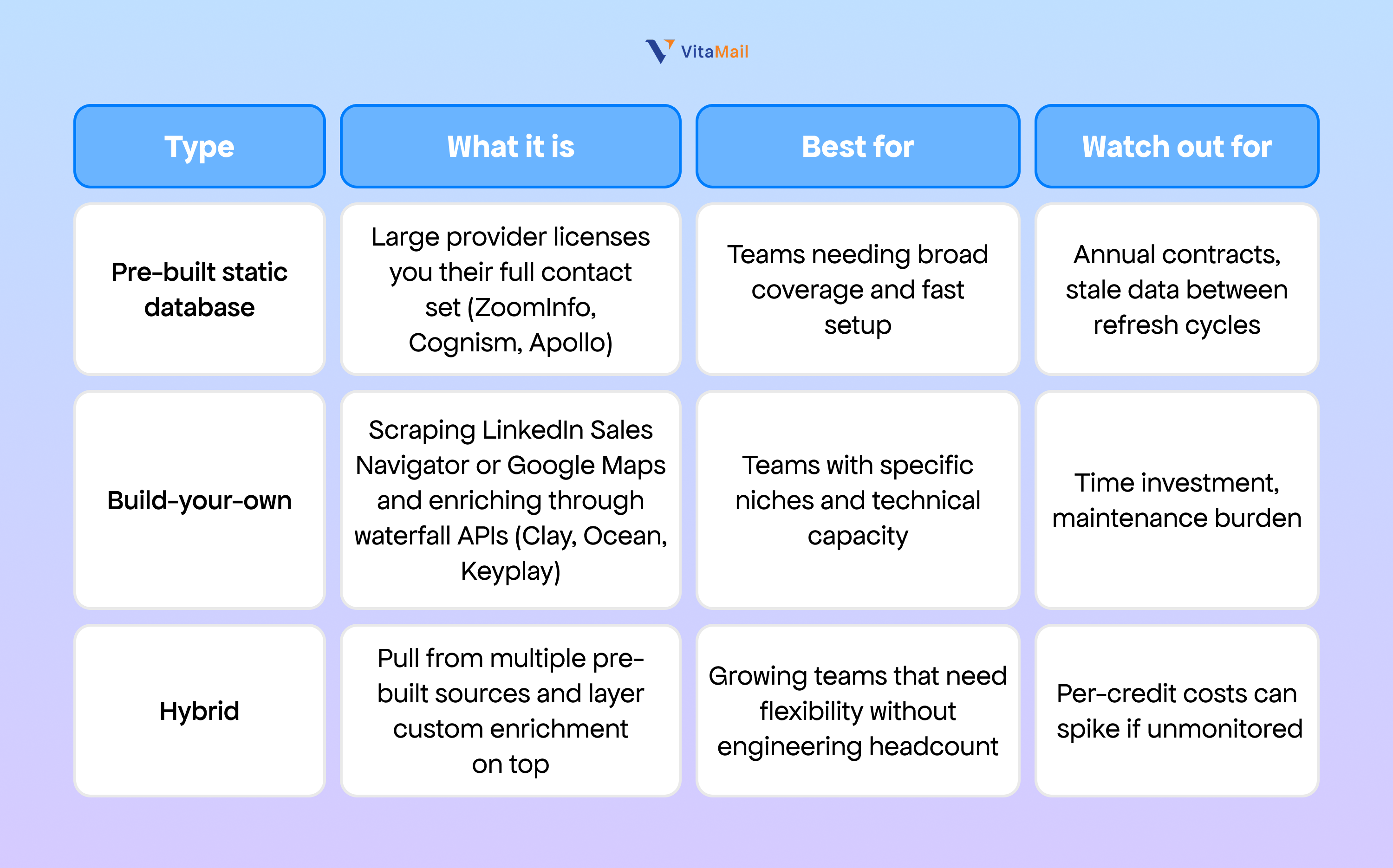
A founder running solo outbound usually starts with a build-your-own approach because it is cheaper and more targeted. Teams doing high-volume ABM tend to sit in the hybrid camp. Enterprise SDR organizations gravitate to pre-built databases for speed and predictability.
How to build a B2B contact database from scratch
If you are skipping the pre-built route, here is the five-step workflow that works for most B2B teams.
Step 1: Define your ICP in writing
Do not start with tools. Start with a one-page document that names your ideal customer profile. Include:
- Target industries (specific NAICS codes if possible)
- Employee count range
- Revenue range
- Geography
- Buyer titles and seniority levels
- Trigger events that signal a good fit (new funding, new hire in a specific role, tech stack change)
When Marcus, a VP of Revenue at Chartline, defines his ICP, he specifies "B2B SaaS companies between 50 and 500 employees, headquartered in North America, with a dedicated RevOps function, using Salesforce as the primary CRM." That level of specificity is what separates a list of 500 good prospects from a list of 50,000 mediocre ones.
Step 2: Source contacts from multiple channels
Do not rely on a single source. Combine:
- LinkedIn Sales Navigator filtered by your ICP
- Vertical databases specific to your niche (BuiltWith for tech stack targeting, for example)
- Conference attendee lists where legal
- Public filings and job boards
- Your website visitors through reverse IP lookup
The goal is redundancy. If a contact appears in two or more sources, it is probably current.
Step 3: Verify every email before you send
This step is non-negotiable. Run every extracted email through a verification tool before it ever touches your sending infrastructure.
A single spray of unverified emails can tank a warmed-up domain in a week. You are better off cutting a list in half and sending to verified contacts than sending to a larger list full of traps.
Step 4: Enrich with context that lets you personalize
Once you have a verified list, enrich each record with the signals you will actually use in your outreach. For each contact, pull:
- Last three LinkedIn posts
- Company press releases or funding news in the last 90 days
- Current job tenure
- Mutual connections
- Tech stack
Priya, a Head of Growth at Fidelio, does not just want to know that her prospect runs marketing at a 200-person SaaS. She wants to know that they just hired a VP of Demand Gen and announced a Series B last month. Those are the details that make a cold email feel like a conversation.
Step 5: Segment for targeted outreach
A flat list of 5,000 contacts is not a campaign. Segment by:
- Buyer persona (role)
- Industry vertical
- Company size band
- Trigger event or intent signal
Each segment gets its own messaging angle. Selin, the Marketing Director at Portlio, should not get the same email as James, the Founder at Stackr. Even if they both fit your ICP, the relevant pain point is different.
Top B2B contact database providers compared
The market is crowded. Here is a practical comparison of the most common providers cold email teams consider in 2026.
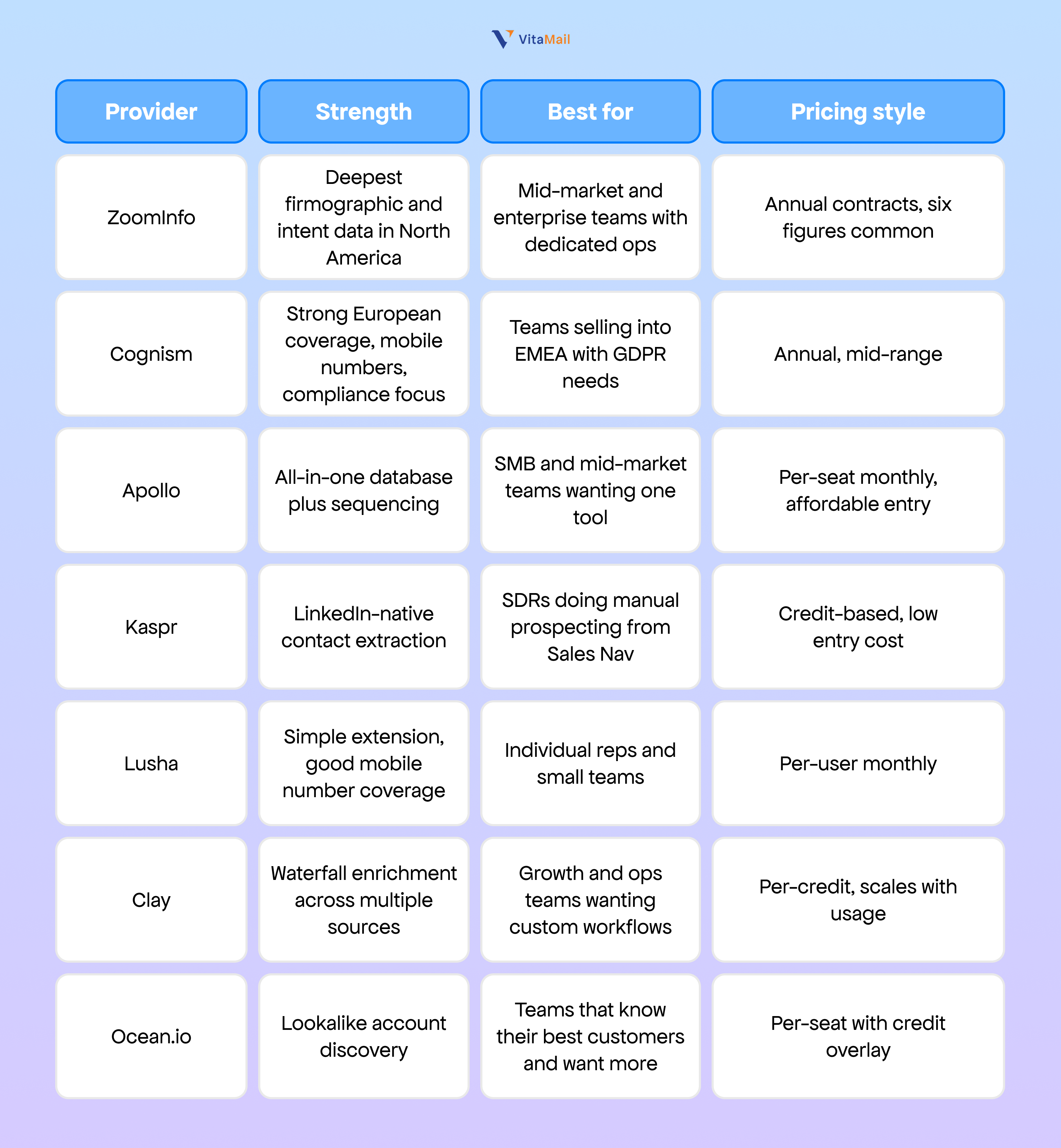
No single provider wins on every dimension. Most high-volume outbound teams use a waterfall setup that pulls from two or three sources and picks the first verified match for each record.
How to use a B2B contact database for cold email
Buying or building the database is the easy part. Here is the operator-grade workflow for turning it into replies.
Verify before you send, every time
Even if your database provider claims real-time verification, run a second pass through a bulk email verifier before uploading to your sending tool. Catch-all domains, role-based accounts (info@, sales@), and known spam traps should be filtered out.
Aim for a bounce rate under 2%. Anything above 4% puts your sender reputation at risk.
Warm up your sending domain before volume
Do not take a fresh domain and blast 500 emails on day one. Warm up the inbox with gradual volume increases over two to four weeks, starting at 10 to 20 sends per day and ramping up.
Use a dedicated sending domain, not your primary company domain. If something goes wrong and you land on a blocklist, your main email is not collateral damage.
Personalize at the level the database allows
A good contact database gives you enough context to write one relevant opening line per prospect. That is the difference between a 2% reply rate and a 12% reply rate.
Here is a template Nadia, an SDR at Outbound Lab, uses on mid-market SaaS founders:
Subject: Quick question about {{company_name}}'s pipeline
Hi {{first_name}},
Noticed {{company_name}} just hired a VP of Sales last month. Usually when that happens, the first 90 days are heavy on pipeline generation before the new leader's number kicks in.
We help B2B SaaS teams like yours spin up personalized cold email at volume without burning domains. Typical result is 8 to 12% reply rates in the first sequence.
Worth a 15-minute conversation next week?
{{sender_name}}
Notice what is doing the work: the trigger event (new VP hire), the specific pain point (pipeline before the number kicks in), and a concrete proof point (reply rate range).
Follow up systematically
One email is not a campaign. The majority of replies come from follow-ups two through five, not the first touch.
Plan a sequence of four to six touches spaced across two to three weeks. Change the angle each time. Do not just "bump this up" or "circle back."
Common mistakes that kill database ROI
The most expensive contact database in the world will not save you from these mistakes.
- Treating the database like a list to burn through. Contacts are not disposable. Every bad email degrades your sender reputation for the next campaign.
- Skipping verification to save time. An hour of verification saves a week of deliverability recovery.
- Sending the same message to every segment. A generic email to 5,000 prospects will underperform a personalized email to 500 every time.
- Ignoring compliance. "We got the data from a vendor" is not a defense under GDPR. You are responsible for lawful processing.
- Not tracking data decay. Refresh your contact data at least quarterly. Titles change, people leave, and yesterday's decision-maker is today's bounce.
- Using your primary domain for outbound. Spin up a lookalike domain and a dedicated outreach inbox.
How VitaMail turns your contact database into replies
A clean B2B contact database is the starting point. What happens between "contacts in a CSV" and "replies in your inbox" is where most outbound programs struggle.
VitaMail is built for that gap. Three capabilities matter most once you have your database ready:
- Bulk email verifier. Upload your list and get a verified, ready-to-send subset in minutes. Catch-alls, role accounts, and syntax errors get filtered before they hit your sending tool.
- Domain health checker. Monitor SPF, DKIM, DMARC, and blocklist status across your sending domains. Catch reputation drops before they turn into deliverability collapse.
- AI personalization at scale. Pull enrichment context into each email programmatically so Marcus at Chartline and James at Stackr get different opening lines drawn from their actual LinkedIn activity and company news.
If you are already running outbound and your reply rates are flat, the fix is rarely "write better emails." It is usually "verify the list, fix the domain, and personalize deeper." VitaMail handles all three in one place.

Final word
A B2B contact database is the foundation of every outbound program, and most teams underinvest in it. Buy or build with your specific ICP in mind, verify every email before it leaves the server, and enrich deeply enough that personalization is more than a first name.
Treat the database as an asset that depreciates. Refresh it, clean it, and segment it before every campaign. The teams that win at cold email are not the ones with the cleverest copy. They are the ones with the cleanest lists and the most disciplined sending.
If you are ready to turn your contact database into replies, start with VitaMail's free bulk email verifier and domain health checker.

