





Cart recovery emails only work if they reach the inbox. Bad emails block revenue. They raise bounces. They hurt your sender reputation. Then more of your messages land in spam.You can stop that with the right email validation tool for e-commerce. This article shows how to fix the leak using bulk list cleaning and single-email checks—even without an API or real-time validation.
Why cart recovery emails fail
Typos happen at checkout. People use throwaway addresses on giveaways. Old lists sit for months. You import contacts from a previous provider and hope for the best.The result:
- Hard bounces from invalid addresses
- Spam traps and disposable domains
- Lower sender score and worse deliverability
- Fewer recovered orders and wasted ad spend
It feels like “email stopped working.” In reality, your list quality slipped.
What email validation actually does
Email validation checks addresses and classifies them. You get clear labels like valid, invalid, disposable, role, or risky/catch-all. Then you act:
- Remove invalid and disposable emails from campaigns
- Throttle or test risky/catch-all before sending at scale
- Keep sending to valid contacts and rebuild trust with mailbox providers
Cleaner lists → fewer bounces → better inbox placement → more revenue from the same flows.
You don’t have real-time validation? You’re still fine.
Many brands think they must have a real-time API at checkout. Useful, yes. Required, no. You can protect your cart recovery and lifecycle flows with a simple stack:
- Bulk list cleaning on a schedule
- Single-email verification for one-off checks
- Typos prompts in forms (client-side suggestions like “Did you mean @gmail.com?”)
- Double opt-in for newsletter and giveaway sources
- Smart suppression rules inside your ESP
This setup keeps data clean and deliverability stable—without any API.
Why VitaMail fits e-commerce teams
VitaMail provides two things you actually use week to week:
- Bulk verification for fast list cleaning
- Single-email verification for quick spot checks
No API. No complex dev work. No heavy integration. Just upload, verify, and act. This works well for lean teams that need results and don’t want to maintain custom code.
Where VitaMail helps most
- You’re running cart recovery, browse abandonment, and post-purchase flows.
- Your imports have grown over time and bounce rate creeps up.
- You launch promos and want to avoid sudden deliverability drops.
- You need a simple, repeatable hygiene routine.
Cart recovery, saved: how the flow works without an API
- Capture the email at checkout or in a cart reminder form.
- Reduce typos at the source using client-side suggestions (no server API needed).
- Send your abandoned cart flow as usual.
- Run VitaMail bulk cleaning every week on “New Signups (last 7–14 days)” and “Recently Active.”
- Remove invalid/disposable from all campaigns and flows.
- Segment risky/catch-all and warm them with low-frequency sends.
- Watch deliverability improve. Inbox placement rises. Cart recovery earns more.
This process compounds. The cleaner your list, the stronger your reputation. The stronger your reputation, the more emails hit the inbox.
Simple rollout plan (copy this)
Step 1: Clean the core
- Export your master list and your automation audiences (cart recovery, browse, transactional backups if available).
- Run VitaMail bulk verification.
- Create four segments in your ESP:
- Safe
- Unknown
- Invalid
Action: Suppress Invalid and Unknown everywhere. Send carefully to Risky/Catch-All or warm them first.
Step 2: Protect new data
- Add typo prompts to forms (front-end suggestions are enough).
- Use double opt-in on newsletters, giveaways, and lead magnets.
- Keep checkout fast; don’t add heavy steps.
Step 3: Put hygiene on a calendar
- Weekly: Run VitaMail bulk verification on “New Signups (7–14 days).”
- Monthly: Verify the active list you send to most often.
- Quarterly: Verify long-tail segments before big promos.
Step 4: Spot-check high-value addresses
- Use single-email verification before manual outreach, B2B quotes, VIP support cases, or win-back calls.
Step 5: Measure what matters
Track:
- Bounce rate (target: as low as possible; watch hard bounces)
- Spam complaint rate (keep it tiny)
- Open and click rates on cart recovery and lifecycle flows
- Revenue recovered from abandoned carts
- List growth quality (share a simple monthly dashboard with your team)
What to look for in any email validation tool
Even without an API, these criteria matter:
- Accuracy and clear result codes (valid/invalid/disposable/risky/role)
- Speed for bulk jobs so cleaning doesn’t block campaigns
- Readable reports that marketers can use without a data analyst
- Fair pricing for seasonal peaks and growth
- Data handling you trust (security and sensible retention)
- Good CSV/ESP workflows so you can move fast
Quick Answer: where VitaMail stands
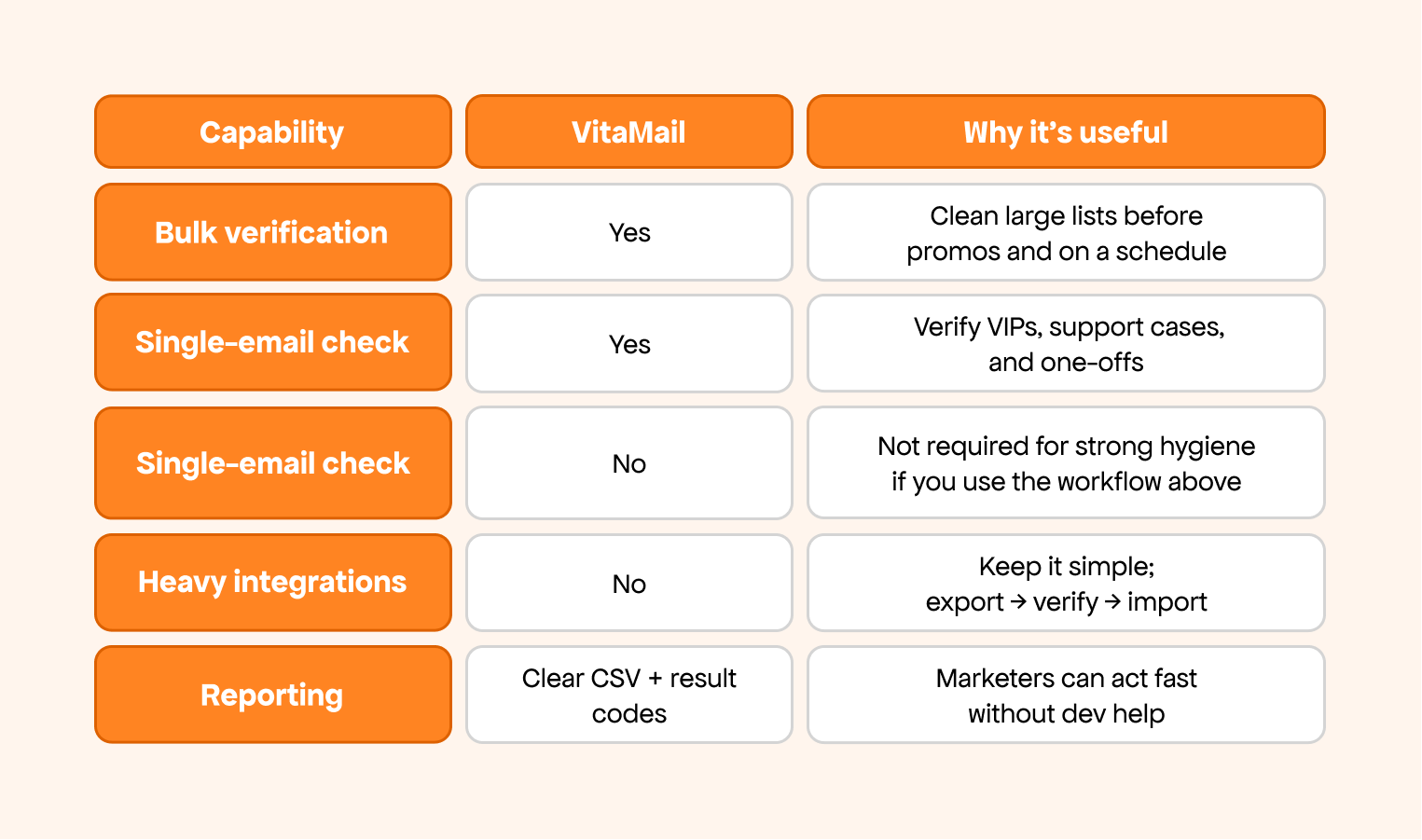
Bottom line: If you need simple, dependable hygiene without an API, VitaMail gets it done.
Real-world pattern you can copy
A mid-market DTC brand ran this plan:
- Cleaned 220k contacts with bulk verification
- Suppressed invalid/disposable across all sends
- Split risky/catch-all into a warming lane
- Added typo prompts and double opt-in on non-checkout forms
- Verified “New Signups (7–14 days)” every Friday
Outcomes they saw over the next few campaigns:
- Bounce rate dropped and stayed low
- Inbox placement improved across Gmail and Outlook
- Cart recovery clicks rose without changing the offer
- Promo weeks ran smoother with fewer spam complaints
Your numbers will differ, but the direction is consistent: clean list, better placement, more recovered orders.
Mistakes to avoid
- Mailing invalid and unknown addresses to “see what happens.”
- Verifying once, then forgetting about it for a year.
- Mixing risky/catch-all with main segments on high-stakes sends.
- Skipping typo prompts because “it’s a small detail.” Small details save revenue.

Final thoughts
Invalid emails steal sales quietly. You can stop that without code, without an API, and without changing your offers. Use a clean, repeatable hygiene routine:
- Bulk verification with VitaMail
- Single-email checks when it matters
- Typos prompts + double opt-in to protect future signups
- Clear suppression rules inside your ESP
Start today. Clean your list. Keep bounces down. Get more cart recovery emails into real inboxes—so more carts turn into orders.

