




A healthy email list starts with valid addresses. By using email scrubbing tools and proven validation methods, you can prevent errors, protect your reputation, and ensure your campaigns reach the right inboxes.
How to Ensure Your Email List Contains Only Valid Addresses?
A clean email list is the foundation of strong deliverability. Sending campaigns to invalid contacts wastes money, increases bounce rates, and damages your sender reputation. To avoid this, you need to regularly validate and maintain your list. Here are the most effective ways:
1. Use an Email Verification Tool Instead of manually checking each contact, rely on a professional service that scans your list for invalid, fake, or disposable emails. Tools like VitaMail Email Validation can instantly detect issues and mark risky addresses before you hit send. Maintaining a clean email list is an ongoing process, and strong email list hygiene practices help prevent invalid addresses from entering your campaigns in the first place.
2. Apply Email ScrubbingEmail scrubbing means removing bad or inactive addresses from your database. This step filters out typos, outdated accounts, and spam traps. If you’re wondering how to clean an email list, scrubbing is the process that keeps your database lean and healthy.

By combining these methods, you’ll always send to real, active inboxes improving engagement and making sure your marketing budget isn’t wasted on invalid addresses.
Why should you check if an email is valid before sending?
Validating your email list before launching a campaign is not just a best practice, it’s a necessity if you want consistent deliverability and long-term ROI from email marketing. Sending to invalid or fake contacts directly affects how mailbox providers like Gmail, Yahoo, and Outlook perceive your domain. Here’s why regular validation matters:
1. Protects domain reputation and IP health
Email service providers track your bounce rates closely. A high volume of invalid emails signals poor list hygiene, which can damage your domain reputation. Once flagged, even your valid subscribers may stop receiving your messages in their inbox and instead find them in the spam folder. Recovering from a damaged sender score is expensive and time-consuming.
2. Reduces bounce rates and improves inbox placement
Hard bounces (invalid addresses) and repeated soft bounces (temporary issues like a full inbox) quickly erode deliverability. By verifying your list in advance, you minimize these errors, which helps your campaigns land in inboxes instead of being filtered or blocked.
3. Saves budget and maximizes ROI
Most platforms charge based on the number of emails sent or the size of your database. If 10–20% of your list is invalid, you’re literally paying for emails that will never be seen. Cleaning your list ensures your budget only targets real, reachable users.
4. Increases engagement metrics
Metrics like open rate, click-through rate, and conversions are all tied to the quality of your list. When you remove fake, mistyped, or inactive emails, engagement improves naturally. Higher engagement also boosts your reputation with ESPs, creating a positive cycle.
5. Avoids spam traps and blacklisting
Invalid or recycled email addresses are often converted into spam traps by ISPs. If your campaigns hit these traps, your domain can be blacklisted, blocking you from reaching any audience at all. Proactive validation helps you avoid this costly outcome.
6. Supports compliance and data quality
Regulations like GDPR and CAN-SPAM require responsible data management. By validating and cleaning your list regularly, you’re not only protecting deliverability but also ensuring compliance with data protection laws.
In short, learning how to check if an email is valid isn’t just a technical step, it’s the foundation of sustainable email marketing.
H2: How to check if an email is valid?
If you want a fast and reliable way to know how to check if an email is valid, VitaMail gives you clear results in just a few steps. Here’s how it works:
Step 1: Upload your email list Log in to your VitaMail dashboard and upload your contact list in CSV or XLS format.
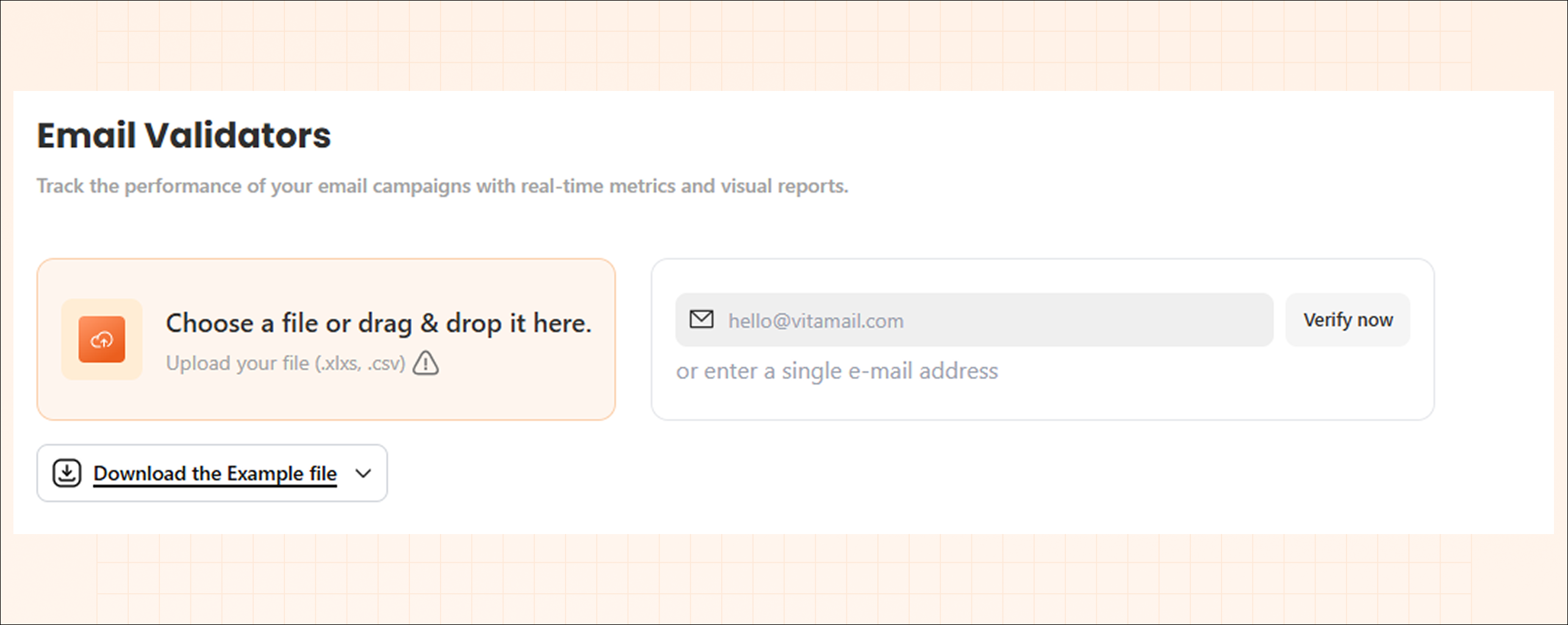
Step 2: Automated validation VitaMail checks each address against domain (MX) records and mail server responses to confirm whether the inbox can actually receive messages.
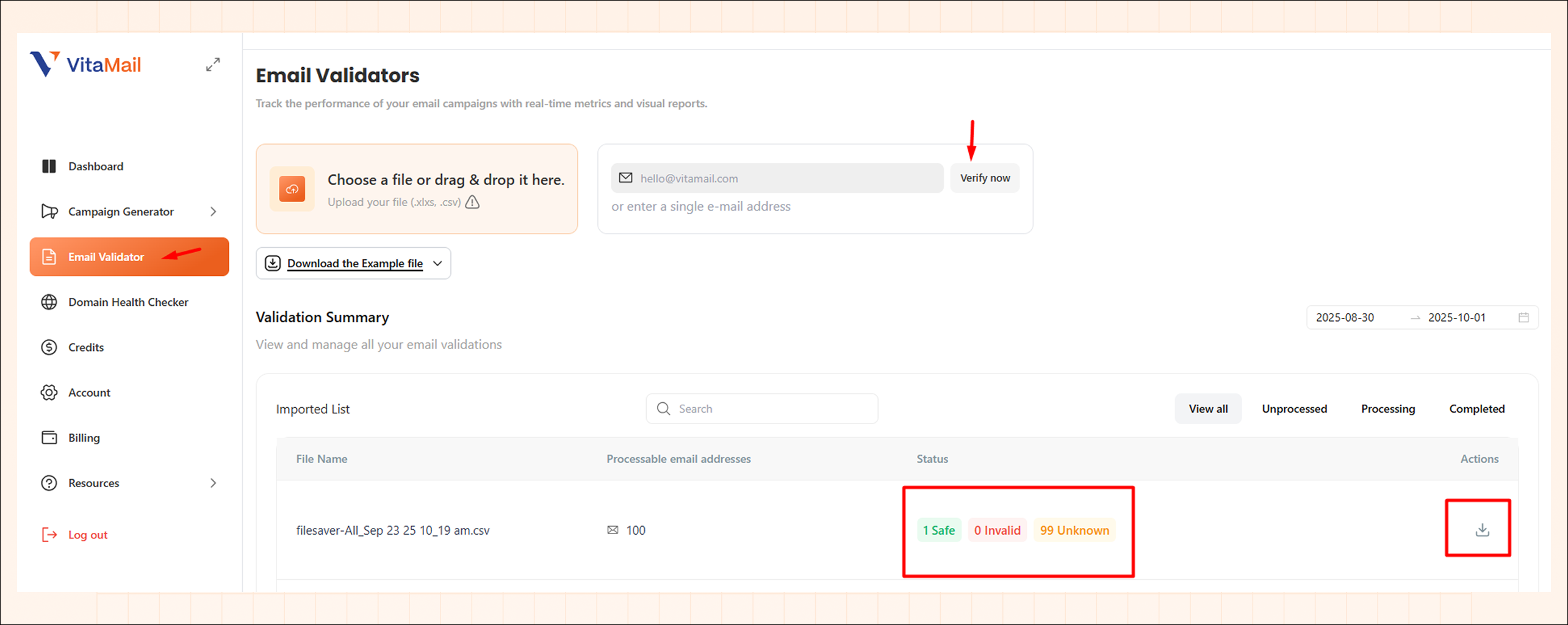
Step 3: Review results Once processing is complete, your list is categorized into three groups:
- Safe – Valid and active addresses.
- Invalid – Non-existent or inactive emails.
- Unknown – Addresses that couldn’t be fully confirmed.
You can then export the cleaned list and use only safe contacts for your campaigns.

By validating with VitaMail, you reduce bounce rates, protect your sender reputation, and make sure every campaign goes to real people.
How does an email domain reputation check affect validation?
Checking if an email address is valid is only one part of the process. The second part is making sure your sending domain has a strong reputation. Internet service providers (ISPs) and email platforms use this reputation as a trust signal when deciding whether to deliver your message to the inbox or filter it to spam.
Here’s how domain reputation directly affects validation results:
1. Low reputation increases false negatives If your domain has a weak reputation, some valid email addresses may show up as unknown or even be blocked by the recipient’s mail server. This makes it harder to get an accurate validation outcome.
2. High reputation improves inbox placement When your domain is trusted, ISPs are more likely to accept your emails without restrictions. Even borderline addresses (for example, a full inbox) are less likely to bounce.
3. Invalid emails damage your reputation Every time you send to invalid addresses, your bounce rate rises. ISPs track this behavior and lower your domain score, which reduces your future deliverability even for safe emails.
4. Validation + reputation go hand in hand VitaMail email validation tool can confirm whether an address is safe, invalid, or unknown. But if your domain reputation is poor, even the safe addresses may not receive your campaigns. That’s why combining both list cleaning and domain monitoring gives the best results.

How to fix invalid email addresses in your list?
Once you’ve validated your list and identified invalid contacts, the next step is deciding how to handle them. Sometimes an email address can be corrected, while in other cases it’s better to remove it entirely.
Here are a few ways to fix invalid emails:
- Correct obvious typos – For example, if “john@gamil.com” appears, it’s likely meant to be “john@gmail.com.” These small changes can often save a valid contact.
- Reach out through another channel – If you know the person (e.g., a client or subscriber), try to confirm their correct email via phone or social media.
- Use automated tools – Platforms like VitaMail flag invalid emails, but they can also help identify common patterns that are fixable versus those that aren’t.
However, not every email can or should be fixed, sometimes removal is the best choice.
When should you remove an invalid address instead of fixing it?
There are cases where keeping an invalid address does more harm than good. You should remove an email if:
Quick tips: Understanding what makes an address invalid is essential, and this invalid email address guide breaks down the most common causes and warning signs.
- The domain no longer exists or has no active MX records.
- The mailbox is permanently closed or blocked.
- The email is clearly fake or disposable (e.g., abc123@mailinator.com).
- It’s a role-based address (info@, support@, admin@) that will never provide real engagement.
In these cases, trying to fix the email is a waste of resources and risks damaging your sender reputation. Removing them is the smarter long-term move.
How often should you perform email list cleaning?
The frequency of cleaning depends on how often you collect new leads and send campaigns, but general best practices are:
- Before every major campaign – Always validate your list if you haven’t used it in a while.
- Quarterly for active senders – If you send campaigns weekly or monthly, a full scrub every 3 months keeps your list healthy.
- In real-time for sign-ups – The best option is to validate emails at the point of entry with VitaMail - Email Validation Tool. This prevents invalid addresses from entering your database in the first place.
Consistent cleaning means lower bounce rates, stronger engagement, and higher ROI on your email marketing.

What is the best email list cleaning service in 2025?
There are many tools available for verifying emails, but the best email list cleaning service in 2025 is one that combines accuracy, speed, and ease of use. A strong service should:
- Validate emails through multiple checks (domain, MX, SMTP).
- Detect disposable and role-based addresses.
- Provide clear results (safe, invalid, unknown).
- Integrate easily with your existing email marketing platform.VitaMail is designed with these standards in mind. It not only helps you identify invalid emails but also gives you actionable results so you can instantly decide whether to fix, remove, or monitor addresses.

