





Quick answer: The right email deliverability tool depends on which failure you are trying to fix, not on which tool is best overall. For pre-send list hygiene combined with running the campaign itself, use VitaMail. For enterprise-scale validation, ZeroBounce. For inbox placement testing, GlockApps. For warming a new sending domain, Warmy or MailReach. For DMARC enforcement, PowerDMARC. For sending infrastructure, Postmark for transactional mail or Amazon SES for lowest cost at volume. Most senders need two tools rather than one: something that cleans the list before the send, and something that monitors reputation after it.
Deliverability stopped being optional in 2026. Google, Yahoo and Microsoft now reject non-compliant bulk mail at the SMTP level instead of filtering it to spam. A misconfigured domain no longer underperforms quietly. It fails silently, and most teams find out weeks later.
How we evaluated these tools. Each tool is assessed against seven criteria: authentication monitoring, inbox placement testing, list validation accuracy, warm-up capability, blacklist and reputation monitoring, reporting depth, and pricing transparency. Tools are grouped by the job they do rather than ranked head to head, because a validation service and a DMARC monitor are not substitutes for each other.
Disclosure: VitaMail is our own product. We have placed it in the category where it actually competes and listed its limitations alongside its strengths. Every other tool here is assessed on public documentation and hands-on use.
The 12 Best Email Deliverability Tools at a Glance
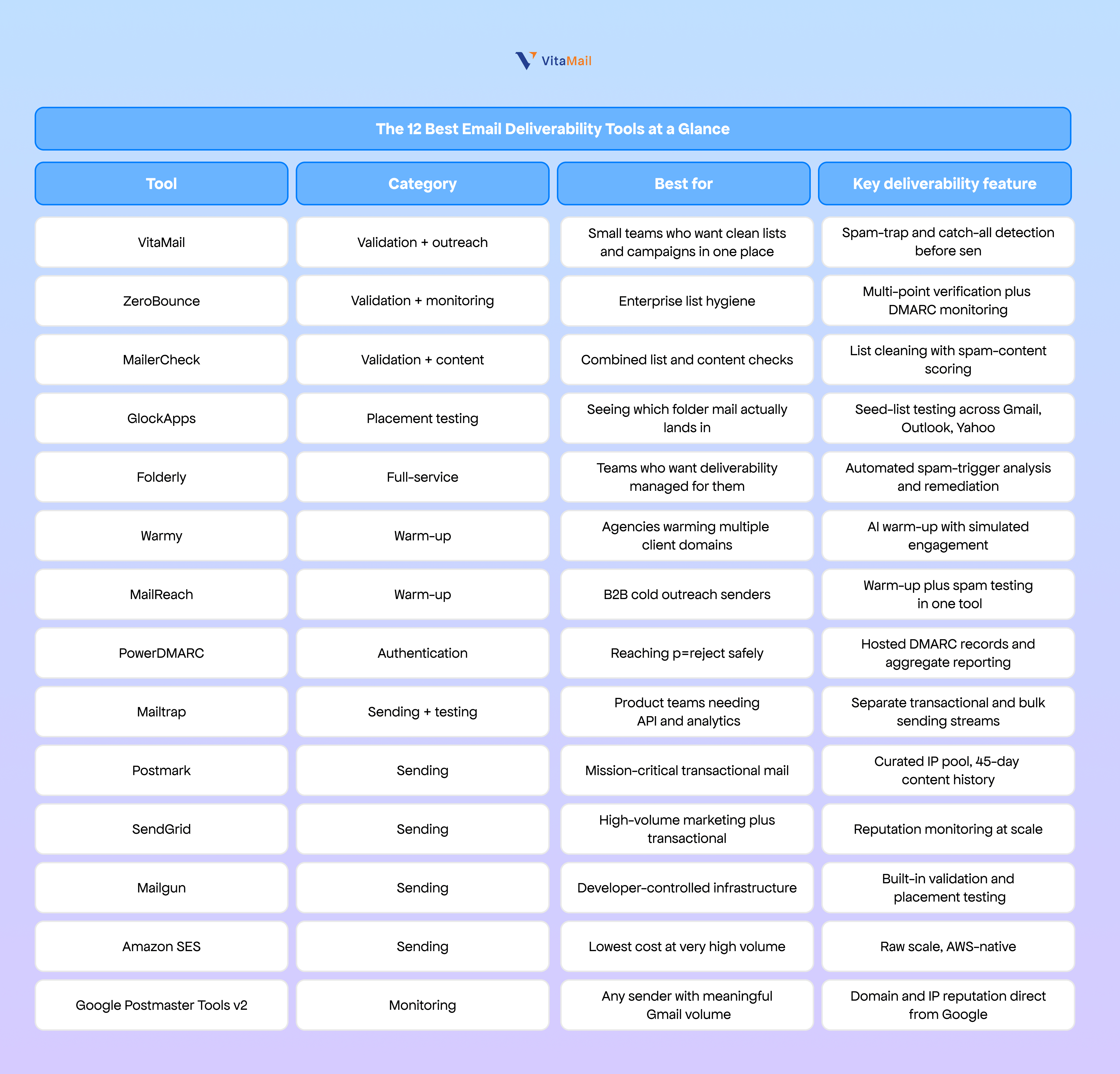
Pricing changes frequently across this category, so we have left it out of the table rather than publish figures that go stale. Each vendor publishes current pricing on their own site.
What Email Deliverability Actually Means
Email deliverability is whether your message reaches the primary inbox. Email delivery is only whether the receiving server accepted it. Those two words get used interchangeably and the difference costs businesses real money, because a platform can honestly report a 99% delivery rate while a large share of that mail sits unread in spam folders.
Think of it as a parcel. Delivery is the courier confirming the package arrived at the address. Deliverability is whether it made it inside the house or was left in the rain. Your email service provider reports the first one. Only the recipient's inbox tells you the second.
Why deliverability decides your email ROI
Global inbox placement averaged around 87% in 2025, which means roughly one in eight legitimate commercial emails never reached an inbox. For a program generating $100,000 a year from email, that gap is a five-figure line item that never appears in any report, because unopened mail and undelivered mail look identical on most dashboards.
The damage compounds in three directions:
- Lost revenue. Every message in spam is a campaign you paid to produce and nobody read.
- Reputation decay. Mailbox providers track how recipients treat your mail. Complaints and deletions lower your score, which makes the next send harder, which produces worse signals. Once the loop starts it accelerates. Our guide to domain reputation and email deliverability covers how that score is built.
- Broken trust. When a password reset or a shipping confirmation lands in spam, the customer does not blame their filter. They blame you.
How to check your current deliverability
Open rates alone will not tell you. Run these four checks in order:
- Watch the leading indicators. Bounce rate, complaint rate, unsubscribe rate and reply rate move before open rate does. Compare yours against the average bounce rate by industry to know whether your number is actually a problem.
- Test inbox placement. Send to a seed list and see where the message lands across providers.
- Check blacklists. Run your domain and IP through a domain blacklist checker.
- Check your authentication. A domain health checker will tell you in seconds whether SPF, DKIM and DMARC are published and passing.
If you want the full sequence as a working document, we maintain a free email deliverability checklist.
The 2026 Rules: What Gmail, Yahoo and Microsoft Now Require
If your domain sends 5,000 or more messages per day to Gmail, Yahoo or Outlook addresses, all three providers require SPF, DKIM and DMARC on the sending domain, a spam complaint rate below 0.3%, and RFC 8058 one-click unsubscribe on marketing mail. Failing any of these no longer means landing in spam. It means the message is rejected at the SMTP level and never arrives.
This is the part of the topic that has changed most since 2024, and the part most guides still have wrong.
The enforcement timeline
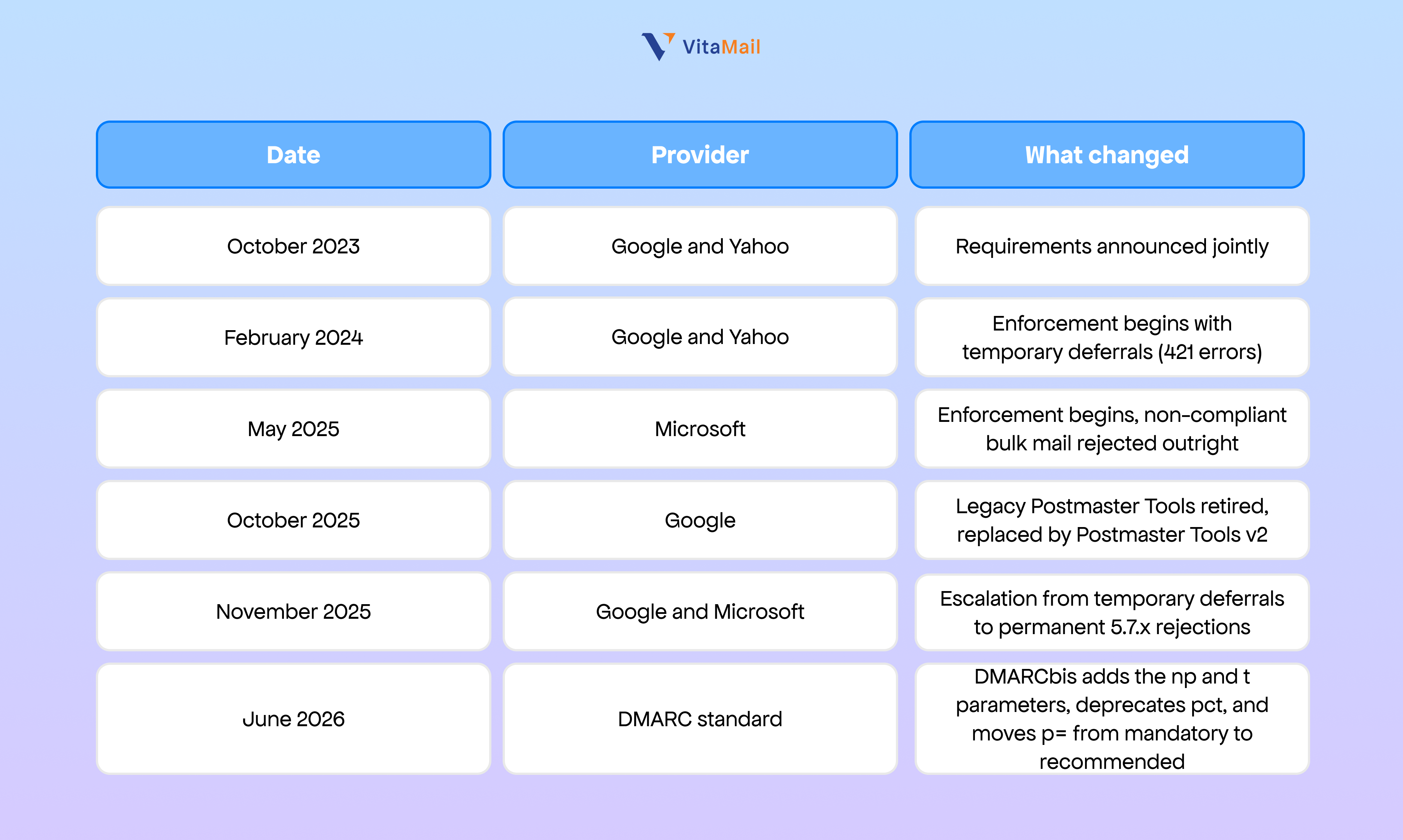
DMARCbis adds the np and t parameters, deprecates pct, and moves p= from mandatory to recommended
Do the rules apply if you send under 5,000 a day?
Partly. The hard enforcement targets bulk senders, but Google requires at least SPF or DKIM from every sender, and Yahoo requires both regardless of volume. Microsoft enforces above the threshold only. In practice, authentication is now the baseline for anyone sending business mail, and it also protects your domain from being spoofed.
The threshold is measured per sending domain, across all mail to that provider, not per campaign. If you are running outbound at scale, how many cold emails you can send per day covers where that line sits in practice.
SMTP error codes and what each one means
These are the codes that show up in your bounce logs. Most senders never look at them, which is exactly why a rejection can run for weeks unnoticed.
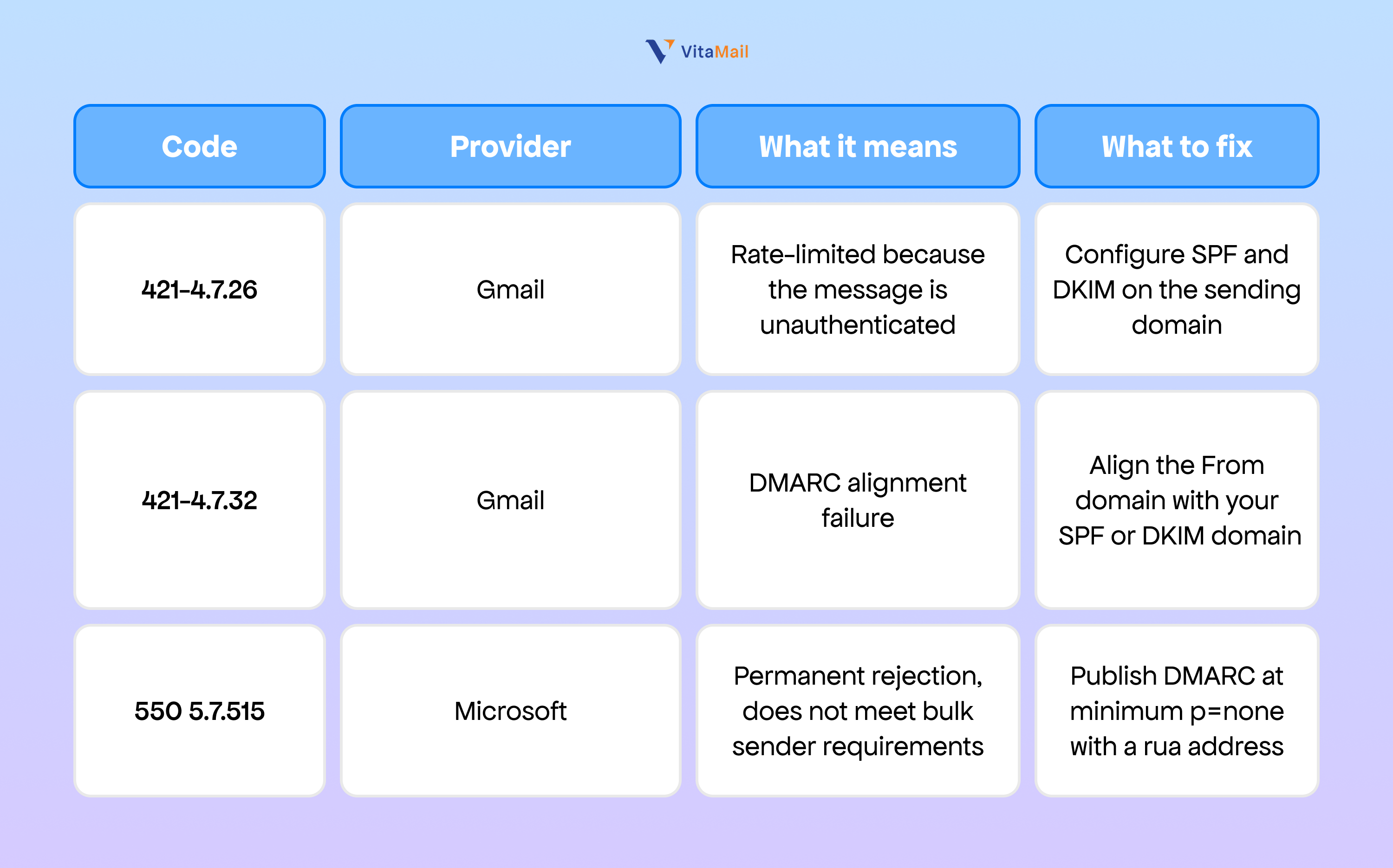
The full reference including soft bounce codes is in our SMTP bounce codes guide, and the practical difference between the two failure types is covered in soft and hard bounces.
Why a permanent rejection is worse than the spam folder
A spam placement is recoverable. A 5.7.x rejection is silent from the sender's side. There is no warning email and no dashboard alert. Unless someone is watching bounce logs or Google Postmaster Tools, a growing share of your Gmail-addressed sends simply stops arriving. Teams routinely discover this weeks later, after a sustained drop in replies they had written off as seasonality.
SPF, DKIM and DMARC Explained in Plain English
These three records are your domain's authentication layer. Receiving servers check them before they look at your content at all.
SPF: the authorised sender list
SPF is a DNS record listing which servers are allowed to send mail on behalf of your domain. When a message arrives, the receiving server checks whether the sending IP is on that list.
Without it, receiving servers cannot verify you, your mail is more likely to be flagged, and anyone can spoof your domain to phish your customers. You can check yours in seconds with our free SPF record checker.
DKIM: the tamper-proof seal
DKIM adds a cryptographic signature to every message, proving two things: that it genuinely came from your domain, and that nothing was altered in transit. Without it, providers cannot verify content integrity.
DMARC: the policy that ties them together
DMARC tells receiving servers what to do when SPF or DKIM fails: monitor (p=none), quarantine, or reject. It also sends aggregate reports showing every source sending mail as your domain, which is usually more revealing than people expect.
Without it you have no control over unauthenticated mail using your domain, no visibility into spoofing, and you miss the reputation benefit providers give to domains with a published policy.
All three are covered in depth, including record syntax, in DMARC, DKIM and SPF explained. If your records are not resolving at all, the problem is often upstream in your MTA, MX and DNS records.
How to move from p=none to p=reject safely
This is where most senders either stall or break their own mail.
- Publish p=none with a rua reporting address. This changes nothing about delivery and starts the reports flowing.
- Read the reports for at least four weeks. You are looking for legitimate sending sources that are not aligned: your CRM, your invoicing tool, a vendor you forgot was sending on your behalf.
- Fix alignment for each source. Every legitimate sender needs to pass either SPF or DKIM in alignment with your From domain.
- Move to p=quarantine. Monitor for two to four weeks.
- Move to p=reject. Most well-run programs reach this within six months.
Moving faster than your reports justify will block legitimate mail. Moving too slowly leaves your domain spoofable.
The Six Factors That Decide Whether You Reach the Inbox
Authentication gets you past the door. These six decide what happens next.
1. List engagement
Providers watch how recipients treat your mail. Opens, clicks, replies and "not spam" actions are positive signals. Deleting without opening, ignoring, and marking as spam are negative. Engagement is the heaviest weight in most filtering models, which is why a small engaged list outperforms a large indifferent one.
2. List hygiene and spam traps
Sending to invalid addresses produces hard bounces, and a high bounce rate tells providers you are not managing your list. Worse are spam traps: addresses operated by blocklist providers specifically to catch senders with poor practices. Hitting a single pristine trap can damage a domain that took years to build. Our spam trap guide explains how they end up on lists that look clean.
Related failure modes worth understanding: catch-all email addresses, which accept everything and tell you nothing, and disposable email domains, which inflate your list with addresses that will never engage.
3. Domain and IP reputation
Both your domain and your sending IP carry a score, built over time from volume, engagement, bounces, complaints and authentication status. A new domain has no score at all, which is not neutral, it is untrusted. Domain age affects deliverability more than most senders expect, and reputation damage takes far longer to repair than to cause.
4. Sending consistency and volume ramp
Providers build expectations from your pattern. A sender who moves 2,000 messages a day for six months and then sends 80,000 on a Tuesday looks compromised, because that is what a compromised account looks like. Ramp gradually and keep your cadence predictable. Email frequency covers where the practical limits sit.
5. Content and formatting signals
Content matters less than authentication and engagement, but it still matters. Spam trigger vocabulary, all-caps subject lines, excessive punctuation, image-only emails, link shorteners and unbalanced text-to-image ratios all contribute. Run anything you are unsure about through a spam content checker before sending, and keep our spam words list nearby when writing.
6. Infrastructure: shared versus dedicated IPs
On a shared IP your reputation is partly someone else's behaviour. On a dedicated IP it is entirely yours, which is better if your volume is high enough to sustain a reputation and worse if it is not. The shared versus dedicated IP comparison covers where the crossover sits. For outbound specifically, cold email domain infrastructure setup covers the separate-domain approach most teams should be using.
Email Deliverability Checklist
Work through these in order. The first four are non-negotiable in 2026.
- Authenticate the domain. SPF, DKIM and DMARC published and passing.
- Publish DMARC with reporting. Start at p=none with a rua address and read what comes back.
- Add one-click unsubscribe. RFC 8058 headers on all marketing mail, with opt-outs honoured within two days.
- Keep complaints under 0.1%. The enforcement threshold is 0.3%, but 0.1% is the number to manage against.
- Warm up new domains and IPs. Start low, increase gradually, watch bounces at every step. See how to warm up an email domain.
- Use double opt-in. It eliminates typos and non-consenting addresses at the source. The double opt-in versus single opt-in comparison covers the growth trade-off honestly.
- Validate before every campaign. Not once a year. Before every send of any size.
- Clean inactive subscribers regularly. Email list hygiene is a cadence, not a project. If your list has been sitting untouched, start with cleaning an old email list before you send anything to it.
- Segment. Targeted sends produce better engagement, and better engagement produces better placement.
- Keep a consistent schedule. Predictable volume and timing build trust.
- Make unsubscribing obvious. Losing a subscriber is far cheaper than a spam complaint.
- Monitor continuously. Postmaster Tools v2, blacklist checks, and bounce logs. Deliverability decays quietly.
For a structured version you can run monthly, use our 12-month list hygiene calendar.
Subject lines: what helps and what hurts
$ Save 90% today $
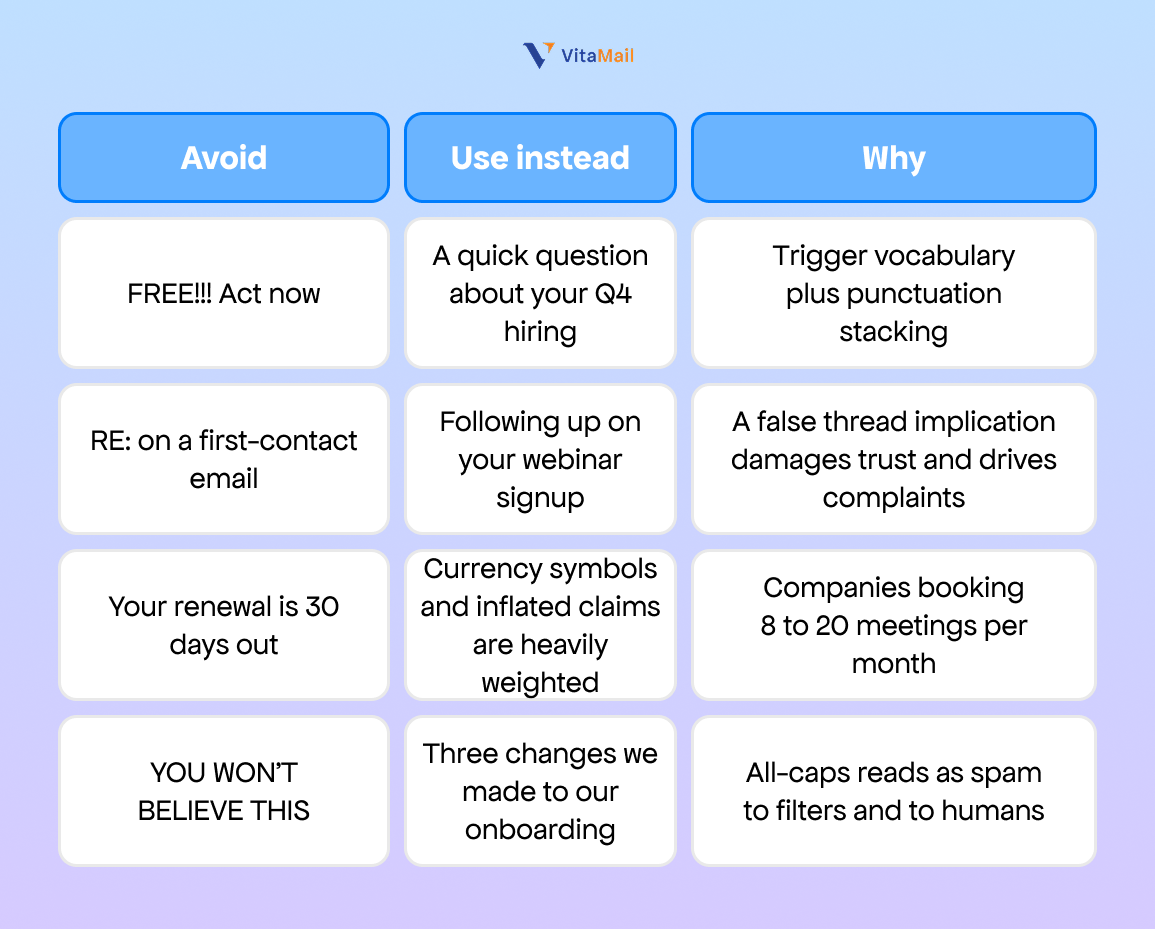
More on this in cold email subject lines and our spam words to avoid breakdown.
The Five Types of Email Deliverability Tool
Email deliverability tools fall into five categories, and they are not substitutes for each other. Validation tools clean the list before you send. Warm-up tools build sender reputation on a new domain or IP. Placement testing tools show you which folder your mail actually lands in. Authentication monitoring tools track SPF, DKIM and DMARC and help you move to enforcement. Sending infrastructure is the platform that transmits the mail. Most senders need at least two: one that cleans the list, and one that monitors what happens after the send.
Buying the wrong category is the most common and most expensive mistake in this space. A warm-up tool will not save a list full of spam traps. A validator will not fix a missing DMARC record. Diagnose first, then buy.
The 12 Best Email Deliverability Services and Tools in 2026
1. VitaMail: best for pre-send hygiene plus integrated outreach
Best for: small teams and solo operators who want to clean a list and run the campaign from the same place, instead of stitching together a validator, a warm-up tool and a sending platform. Pricing: $49 per month. A free plan includes 1,000 verification credits and access to a limited set of tools, without cold email outreach. Disclosure: VitaMail is our product.
VitaMail combines email verification with campaign sending, so list hygiene happens inside the same workflow as the send rather than as a separate pre-flight step in a different tool. Verification runs a multi-layer check that flags invalid addresses, hard bounces, disposable domains, duplicates, syntax errors, role-based addresses, catch-all servers and known spam traps.
The free tools alongside it cover most of the diagnostic work a sender needs before a first campaign: email validator, SPF checker, domain health checker, domain blacklist checker and spam content checker.
There are two real limitations. VitaMail does not currently offer an API, so real-time validation inside a signup form or a CRM needs a specialist tool alongside it. And it is built for small business and agency outbound rather than enterprise transactional infrastructure, so a team sending millions of application emails a month will still want a dedicated sending platform. What shipped in the current version is documented in VitaMail V5: run your email campaigns in one place.
Pros
- Verification and sending in one platform, so cleaning is not a separate manual step
- Spam-trap and catch-all detection, not just syntax and MX checks
- Flat monthly pricing rather than per-email credit accounting
- Free diagnostic tools for validation, SPF, domain health, blacklists and spam scoring
- Built for non-technical operators rather than developers
Cons
- No API, so no real-time validation on forms or in a CRM
- Not built for high-volume transactional infrastructure
- A younger product than the incumbents in this category
2. ZeroBounce: best for enterprise validation
Best for: large lists and organisations with compliance requirements.
ZeroBounce is one of the most established names in validation, handling very large lists with detailed per-address results. Beyond core verification it adds DMARC monitoring, blocklist monitoring, inbox placement testing and email warm-up, which makes it one of the most complete single tools on this list. It carries SOC 2 Type II and ISO 27001 certification, which matters when procurement is involved.
The trade-off is cost and complexity. For a small business validating a 5,000-contact list twice a year, most of what you are paying for goes unused. We compare the lighter options in best ZeroBounce alternatives.
Pros: deep verification detail, enterprise scale, strong compliance credentials, broad integrations Cons: priced for scale, feature breadth is more than most small senders need
3. MailerCheck: best for validation plus content testing
Best for: small businesses who want list cleaning and spam-content scoring in one place.
MailerCheck sits between a pure validator and a full deliverability suite, combining list cleaning with content analysis and inbox placement testing. It suits marketing teams who want to understand both who they are sending to and what they are sending, without managing two vendors.
Pros: clean interface, combines list and content checks Cons: less depth on authentication monitoring than a dedicated DMARC tool
4. GlockApps: best for inbox placement testing
Best for: finding out where your mail is actually landing.
GlockApps sends your message to a seed list of addresses across Gmail, Outlook, Yahoo and other providers, then reports which folder it hit at each one. That is a different question from "did it bounce," and it is the only way to see the promotions tab problem, which no bounce report will ever show you. It also runs blacklist monitoring and DMARC analytics.
It is a diagnostic tool rather than a fix, so it works best paired with something that addresses whatever it finds.
Pros: the clearest picture of actual folder placement, provider-by-provider breakdown, DMARC reporting included Cons: diagnoses rather than fixes, seed-list results are directional rather than exact
5. Folderly: best for full-service deliverability management
Best for: teams who want the problem handled rather than measured.
Folderly connects to your mailbox and runs continuous analysis: spam trigger identification, DNS configuration review, daily inbox versus spam counts, and a single score with specific remediation steps. It is closer to a managed service than a tool, which suits teams without in-house deliverability knowledge.
Pros: actionable recommendations rather than raw data, easy-to-read scoring, continuous rather than point-in-time Cons: higher price point, spam analysis focused on the major providers
6. Warmy: best for AI-driven warm-up at agency scale
Best for: agencies managing outreach across many client domains.
Warmy gradually increases sending volume while simulating real engagement to build sender reputation on new or damaged domains. It also monitors domain health, tracks SPF, DKIM, DMARC and blacklist status, and manages multiple mailboxes from one dashboard, which is the feature that matters if you are running ten client accounts. Multi-language warm-up supports geographically diverse outreach.
Pros: strong multi-mailbox management, inbox placement testing included, comprehensive domain health monitoring Cons: not a campaign tool, so it needs a sending platform alongside it; assumes some deliverability knowledge
If you are evaluating the agency stack more broadly, see best agency tools to scale and our email marketing solutions for agencies.
7. MailReach: best for B2B cold outreach warm-up
Best for: outbound sales teams specifically.
MailReach focuses narrowly on B2B cold email, combining warm-up with spam testing and diagnostics. Where general warm-up tools give you a vague score, MailReach is built around the specific failure patterns of prospecting mail. If cold outreach is your primary use case, that specialisation is worth more than a broader feature set.
Pros: built for cold email rather than adapted to it, warm-up and diagnostics combined Cons: narrow by design, limited value for marketing or transactional senders
8. PowerDMARC: best for DMARC enforcement
Best for: getting from p=none to p=reject without breaking legitimate mail.
PowerDMARC turns DMARC aggregate reports, which arrive as raw XML and are effectively unreadable, into a dashboard showing every source sending as your domain. It offers hosted DMARC records, threat intelligence and forensic reporting. Given that the 2026 requirements are fundamentally authentication requirements, this category has become significantly more relevant than it was two years ago.
Pros: makes DMARC reports usable, hosted records simplify DNS management, strong for the enforcement journey Cons: solves only the authentication layer, does nothing for list quality or engagement
9. Mailtrap: best for product teams needing API and analytics
Best for: developers and product teams sending at volume.
Mailtrap provides an email API and SMTP service with separate sending streams for transactional and bulk mail, which keeps a marketing campaign's complaint rate from contaminating your password resets. Analytics are strong and the developer experience is well regarded.
Pros: high inbox placement, separate streams protect transactional mail, well-documented API Cons: fewer native integrations than competitors, no contact-level verification, limited relevance for outbound sales
10. Postmark: best for transactional speed and reliability
Best for: application email where every single message matters.
Postmark maintains a deliberately curated network of sending IPs and enforces strict sending policies with manual account approval, which is why their transactional deliverability is consistently among the best available. Forty-five days of full content history means you can trace any individual message. Message Streams extended them into marketing mail, but transactional remains the core strength.
Pros: industry-leading transactional deliverability and speed, full content history, excellent support Cons: strict policies exclude some legitimate marketing use cases, weaker for bulk campaigns, no built-in validation
11. SendGrid: best for high-volume scale
Best for: large senders combining marketing and transactional mail.
SendGrid, part of Twilio, is among the largest cloud email platforms, with a robust API, deep analytics and reputation monitoring. It handles both transactional and large marketing sends, which is genuinely useful when you do not want two vendors.
Pros: excellent scalability, powerful API, detailed reporting, handles both send types Cons: pricing escalates with advanced features and dedicated IPs, interface is complex for non-technical marketers, validation features weaker than dedicated tools
12. Mailgun: best for developer-controlled infrastructure
Best for: teams who want to control their own sending stack.
Mailgun is developer-first, offering both SMTP relay and API sending with built-in validation, inbox placement testing, dedicated IP options and advanced suppression management. The Mailjet acquisition added marketer-facing tools including an email editor.
Pros: flexible and powerful API, both SMTP and API sending, validation and placement testing built in Cons: developer-oriented interface, support limited on lower tiers, pricing is complex across sending, validation and testing
13. Amazon SES: best for lowest cost at very high volume
Best for: engineering teams already inside AWS.
SES is the cheapest way to move large volumes of email, and it is the infrastructure behind Amazon's own sending. What you gain in cost you pay for in labour: authentication, reputation monitoring, bounce processing and analytics all have to be configured or built yourself.
Pros: lowest cost per message at scale, Amazon-grade reliability, native AWS integration Cons: difficult for non-developers, no marketing tools or templates, you build your own monitoring and bounce handling
14. Google Postmaster Tools v2: best free monitoring
Best for: every sender with meaningful Gmail volume.
Postmaster Tools reports domain reputation, IP reputation, spam rate, authentication pass rates and delivery errors directly from Google, which makes it the only source that tells you what Gmail actually thinks of you rather than what a third party infers. The legacy dashboard was retired in October 2025 and replaced by v2. It costs nothing and there is no reason not to have it configured. Setup walkthrough: using Google Postmaster Tools to check domain reputation.
Pros: free, authoritative, direct from the largest mailbox provider Cons: Gmail only, requires DNS verification, reports only at meaningful volume
How to Choose the Right Tool for Your Situation
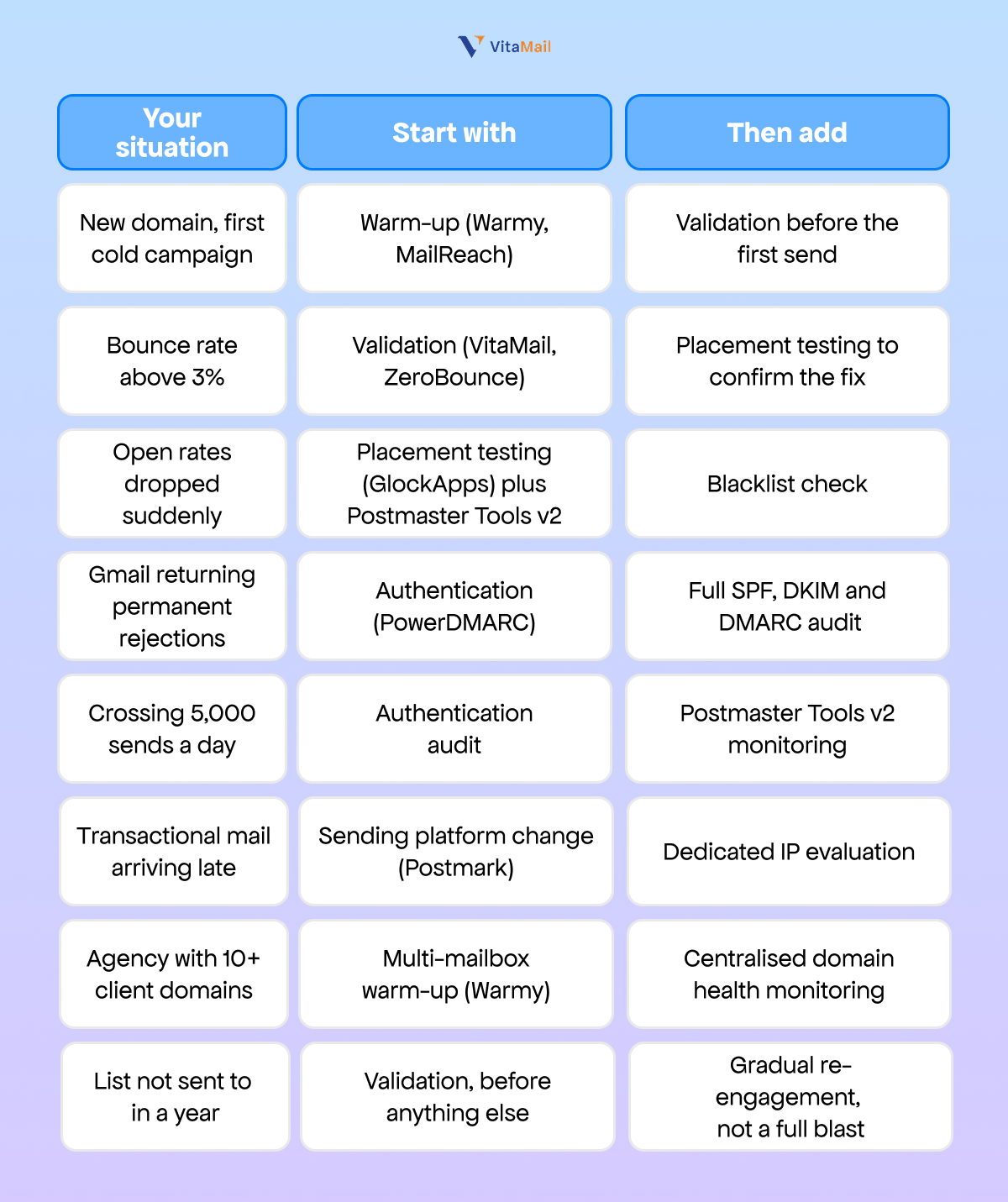
If your primary problem is bounces rather than placement, start with how to reduce email bounce rate. If it is B2B specifically, B2B email deliverability fixes goes deeper on that context.
Conclusion: Deliverability Is a Reputation, Not a Setting
Email deliverability is not something you configure once. It is a reputation you maintain.
The technical foundation, SPF, DKIM and DMARC, is now the price of entry rather than a competitive advantage, and since November 2025 the penalty for missing it is a rejected message rather than a spam folder. What separates senders who reach the inbox from those who do not is everything that happens after authentication: list quality, engagement, and consistency over time.
Of everything on this page, cleaning your list before you send is the highest-leverage single action. It is the only step that removes the problem, invalid addresses, spam traps and catch-alls, rather than measuring it after the damage is done.
Clean your list and run your next campaign from one place. Start with VitaMail or validate a list right now.

