




You are about to spend real money on email infrastructure for outbound. The choice between Google Workspace and Microsoft 365 decides how many inboxes you can run, how much setup pain you eat, and how many of your emails land where buyers actually read them.
Both providers tightened sender rules in 2024, and by 2026 the cold email playbook looks different on each platform. Google Workspace vs Microsoft 365 is not a coin flip anymore. The winner depends on your sending volume, your ideal customer, and how much technical setup you can tolerate.
This guide compares cost, deliverability, setup complexity, and ban risk for both, with a clear recommendation by use case.
Key Takeaways:
- Google Workspace wins on: fast setup, cleaner admin UI, better inbox placement when recipients use Gmail
- Microsoft 365 wins on: cost at scale through aliases, higher practical sending limits, better placement to Outlook recipients
- Tie on: SPF, DKIM, and DMARC requirements (both now mandatory at any cold email volume)
- Neither solves: domain reputation, warm-up, or list hygiene (you still need a dedicated cold email tool)
How Google Workspace vs Microsoft 365 Handle Cold Email in 2026
Both Google and Microsoft spent the last two years tightening rules for bulk senders. SPF, DKIM, and DMARC are now mandatory. Spam complaint thresholds are enforced. Domains with bad reputation get throttled within days, not weeks.
The practical impact: a cold email inbox that sent 100 emails a day in 2022 without a second thought now needs proper authentication, gradual warm-up, and tight complaint rates on both platforms. What changed between the two is how strictly each enforces those rules and how hard they punish senders who break them.
Google's approach
Google filters aggressively on content, sender history, and engagement signals. A single spam-labeled campaign can push your inbox into the promotions tab for weeks. Accounts that send to unverified addresses or trigger repeated complaints get throttled fast, sometimes within 48 hours.
Microsoft's approach
Microsoft tends to be slower to throttle but harder to recover from once flagged. Outlook's filters weight spam confidence level and Smart Network Data Services signals heavily. New domains sending cold volume often land in junk for the first 2-3 weeks even with perfect authentication in place.
Cost Breakdown at Cold Email Scale
Running serious cold email needs multiple inboxes. Most operators rotate 3-5 inboxes per domain and several domains in parallel. Here is what the two providers actually cost at that scale.
The alias math that changes everything
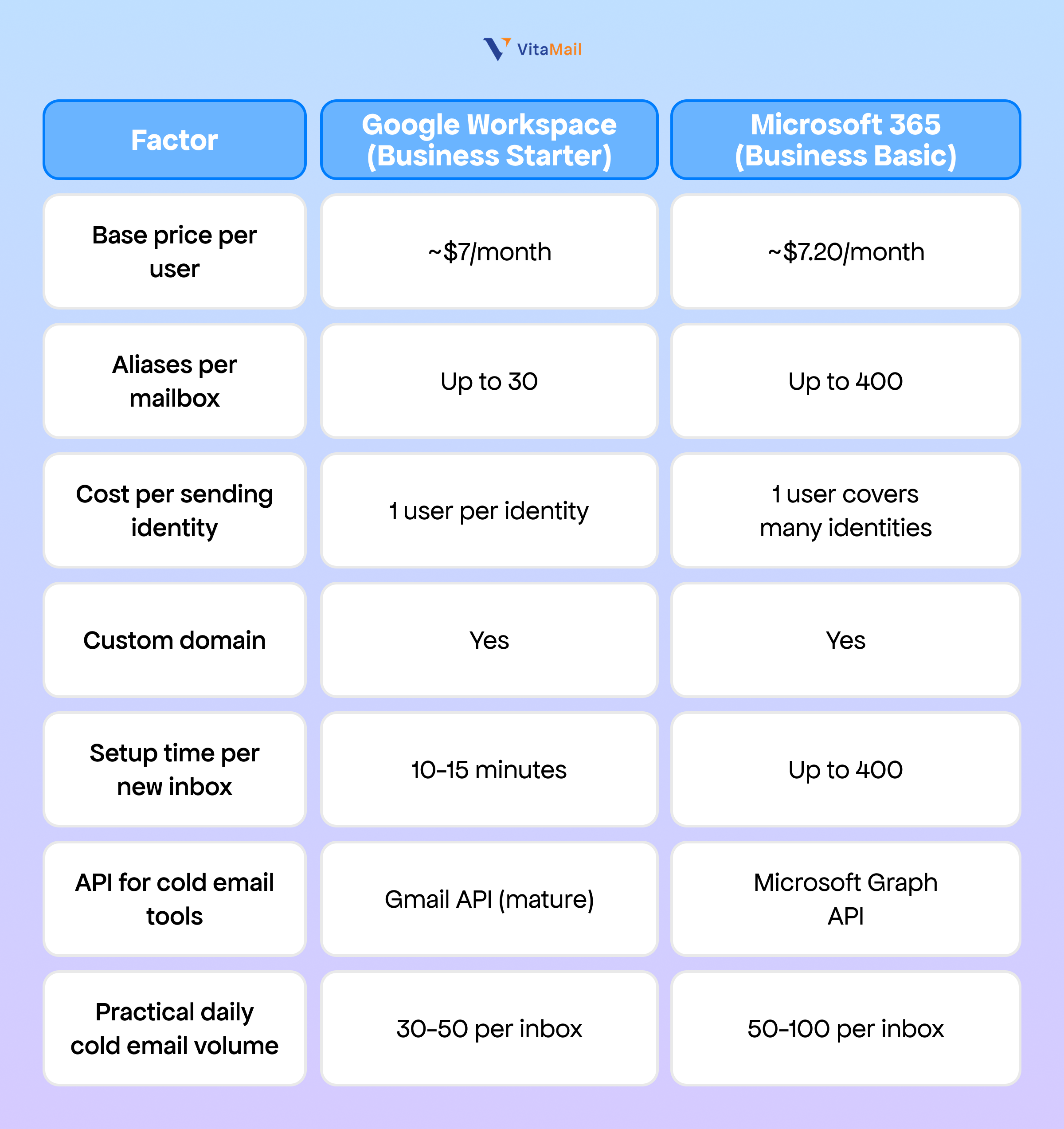
Microsoft 365 lets you assign up to 400 aliases to a single licensed mailbox. For cold email, this means one $7.20 seat can cover dozens of "from" addresses across multiple domains. Google Workspace caps aliases at 30 and most cold email tools only fully support 3-5 active aliases per inbox before deliverability suffers.
At 10 domains with 3 sending identities each (30 identities total):
- Google Workspace: roughly $210 per month for 30 users
- Microsoft 365: roughly $70 per month for 10 users with aliases handling the extra identities
One catch: not every cold email tool supports Microsoft aliases cleanly. Some require one real mailbox per sending identity, which wipes out the savings. Check your tool's documentation before you architect this.
Setup Complexity: What It Actually Takes
Google Workspace setup
Spin up an account, verify your domain through a single TXT record, and the default SPF and DKIM templates are ready to paste into your DNS. Most operators are sending within 20-30 minutes. Adding a user, creating an alias, or enabling IMAP takes a few clicks.
If Marcus at Chartline asked you to set up 3 new inboxes on a fresh domain, you could hand him working credentials before lunch with proper email warm-up scheduled to start that afternoon.
Microsoft 365 setup
The admin center is denser and assumes IT experience. Domain verification requires several MX, TXT, and CNAME records. DKIM is not enabled by default, so you generate the key and enable it per domain. DMARC setup is manual. If you need help, VitaMail has a full SPF, DKIM, and DMARC setup guide that covers both platforms.
Expect 40-60 minutes per domain on your first pass, 25-30 once you know the clicks. For non-technical founders, the learning curve is real.
If you are setting up 10 domains over a weekend, Google saves you roughly 3-4 hours. If you are setting up 50 over a quarter, the cost advantage of Microsoft eventually outweighs the setup pain.
Gmail vs Outlook Cold Email Deliverability
Deliverability is the whole ballgame. A cheaper, easier inbox that lands in spam is worthless. When operators talk about Gmail vs Outlook cold email results, the data splits along recipient lines.
To Gmail recipients
Gmail-to-Gmail has a small native advantage. Messages from Google Workspace inboxes route inside Google's infrastructure and skip some external-sender checks. The effect is modest, a few percentage points in inbox rate, but it compounds at volume.
To Outlook recipients
Outlook treats Google Workspace domains as fully external and applies full filtering. Microsoft 365 senders get slightly better placement in Outlook inboxes because Smart Network Data Services have more history with Microsoft-originated mail. Again, the effect is real but not huge, a modest lift when authentication is otherwise equal.
The domain reputation reality
Neither provider gives you deliverability. Your domain health does. Both Google Workspace and Microsoft 365 will happily send your emails to spam if your complaint rate spikes, your open rates tank, or your list has high bounce rates.
Priya at Fidelio learned this the hard way. She switched from Google to Microsoft 365 expecting a deliverability boost, kept sending to the same unverified list, and hit a 0.8% complaint rate within 2 weeks. Microsoft throttled her harder than Google had. The platform was not the problem.
Sending Limits and Ban Risk
Google Workspace limits
- Official cap: 2,000 external recipients per day per user
- Practical cold email limit: 30-50 per inbox per day with gradual warm-up
- Pushing past 100 per inbox triggers throttling within 3-5 days
- Account suspension risk is real if you trip spam filters repeatedly
Microsoft 365 limits
- Official cap: 10,000 recipients per day per mailbox (Business Basic)
- Practical cold email limit: 50-100 per inbox per day with warm-up
- More tolerant of sudden volume changes
- Suspension is less frequent but recovery takes longer when it happens
Ban recovery
Google's suspension appeals are fast (24-72 hours) but rarely reversed once spam rules are violated. Microsoft's appeals take 3-7 days and offer slightly better reinstatement odds if the account has clean history. Neither is a place you want to visit. The real lesson: send below the safe threshold, warm up every inbox, and monitor reply-to-spam ratios daily.
Integration with Cold Email Tools
Both platforms offer OAuth connections for cold email tools. The Gmail API is mature, well-documented, and most tools connect in 30 seconds. Microsoft Graph API is more powerful but less consistently implemented. Some older cold email tools still rely on app passwords for Microsoft, which Microsoft is in the process of deprecating.
API sending beats SMTP. It gives the cold email tool granular control over headers, threading, and reply tracking. SMTP works but leaves more fingerprints that spam filters can catch.
Check your cold email tool's documentation for "Microsoft 365 native integration" or "Gmail API connection." If it still asks for SMTP credentials, you are on older infrastructure and slightly worse deliverability by default.
When Google Workspace Wins
Choose Google Workspace if:
- You send fewer than 500 cold emails per day across all inboxes
- Your ideal customer lives on Gmail (SMBs, startups, creators, DTC brands)
- You value setup speed over monthly cost
- You run a small team and do not want IT overhead
- You already use Drive, Docs, and Meet and want a single login
Selin at Portlio runs a 3-person agency selling to US e-commerce founders. Her prospects are almost entirely on Gmail. She runs 6 inboxes across 2 domains. Google Workspace is the right call for her, the extra $30 a month is worth the saved setup time and cleaner admin.
When Microsoft 365 Wins
Choose Microsoft 365 if:
- You send more than 1,000 cold emails per day
- Your ICP is enterprise or mid-market, where Outlook dominates
- You run 10+ domains and want alias-based scaling
- You have technical capacity for a denser admin panel
- Your cold email tool explicitly supports Microsoft Graph
James at Stackr sells B2B software to insurance companies. Insurance IT departments almost universally run Outlook. He rotates 20 inboxes across 8 domains. Microsoft 365 cuts his infrastructure cost roughly in half and places better with his buyer pool.
How VitaMail Handles Both Providers
Picking the best email provider for cold email is only half the problem. The other half is the infrastructure the provider does not give you.
VitaMail connects natively to both Google Workspace and Microsoft 365 through OAuth, no app passwords, no SMTP workarounds. The platform handles the pieces neither provider solves: domain health monitoring, automated warm-up, bulk email verification, and AI personalization tied to each recipient's context.
Practically, this means you can set up 30 inboxes across both providers, connect them to a single VitaMail workspace, and the tool routes sends based on inbox health in real time. If a Microsoft inbox gets throttled, VitaMail shifts volume to healthy Google inboxes automatically.
The domain health checker flags SPF, DKIM, and DMARC issues before you send the first email. The bulk verifier catches dead addresses that would tank your sender reputation on either platform. For operators running hybrid stacks, the value is avoiding the manual juggling that kills most outbound programs.

The Decision Framework
If you are still unsure, walk through this checklist:
- Volume per day: Under 500 = Google probably wins. Over 1,000 = Microsoft wins.
- Buyer ecosystem: Gmail-heavy prospects = Google edge. Outlook-heavy = Microsoft edge.
- Number of domains: Under 5 = either works. Over 10 = Microsoft aliases save real money.
- Setup time budget: Want each domain live in under an hour? Google. Okay with 40 minutes per domain? Microsoft is open.
- Technical capacity: Non-technical founder = Google. Has an ops person or agency support = Microsoft is fine.
If your answers are mixed, run a head-to-head test. Buy 2 domains, one on each provider, send the same campaign for 2 weeks, and measure inbox rate, open rate, and reply rate. Real cold email deliverability data beats any comparison article, including this one.
Conclusion
The Google Workspace vs Microsoft 365 decision in 2026 comes down to volume, buyer ecosystem, and setup tolerance. Google Workspace wins for small-scale, Gmail-targeted operators who value fast setup. Microsoft 365 wins for high-volume senders targeting Outlook buyers who can handle a denser admin experience.
Start with your ICP's email ecosystem and your daily send volume. Layer in cost and setup time second. Whichever you pick, the platform is only as good as your warm-up, list hygiene, and domain reputation underneath it.
If you are on the fence, run both for 2 weeks across 2 domains and let the deliverability data decide. Then connect the winning stack to VitaMail to handle the warm-up, verification, and personalization that neither provider ships out of the box.

