




Search "how many cold emails per day" and you will get answers ranging from 20 to 1,000. Both are technically possible. Neither is useful on its own. The number that is safe for you depends on five variables, and ignoring any one of them is how domains end up blacklisted.
How many cold emails you can safely send per day depends on your inbox type, your domain's warmup status, your list quality, and your current spam and bounce rate metrics. For a newly warmed custom domain, 20–50 per day is the safe starting point. For a fully established domain with clean metrics, 200–500 per day is achievable. Gmail and Outlook personal accounts should never be used for cold outreach.
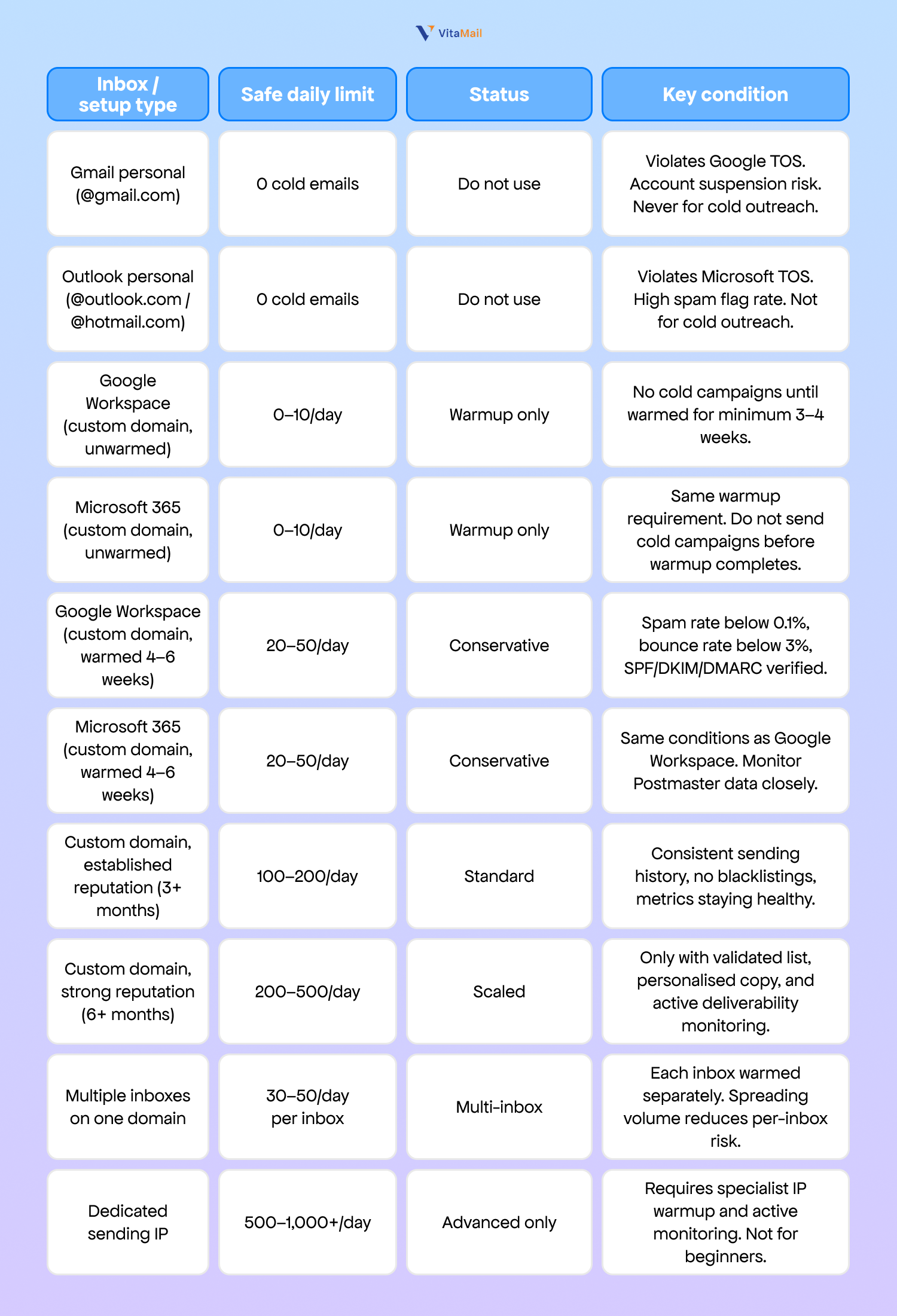
This post gives you the complete limits table by inbox type (10 configurations), the five variables that change the number, a week-by-week ramp schedule from zero to full volume, and the four warning signs that mean you need to reduce volume immediately.
Why there is no single answer: the five variables that change your limit
Variable 1: Domain age and warmup status
This is the single biggest variable. A domain warmed for only 3 weeks has no established sender reputation. A domain with 6 months of consistent, clean sending can sustain 10 times the volume under identical conditions.
Inbox providers (Gmail, Microsoft, Yahoo) score every sending domain based on historical engagement data. No sending history means no trust. The provider applies its most cautious filtering, which means lower delivery rates and faster throttling at even moderate volumes. A domain with 6+ months of healthy engagement has earned a reputation buffer that allows higher daily volume before triggering filters.
Variable 2: Inbox provider
Google Workspace, Microsoft 365, and personal email accounts (Gmail, Outlook) each have different spam detection algorithms, different throttling thresholds, and different policy risks.
Google Workspace technically allows up to 2,000 emails per day per account (Google Workspace Admin Help, 2024). Microsoft 365 permits up to 10,000 recipients per day with a rate of 30 messages per minute (Microsoft 365 sending limits documentation, 2024). These are platform limits, not cold outreach safe limits. The practical ceiling for cold email is set by sender reputation, not by the platform's technical maximum.
Gmail personal accounts are a different category entirely. Google's Terms of Service and Gmail Program Policies prohibit using personal Gmail accounts for bulk or commercial sending. Sending cold outreach from a @gmail.com address violates those terms and will result in account suspension.
Variable 3: List quality and validation status
An unvalidated email list produces bounce rates that trigger ISP throttling regardless of volume. Bounce rates above 3% trigger spam filter flags at most major inbox providers (Mailchimp deliverability guide, 2024; Postmark sender best practices, 2024). At 5% and above, providers may begin rejecting emails from your domain outright.
A validated list of 100 addresses is safer than an unvalidated list of 50. Validation removes invalid addresses, catch-all traps, and known spam traps before they generate reputation-damaging bounces.
Variable 4: Personalisation depth and engagement signals
Inbox providers track open rates, reply rates, and spam complaints as ongoing permission signals. A highly personalised campaign with 40%+ open rates and 5%+ reply rates generates positive engagement data that builds reputation and allows higher volume over time. A generic blast with 10% open rates and zero replies erodes your domain reputation with every send.
This is a mechanical input to the algorithm. Two senders on identical domains with identical warmup can have very different safe daily limits based purely on engagement.
Variable 5: Current spam complaint and bounce rate
These are real-time override variables. They reduce your safe daily limit immediately, regardless of domain age or warmup status.
Google's mandatory sender requirements, introduced in February 2024, set 0.1% as the hard ceiling for spam complaint rate for bulk senders (Google Postmaster Tools documentation, 2024). If your bounce rate climbs above 2%, the safe daily limit drops immediately. At 3% and above, most providers begin active throttling. A single campaign with a 5% bounce rate can damage a domain reputation that took months to build.
Cold email sending limits by inbox type: the complete reference
Use this table as your reference. Find your inbox type, check your warmup status, and treat the safe daily limit as a ceiling, not a target.
Gmail and Outlook personal accounts: do not use for cold outreach
Gmail personal accounts (@gmail.com) cannot be used for cold outreach. Google's Terms of Service and Gmail Program Policies explicitly prohibit bulk and commercial sending from personal accounts. Violating this policy results in account suspension. If you use that account for business communication, a suspension locks you out of sent emails, contacts, Google Drive, and any services authenticated through it.
Outlook personal accounts carry the same risk. Microsoft's Acceptable Use Policy prohibits unsolicited bulk email from @outlook.com and @hotmail.com addresses. The correct setup is a custom domain connected to Google Workspace or Microsoft 365.
Google Workspace and Microsoft 365: the technical limit vs the safe limit
Google Workspace allows up to 2,000 emails per day per user account (Google Workspace Admin Help, 2024). Microsoft 365 allows up to 10,000 recipients per day (Microsoft 365 documentation, 2024). These are platform limits, not cold outreach safe limits.
A newly warmed Google Workspace account that sends 500 cold emails on day one will trigger spam filters, damage its domain reputation, and likely face throttling within hours. The platform let you send them. The inbox providers on the receiving end penalised you for it. For a domain warmed for 4–6 weeks with clean metrics, the safe cold email limit is 20–50 per day. That number increases only as your engagement data and reputation improve.
Multiple inboxes: the scaling strategy
The safest way to scale is to distribute sends across multiple warmed inboxes. Five inboxes sending 40 cold emails per day each produce 200 total emails per day, with each inbox well within its safe range. If one inbox has a deliverability problem, the other four continue operating.
Each inbox must be warmed separately for 3–4 weeks before being added to the sending rotation. Using separate subdomains (outreach1.yourdomain.com, outreach2.yourdomain.com) adds another layer of reputation isolation.
Dedicated IP: advanced senders only
A dedicated sending IP is not recommended for teams sending under 10,000 emails per month. Below that volume, you do not generate enough data to build IP reputation. IP warmup is separate from domain warmup, requires specialist monitoring over 4–8 weeks, and active management of feedback loops with major inbox providers.
How to safely increase your cold email volume over time
Once you know your starting limit, the next question is how to increase it without triggering the spam filters you have been carefully avoiding.
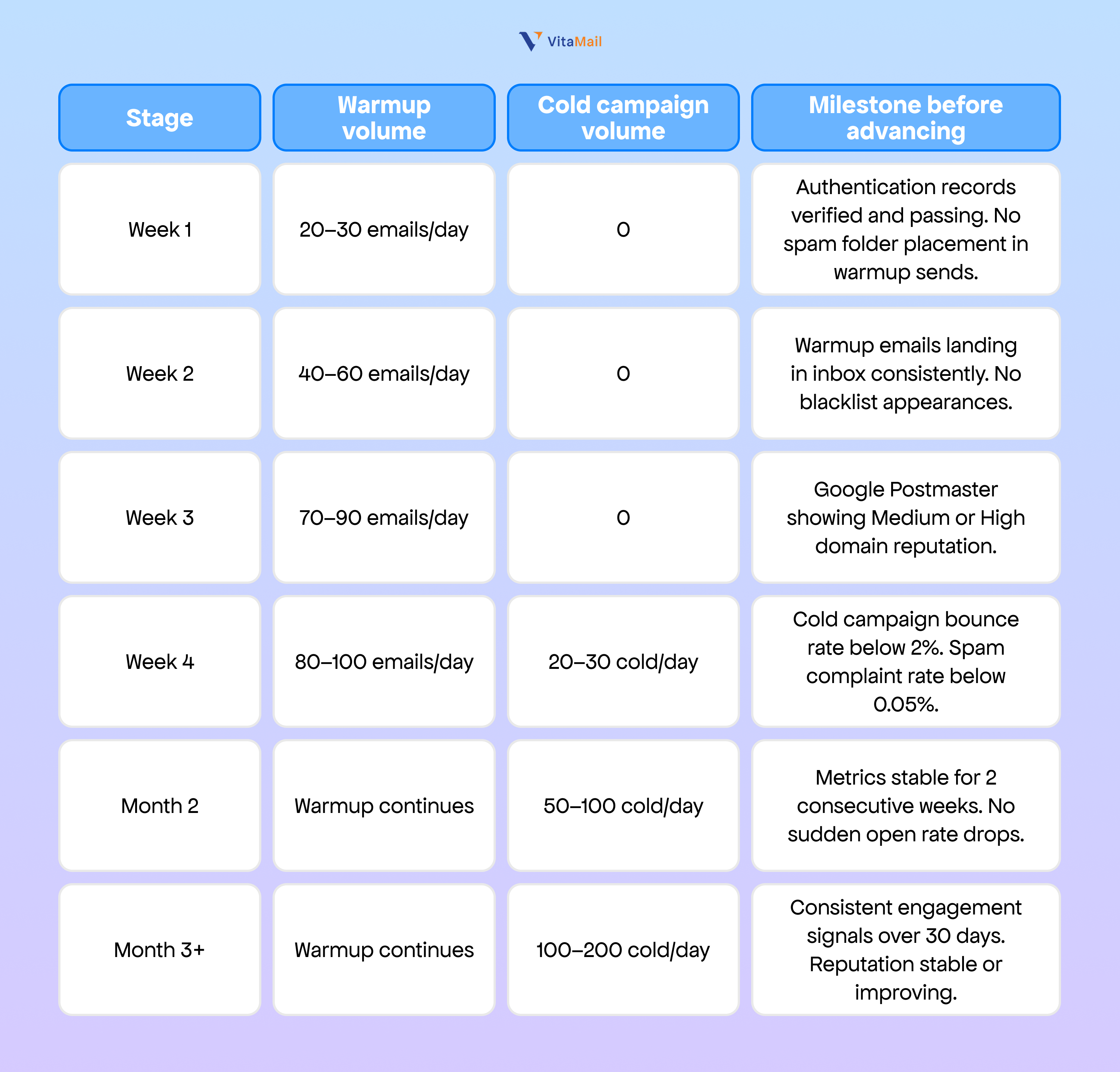
Two rules are non-negotiable during this ramp:
1. The 10–20% rule. Never increase daily sending volume by more than 10–20% per week. Sudden volume spikes are one of the primary triggers for spam filter escalation, even on well-established domains. If you are sending 50 cold emails per day this week, your ceiling next week is 55–60. Not 100.
2. The parallel warmup rule. Never stop warmup email when cold campaigns begin. Warmup must run continuously, generating positive engagement signals that offset the neutral or negative signals from cold outreach.
For the complete process, read our complete email domain warmup guide.
Four warning signs that you are sending too many
Open rate drops suddenly below 20%
A sudden collapse in open rate without a copy change is a deliverability event, not a subject line problem. Your emails are landing in spam folders instead of inboxes.
Check Google Postmaster Tools immediately. If your domain reputation has dropped from High to Medium or Low, your emails are being filtered. Do not send more emails hoping the rate recovers. Pause sending entirely until you identify the cause. Common triggers include a volume increase that was too aggressive, a list segment with high invalid addresses, or a spam complaint spike from a previous batch.
Bounce rate climbs above 3%
A bounce rate above 3% signals a list quality problem or a reputation threshold causing inbox providers to reject your emails before delivery. Pause the campaign immediately. Validate the remaining list and remove bounced addresses permanently. Reduce daily volume by 50% before restarting.
Spam complaint rate approaches 0.1%
When recipients actively mark your emails as spam, the cause is almost always one of two things: you are emailing the wrong people (ICP targeting problem), or your email reads like spam (copy quality problem).
Do not try to lower the rate by sending to better contacts at the same volume. Pause entirely. Review your targeting criteria and your email copy separately. Determine whether the problem is list quality, message quality, or both before sending another email. Google's 0.1% threshold is a hard ceiling (Google sender requirements, 2024). Exceeding it triggers domain-level reputation penalties that take weeks to reverse.
Replies stop even though open rates look fine
This pattern indicates a hidden deliverability problem or list fatigue. Your emails may be reaching the inbox but getting ignored, or your domain may be soft-filtered (placed in inbox but deprioritised). Refresh your list with new, validated leads. Rotate your email copy. Reduce volume by 30% and investigate before scaling again.
How VitaMail V5 monitors and manages your sending volume automatically
VitaMail V5 handles the variables covered in this guide automatically. V5 runs domain warmup on a gradual schedule, sets daily volume caps based on your inbox type and warmup status, and monitors bounce and spam rates in real time. If metrics approach danger thresholds, campaigns pause automatically before damage occurs.
Every lead list generated by V5 is pre-validated, removing list quality as a variable. V5 distributes campaign volume across multiple warmed inboxes automatically, keeping each inbox within its safe daily limit while scaling total output.

Start with the number your domain can sustain
The right daily sending limit is not a single number. It is the highest volume your domain can sustain while keeping bounce rate below 3% and spam complaint rate below 0.1%. Start conservative. Increase by 10–20% per week. Let your metrics set the pace, not a number you read online.
VitaMail manages all of this automatically: warmup, daily volume caps, real-time metric monitoring, and multi-inbox distribution. Your campaigns scale without manual deliverability management.
Start sending cold emails safely at scale. Try VitaMail free!
For more on building your outbound infrastructure, read our complete email domain warmup guide and cold email outreach best practices.

