




Your email list is one of your most valuable business assets. It's a direct line to your customers, prospects, and community. But this asset is only powerful if it's clean, accurate, and full of real, engaged people.
The single biggest threat to its value? Invalid email addresses.
They aren't just a minor annoyance; they are a direct risk to your sender reputation, your marketing budget, and even your legal standing. Sending to invalid addresses is like talking to an empty room and paying for every empty chair.
This guide covers everything you need to know—from defining an invalid email to the advanced, AI-powered strategies for preventing them from ever getting on your list.
What Is an Invalid Email Address?

An invalid email address is an address that cannot receive mail. Some domains may also look suspicious or unfamiliar even when they are legitimate. For example, many users still ask whether @ymail.com is a real Yahoo email domain. It's non-existent, improperly formatted, or belongs to a domain that doesn't accept mail.
The error can be one of two types:
- Syntax Error: The format itself is wrong. Email addresses must follow a specific local-part@domain structure.
- Existence Error: The format is correct, but the specific mailbox (local-part) or the entire domain doesn't exist.
Here’s a simple breakdown:
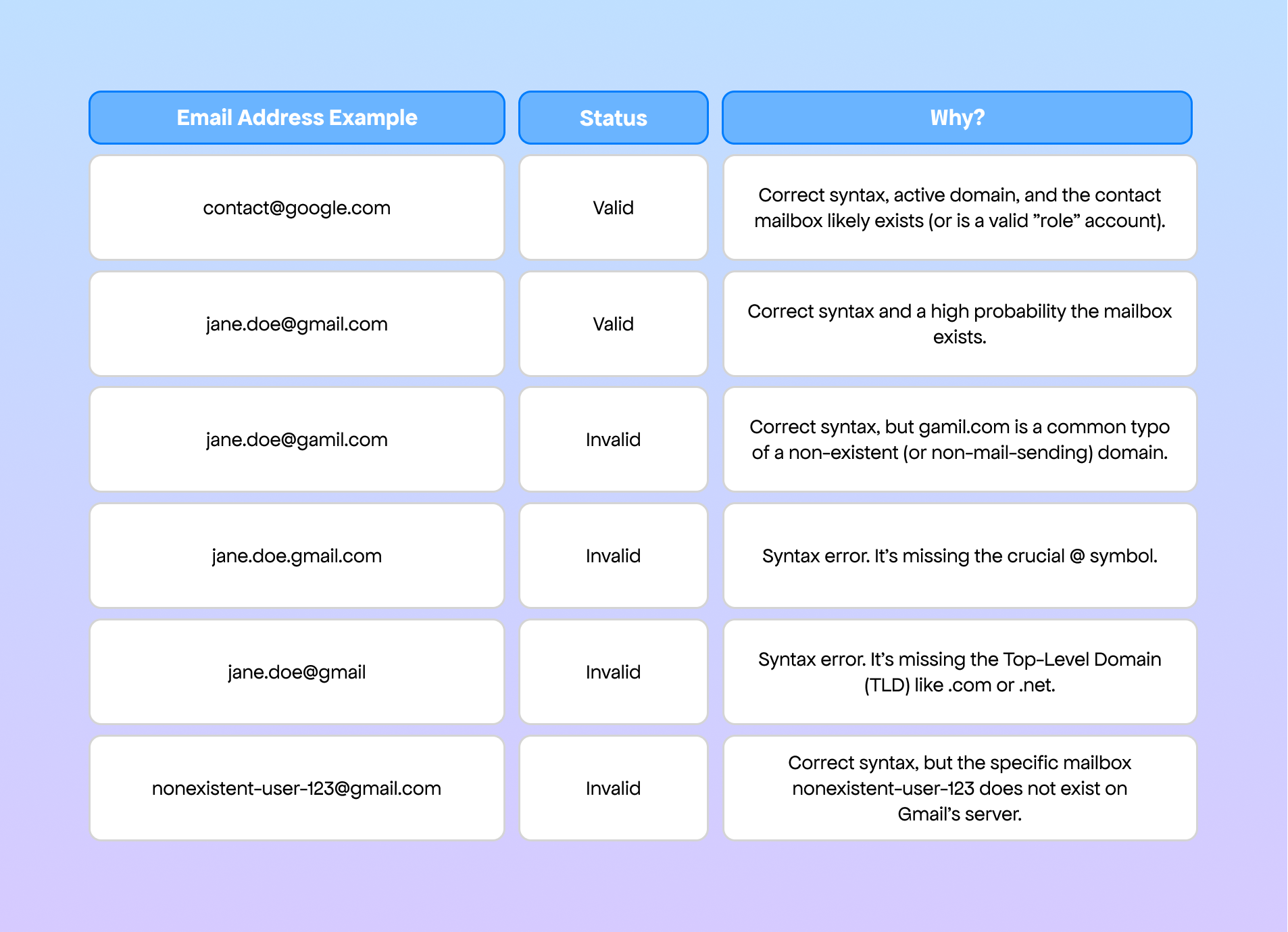
Sending to any of the invalid examples will result in a hard bounce, a permanent delivery failure that sends a critical warning signal to email providers like Gmail, Outlook, and Yahoo.
Why Do Invalid Emails Matter? (Risks and Impact)
Ignoring invalid emails is one of the fastest ways to destroy your email marketing program. The impact is immediate and cascades across your business.
Deliverability, Sender Reputation, and Costs
This is the most immediate operational risk.
- High Bounce Rates: When you send to an invalid address, it "bounces." This hard bounce is a permanent failure. Email Service Providers (ESPs) and Internet Service Providers (ISPs) track this rate obsessively.
- Damaged Sender Reputation: Your sender reputation (a score tied to your domain and sending IP) determines if you land in the inbox, the spam folder, or get blocked entirely. A high bounce rate is the #1 factor that damages this reputation.
- The 2% Threshold: Most experts agree: if your hard bounce rate climbs above 2%, you are in the danger zone. ISPs will begin to throttle your mail or filter it as spam. If it hits 5% or more, you risk being blacklisted.
- Wasted Costs: You pay your ESP (like Mailchimp, Klaviyo, or SendGrid) based on the number of contacts in your list or the volume of emails you send. Sending to 10,000 invalid contacts means you are literally throwing money away every single month.
- Skewed Analytics: Your open rates, click-through rates, and conversion metrics become meaningless. You can't make smart marketing decisions because your data is diluted by non-existent users.
Legal & Regulatory Risks (GDPR, CAN-SPAM)
A dirty list isn't just a marketing problem; it's a compliance liability.
- GDPR (General Data Protection Regulation - EU): Under GDPR, you must have a legal basis (like explicit consent) to process personal data, including email addresses. A list fullof invalid emails strongly suggests poor data collection practices, suchas list harvesting or a lack of provable consent. Holding this data without a legitimate purpose can be a violation, with fines up to €20 million or 4% of global annual revenue.
- CAN-SPAM (Controlling the Assault of Non-Solicited Pornography And Marketing Act - US): This law requires you to honor opt-out requests promptly. If a user unsubscribes and you continue to email them (even if their email later becomes inactive), you are in violation. A high number of invalid emails often correlates with lists that don't properly manage unsubscribes.
- Global Variants (CASL, etc.): Canada's Anti-Spam Legislation (CASL) is even stricter, requiring express consent. A list riddled with invalid or spam-trap emails is a major red flag for regulators that you are not respecting these consent-based laws.
Common Causes of Invalid Email Addresses
Invalid emails creep into your list in four primary ways.
1. Typos & Format Mistakes
This is the most common and innocent cause: human error during signup.
- Examples: john.doe@gamil.com (typo), sara@aol.con (TLD error), pete..smith@example.com (invalid double-dot syntax).
2. Disposable and Temporary Emails
These are "burner" emails from services like 10MinuteMail or Mailinator. Users provide them to get a free download, discount code, or service trial without wanting to receive marketing follow-ups.
- Problem: The email is valid for 10-60 minutes—just long enough to pass a single opt-in—and then self-destructs, becoming a hard bounce on your next send.
3. Deleted/Inactive Mailboxes
This is list decay, and it happens to every list. An email that was perfectly valid last year might be invalid today.
- Causes: People change jobs (B2B lists decay at up to 40% per year), students graduate, or users abandon old free accounts (e.g., that old Hotmail address).
- Industry Stat: On average, email lists decay at a rate of 20-30% per year. This means that without regular cleaning, a third of your list could be useless in 12 months.
4. Automated Signups and Spam Traps
This is the most dangerous category.
- Bot Signups: Malicious bots crawl the web, find your signup forms, and flood them with fake, auto-generated, or stolen email addresses.
- Spam Traps (Honeypots): These are email addresses used by ISPs and anti-spam organizations specifically to catch spammers. Hitting one is a critical blow to your reputation.
- Pristine Traps: Email addresses that have never been valid and are posted on hidden webpages for scrapers to find. If you email one, you are proven to be harvesting emails.
- Recycled Traps: These are old, abandoned emails (from the "Deleted/Inactive" category) that ISPs reactivate. If you email one, it proves you haven't cleaned your list in years.
How to Detect & Fix Invalid Emails
You can't just "look" for invalid emails. You need a systematic process for both detection and removal.
Manual Methods (Visual & Recovery)
- Visual Inspection: Only feasible for a list of <100 people. You can manually sort your list in a spreadsheet and look for obvious typos like @gamil.com. This is not scalable.
- Engagement Monitoring (Sunsetting): This is a manual hygiene process. Create a segment of users who haven't opened or clicked an email in the last 6-12 months. Send them a final "win-back" campaign ("Is this goodbye?"). If they don't engage, stop emailing them. This doesn't fix invalid emails, but it stops you from emailing inactive accounts that could become recycled spam traps.
Automated/Tool-Based Validation
This is the industry-standard solution. Email validation services (like ZeroBounce, NeverBounce, or Hunter) run your entire list through a multi-step verification process.
- Syntax & Format Check: Instantly flags addresses like user..name@domain or user@domain..
- Domain/MX Record Check: Checks if the domain (@example.com) exists and has a valid Mail Exchange (MX) record, which tells the internet it's set up to receive mail.
- SMTP Handshake: This is the core test. The tool performs a "ping" on the mail server. It essentially "knocks on the door" and asks, "Does the mailbox for jane.doe exist here?" The server will respond with a yes (250 OK) or no (550 No Such User) without actually sending an email.
- Advanced Detection: The best tools also identify:
- Disposable Emails: Flags known temporary email providers.
- "Catch-All" Servers: Identify and block domains (often corporate) that are configured to accept all mail, even for non-existent users, and then send a bounce later. These are marked as "risky."
- Role-Based Accounts: Flags addresses like info@, admin@, or support@. These are often group lists and have very low engagement.
3. Using API and Real-Time Verification
This is the most effective method because it prevents bad emails from ever joining your list.
Instead of cleaning your list later (reactive), you integrate a validation API directly into your signup forms (proactive).
How it works:
- A user types their email into your form.
- As soon as they click out of the field, an API call is silently sent to a validation service.
- In milliseconds, the API responds.
- If invalid, the form displays an error: "Oops! Please check your email for typos."
- If typo detected, it can suggest a fix: "Did you mean user@gmail.com?"
- If disposable, it can block it: "Please use a permanent email address."
4. Monitoring Engagement & Bounce Rates
Your own ESP dashboard is a powerful detection tool.
- Watch Hard Bounces: After every campaign, look at your bounce report. If a specific segment or list has a high bounce rate, export that list and run it through a validation tool immediately.
- Track Soft Bounces: A soft bounce is a temporary failure (e.g., "inbox full" or "server temporarily down"). However, if an address soft-bounces 3-5 times in a row, most ESPs will automatically convert it to a hard bounce. Treat repeat soft-bouncers as invalid.
How to Prevent Invalid Emails in Your List
Fixing a dirty list is good. Never letting it get dirty is better.
Double Opt-In (DOI) Process
This is the gold standard for list building.
- Single Opt-In (SOI): A user fills out a form and is immediately added to your list. This is fast but risky, as it doesn't verify the email at all.
- Double Opt-In (DOI):
- A user fills out your form.
- They are sent a single, automated confirmation email.
- They must open that email and click a confirmation link to be added to your main list.
DOI single-handedly solves multiple problems:
- It confirms the email address is valid, real, and accessible.
- It filters out typos, bots, and disposable addresses (which are rarely checked after signup).
- It provides irrefutable proof of consent, satisfying GDPR and CASL requirements.
2. Registration UX Tips
Your signup form design can be a powerful filter.
- Use Real-Time API Validation: As discussed above, this is your best front-line defense.
- Implement reCAPTCHA: Use Google's reCAPTCHA to ensure the user is a human, not a bot. This stops automated script attacks.
- Add a Honeypot Field: This is a clever anti-bot trick. In your form's HTML, add a field that is hidden from human users (using CSS like display:none or visibility:hidden). Bots, which just read the HTML, will fill it out. Your server-side code can then be set to automatically reject any submission where this hidden field is not empty.
3. Legal Compliance Considerations
Prevention is also a legal strategy.
- Audit Frequency: Don't just clean your list once. You should validate your entire email list at least twice a year to catch list decay.
- Consent Records: Store the timestamp, IP address, and form source for every DOI confirmation. This is your "get out of jail free" card in a compliance audit.
- Clear Privacy Policy: Be transparent about why you are collecting the email and how you will use it, as required by law.

