




Choosing an email host is one of the most foundational decisions a small business can make. Your email is your primary brand identity, your main communication channel, and a critical component of your security.
With 361.6 billion emails sent every single day in 2024 (a number projected to hit 376.4 billion in 2025), standing out and staying secure is harder than ever. A free yourbusiness@gmail.com address doesn't just look unprofessional; it leaves you vulnerable.
You need a dedicated, secure, and professional solution. This guide compares the best email hosting providers for small businesses in 2026, including current pricing, storage, security, AI features, and migration options.
Best Email Hosting for Small Business: Quick Picks
- Best overall: Google Workspace
- Best for Microsoft Office users: Microsoft 365
- Best affordable option: Zoho Mail
- Best for entrepreneurs: Neo Mail
- Best website + email bundle: Hostinger
- Best for privacy: Proton Mail
What Is Business Email Hosting & Why Does It Matter?
Business email hosting is a dedicated service that allows you to operate your email on your own custom domain (e.g., contact@yourcompany.com instead of yourcompany@gmail.com).
Unlike free services (like Gmail or Yahoo), business email hosting is built for professional use. It separates your crucial business communications from consumer-grade platforms, giving you enhanced security, administrative control, and, most importantly, brand credibility.
Why It Matters: 86% of business professionals prefer to use email for business communication. When you send an invoice, a proposal, or a welcome email series, your email address is the first thing your client sees. A custom domain builds immediate trust and legitimacy.
Beyond branding, it's about control and security. Business hosting provides robust spam filters, encryption, and admin panels to manage who has access to your company's data.
Types of Email Hosting Explained
Not all hosting is created equal. Here’s a quick breakdown:
- Shared (Bundled) Hosting: This is when your email hosting is "thrown in" with your web hosting plan. It's often cheap (or free) but provides minimal storage, weak security, and often struggles with email deliverability.
- Dedicated Server Hosting: This is like owning your own private email server. It's powerful and secure but also expensive and requires a dedicated IT expert to manage. This is overkill for most small businesses.
- Cloud Hosting (SaaS): This is the modern standard, offered by providers like Google and Microsoft. You get all the power of a dedicated server without any of the maintenance, paying a simple per-user, per-month fee. It's scalable, secure, and packed with features.
- Hybrid Hosting: A mix of on-premise servers (for sensitive data) and cloud hosting (for flexibility). This is typically for large enterprises with specific compliance needs.
For 99% of small businesses, Cloud Hosting (SaaS) is the best, most cost-effective, and most secure solution.
How We Evaluated the Best Email Hosting Providers
To identify the best email hosting providers for small businesses, we evaluated each service based on the factors that matter most when choosing a reliable business email platform. Rather than focusing on price alone, we considered security, usability, scalability, integrations, and the tools businesses need to manage email efficiently.
Our evaluation considered the following criteria:
- Security – 25%: Spam and phishing protection, two-factor authentication, encryption, and support for SPF, DKIM, and DMARC.
- Pricing – 20%: Starting price, value for money, available plans, storage allowances, and whether the provider offers a free plan or trial.
- Features – 20%: Custom domain support, mailbox storage, admin controls, aliases, migration tools, calendars, collaboration features, and AI-powered tools.
- Ease of Use – 15%: How easy it is to set up accounts, manage users, configure domains, and use the platform without advanced technical knowledge.
- Integrations – 10%: Compatibility with CRM platforms, calendars, productivity software, email marketing tools, and other business applications.
- Customer Support – 10%: Availability of documentation, migration assistance, technical support, and support channels.
We also considered how well each provider can scale as a business grows. A good email hosting solution should make it easy to add users, increase storage, strengthen security, and connect additional business tools without requiring a complete platform migration.
These criteria form the basis of the provider comparisons and recommendations below.
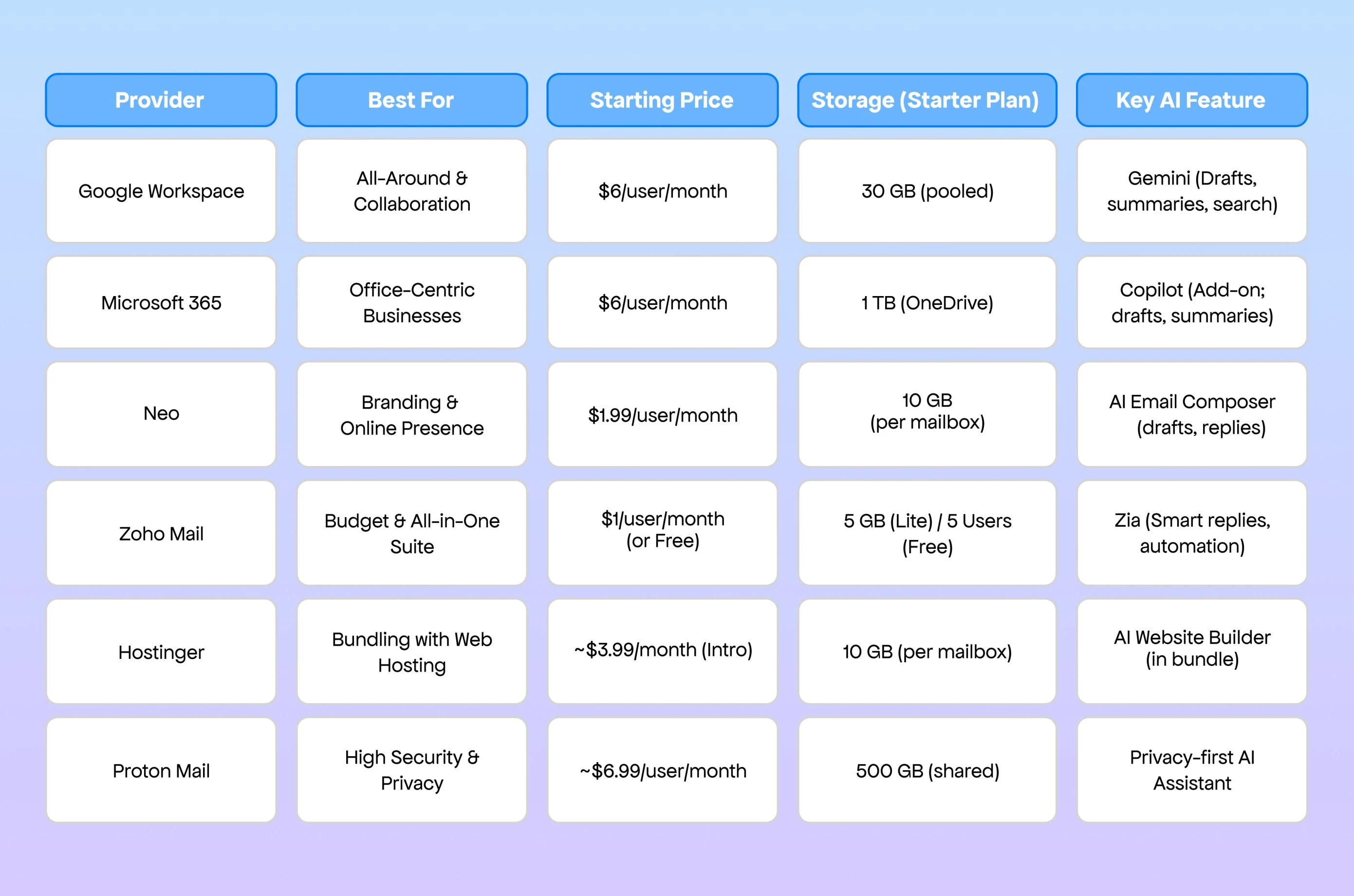
Comparison Table: Top Providers for Small Business (2026)
Review of the Top 6 Email Hosting Providers
Below is a closer look at the six business email hosting providers in our comparison, including who each platform is best for, current pricing, storage, security, and AI capabilities.
1. Google Workspace
Best for: Overall small business email and collaborationStarting price: $7/user/month with an annual commitmentStorage: 30 GB pooled storage per user on Business StarterFree trial: 14 daysAI: GeminiKey advantage: Best-in-class collaboration ecosystemMain drawback: Costs can increase quickly as your team grows
Why We Recommend Google Workspace
Google Workspace is our top overall choice for small businesses that want professional email combined with a familiar productivity suite. Business Starter includes custom-domain Gmail alongside Google Drive, Calendar, Meet, Docs, Sheets, and other collaboration tools.
Its biggest strength is how closely these tools work together. Teams can move from an email conversation to a shared document, calendar event, or video meeting without switching between unrelated platforms.
Google Workspace Business Starter currently starts at $7 per user per month with an annual commitment and includes 30 GB of pooled storage per user.
Pros
- Familiar Gmail interface with a custom business domain
- Strong collaboration through Docs, Sheets, Drive, Meet, and Calendar
- 30 GB pooled storage per user on the Starter plan
- Built-in security and administrative controls
- Easy to scale as your team grows
- Gemini AI included in Gmail on Business Starter
Cons
- More expensive than budget-focused email-only providers
- Storage on the entry-level plan is lower than some competitors
- Businesses that only need email may pay for tools they do not use
Pricing
- Business Starter: $7/user/month with an annual commitment
- Business Standard: $14/user/month with an annual commitment
- Higher-tier plans are available for businesses that need more storage, security, and administrative features.
Security
Google Workspace includes administrative security controls, two-step verification options, spam protection, and tools for managing access across business accounts.
Businesses should still properly configure their domain authentication records, including SPF, DKIM, and DMARC, to strengthen email security and protect their sender reputation.
AI Features
Gemini is integrated directly into Google Workspace. Business Starter includes Gemini in Gmail, where it can assist with drafting and managing email. Business Standard extends Gemini capabilities across applications such as Gmail, Docs, and Meet.
2. Microsoft 365
Best for: Businesses already using Outlook, Word, Excel, and Microsoft TeamsStarting price: $7/user/month, paid yearlyEmail mailbox storage: 50 GB on Business BasicCloud storage: 1 TB of OneDrive storage per userFree trial: 30 daysAI: Copilot Chat, with deeper Copilot features available through eligible plansKey advantage: Deep Microsoft Office integrationMain drawback: More complex administration than simpler email platforms
Why We Recommend Microsoft 365
Microsoft 365 is an excellent option for businesses already built around Outlook and Microsoft Office. Business Basic combines professional custom-domain email with the web and mobile versions of Word, Excel, PowerPoint, Outlook, Teams, SharePoint, and other Microsoft tools.
One important distinction is storage. Business Basic provides 1 TB of OneDrive cloud storage per user, while the primary email mailbox itself has a 50 GB limit. These should not be treated as the same type of storage.
Pros
- Professional email through Outlook and Exchange
- 50 GB primary mailbox on Business Basic
- 1 TB OneDrive cloud storage per user
- Strong integration with Word, Excel, PowerPoint, Teams, and SharePoint
- Suitable for businesses already using Microsoft products
- Built-in anti-spam, anti-malware, and anti-phishing protection
Cons
- Admin settings can be more complicated for beginners
- Desktop Office applications are not included with Business Basic
- Full Microsoft 365 Copilot functionality requires an eligible Copilot plan or subscription
Pricing
- Business Basic: $7/user/month, paid yearly
- More advanced plans add desktop applications, expanded security, and deeper Copilot capabilities.
Security
Microsoft 365 Business plans include built-in anti-spam, anti-phishing, and anti-malware protections. Microsoft also provides tools for configuring email authentication and identity security across business accounts.
AI Features
Business Basic includes secure AI chat capabilities. More advanced Microsoft 365 Copilot plans integrate AI directly into tools such as Outlook, Word, Excel, PowerPoint, and Teams for tasks including email drafting, summarization, research, and document creation.
3. Neo Mail
Best for:Small Businesses and Entrepreneurs Building Their Online Presence
Why We Recommend Neo Mail
Neo Mail is a modern business email platform designed for startups, freelancers, and small businesses that want a professional email solution with built-in growth tools. It allows users to create a custom business email address and includes a free domain name, making it easy to establish a credible brand from day one.
Beyond email hosting, Neo Mail offers additional tools such as AI-powered email writing, email marketing, appointment scheduling, and an AI website builder to help businesses grow. Features like email open tracking, follow-up reminders, and a signature designer help users manage communication more effectively and engage with leads at the right time.
Pros
- Free domain included with business email.
- AI email composer, open tracking, and follow-up reminders.
- Built-in email marketing and appointment scheduling tools.
- An AI-powered website builder for quickly creating a business website.
Cons
- Fewer third-party integrations compared to larger email platforms.
- No free-forever plan is currently available.
Pricing
At the time of this update, Neo lists:
- Starter: $1.99 per mailbox/month (billed yearly)
- Standard: $3.99 per mailbox/month (billed yearly)
- Max: $7.99 per mailbox/month (billed yearly)
Promotional pricing may vary.
Security
Neo provides two-factor authentication, antivirus and anti-spam protection, encryption at rest and in transit, and custom DKIM support. It also offers allowlists and other controls for managing inbound email.
AI Features
Neo Mail includes an AI email composer that helps users draft professional emails, outreach messages, and replies quickly, making everyday communication faster and more efficient.
4. Zoho Mail
Best for: Budget-conscious startups and small teamsStarting price: $1/user/month, billed annuallyStorage: 5 GB per user on Mail LiteFree option: Available for up to 5 users in eligible regionsFree trial: 15 days for paid editionsAI: ZiaKey advantage: One of the most affordable dedicated business email optionsMain drawback: The broader interface and ecosystem can feel less intuitive than Google Workspace
Why We Recommend Zoho Mail
Zoho Mail offers one of the strongest combinations of price and functionality for businesses that mainly need professional email without paying for a more expensive productivity suite.
Mail Lite starts at just $1 per user per month when billed annually and includes custom business email, calendar tools, mobile and desktop applications, and access to Zoho's broader ecosystem.
Zoho also maintains a free business email plan for up to five users in selected data centers, although availability depends on region and the free plan does not include features such as IMAP, POP, or ActiveSync.
Pros
- Mail Lite starts at $1/user/month
- Free plan available in eligible regions for up to five users
- Custom-domain email
- Migration tools
- 99.9% uptime guarantee
- Integration with the wider Zoho business ecosystem
- Zia AI assistant included with paid plans
Cons
- Free plan availability varies by region
- Free accounts do not include IMAP, POP, or ActiveSync
- Interface may require more adjustment for users coming from Gmail
- Third-party ecosystem is less extensive than Google or Microsoft
Pricing
- Mail Lite: From $1/user/month, billed annually
- Mail Premium: $4/user/month, billed annually
- Free Plan: Up to 5 users and 5 GB per user where available
Mail Premium increases mailbox storage to 50 GB per user and adds additional retention and security capabilities.
Security
Zoho provides MFA, identity management, email security controls, and additional advanced security features on higher plans. Mail Premium also includes capabilities such as S/MIME, email retention, eDiscovery, and mobile access management.
AI Features
Zoho's Zia AI assistant is available across its paid Mail and Workplace plans. It supports AI-assisted productivity within the broader Zoho ecosystem.
5. Hostinger Mail
Best for: Businesses looking for low-cost standalone email hostingStarting price: From $0.39/mailbox/month on the currently advertised long-term introductory offerStorage: 5 GB per mailbox on the current Starter planFree trial: Availability depends on the associated Hostinger productMoney-back guarantee: 30 daysAI: Built-in AI email tools on supported plansKey advantage: Very low introductory pricingMain drawback: The lowest prices require a long-term commitment and renew at higher rates
Why We Recommend Hostinger Mail
Hostinger is no longer just an option for businesses that want email bundled with web hosting. It now offers standalone business email plans with built-in AI features, migration tools, custom-domain email, aliases, forwarding, and integrations with popular email applications.
Its biggest advantage is cost. Hostinger frequently offers extremely low introductory rates, making it attractive to freelancers and small businesses that want a professional mailbox without a large monthly software bill.
However, businesses should compare the renewal price, not only the promotional price, before committing to a long-term plan.
Pros
- Very low introductory pricing
- Custom-domain business email
- Simple setup and email migration
- Email aliases and forwarding
- Built-in AI tools on higher plans
- 24/7 support
- 30-day money-back guarantee
Cons
- Lowest rates require long-term commitments
- Renewal prices are substantially higher than introductory offers
- Entry-level storage is limited compared with Google or Microsoft
- Not as comprehensive a collaboration suite as Google Workspace or Microsoft 365
Pricing
Hostinger's pricing changes frequently because of promotional offers. At the time of this update, its email plans include Starter, Standard, and Premium options, with promotional pricing tied to long-term commitments.
Because renewal costs differ from the introductory rate, businesses should check both prices before selecting a plan.
Security
Hostinger Mail includes spam and antivirus protection and supports custom DKIM configuration for domain authentication.
AI Features
Supported Hostinger Mail plans include AI-assisted search, email writing, summarization, and smart replies. Hostinger has also expanded its email offering with tools designed for AI-assisted and automated workflows.
6. Proton Mail
Best for: Privacy-focused businesses and organizations handling sensitive communicationsStarting price: From approximately $6.99/user/month for business email plansStorage: 15 GB per user on Mail EssentialsFree trial: 14 daysAI: Proton Scribe and Lumo on supported plansKey advantage: Privacy and encrypted communicationMain drawback: Fewer third-party integrations than Google Workspace or Microsoft 365
Why We Recommend Proton Mail
Proton Mail is the strongest option in this comparison for businesses that place privacy and data protection above extensive third-party integrations.
Proton's business email infrastructure uses zero-access encryption and supports end-to-end encrypted communication, while its business plans include custom domains, calendars, migration tools, and administrative controls.
Mail Essentials currently provides 15 GB of storage per user and support for three custom email domains.
Pros
- Privacy-focused email infrastructure
- Zero-access encryption
- Support for custom business domains
- Secure calendar included
- Easy migration tools
- Password-protected email options
- 14-day business trial
- Additional privacy-focused tools available in Proton's ecosystem
Cons
- Higher starting cost than budget email providers
- Fewer third-party integrations
- Some advanced AI and security capabilities require higher plans or add-ons
- May be unnecessary for businesses that prioritize collaboration over privacy
Pricing
Proton's business email plans start at approximately $6.99 per user per month, with higher tiers adding significantly more storage, domains, productivity tools, VPN access, password management, and advanced security features.
Security
Security is Proton's main differentiator. Its business platform uses zero-access encryption and offers end-to-end encryption, password-protected emails, account security controls, and additional protection through features such as Proton Sentinel on supported plans.
AI Features
Proton takes a privacy-focused approach to AI. Proton Scribe can assist with email writing, while higher Workspace plans provide access to Lumo, Proton's private AI assistant. Availability varies by plan.
How Much Does Small Business Email Hosting Cost?
Here's how to think about cost:
- Per-User vs. Bundled: Google, Microsoft, Zoho, and Neo Mail charge per user or mailbox. Hostinger charges one price for a bundle of mailboxes. If you have 10 employees, Google's $7 plan will cost $70/month. If you only have 2, it's $14/month.
- Annual vs. Monthly: Most providers offer a 15–20% discount if you pay for a full year upfront.
- Free Trials: Google Workspace and Microsoft 365 both offer 14-day free trials. Zoho offers its "Forever Free" plan for small teams. Neo Mail and several other providers typically offer limited trial access to test the platform before committing.
Key Features of the Best Small Business Email Hosting
Email Deliverability & Authentication
A professional business email address is only useful if your messages actually reach the inbox. That makes email deliverability an important factor when choosing an email hosting provider, especially for businesses that regularly send proposals, invoices, follow-ups, newsletters, or sales emails.
A reliable provider should make it easy to configure the authentication records that verify your domain and help mailbox providers determine whether your emails are legitimate.
Look for support for:
- SPF: Specifies which mail servers are authorized to send email on behalf of your domain.
- DKIM: Adds a digital signature to outgoing emails so receiving servers can verify that the message has not been altered.
- DMARC: Builds on SPF and DKIM and lets you define how receiving servers should handle messages that fail authentication checks.
Properly configuring these records can help protect your domain from spoofing and improve trust with receiving mail servers. For a more detailed explanation, see our guide to DMARC, DKIM, and SPF.
You should also consider the provider's outbound sending limits. Business email hosting is designed primarily for one-to-one communication, so providers often limit how many messages an account can send within a certain period.
If your business plans to send newsletters, automated campaigns, or large-scale outreach, you may need to connect your business email with a dedicated email marketing or outreach platform, such as Sender, rather than sending everything directly from your primary business inbox.
Other deliverability factors to evaluate include:
- Spam and phishing filtering
- Bounce handling
- Domain and sender reputation
- Sending-rate limits
- Shared vs. dedicated sending infrastructure
- Tools for monitoring suspicious activity or authentication failures
It is also important to understand that choosing a reputable email host does not automatically guarantee strong deliverability. Your sending behavior, email list quality, authentication setup, bounce rate, and domain reputation all influence whether messages reach the inbox or get filtered as spam.
If email is a major part of your sales or marketing strategy, regularly monitoring email deliverability and validating addresses before sending campaigns can help protect your sender reputation and reduce unnecessary bounces.
How to Set Up & Migrate Your Business Email Hosting (Step-by-Step)
Migrating your email can feel daunting, but it's a straightforward process.
- Choose Your Provider & Plan: Sign up for your new host (e.g., Google Workspace).
- Purchase Your Domain: If you don't have one, you can buy one from the provider or a registrar like Namecheap.
- Verify Your Domain: Your new host will ask you to prove you own the domain, usually by adding a small text file (a TXT record) to your website's settings.
- Create User Accounts: In the admin panel, create your mailboxes (e.g., you@, info@, support@).
- Migrate Your Old Email: All major providers have built-in migration tools to import your old emails, contacts, and calendars from Gmail or another host.
- Update Your MX Records: This is the most critical step. Your "MX Record" tells the internet where to send your mail. You'll log in to your domain registrar (where you bought your domain) and point the MX record to your new host (e.g., Google's servers).
- Configure Security: Set up your SPF, DKIM, and DMARC records. These are critical for security and email deliverability (i.e., not landing in spam). For more on this, see our guide to DMARC, DKIM, and SPF.
Common Migration Pitfalls & How to Avoid Them
Many guides skip the risks. Here's what to watch out for.
Pitfall 1: DNS Misconfiguration (Email Blackouts)
- The Risk: If you set up your MTA, MX, and DNS records incorrectly, your email will simply stop working—you won't be able to send or receive messages.
- How to Avoid: Follow your new provider's setup guide exactly. Most provide copy-and-paste values.
- Pro-Tip: Lower your domain's "TTL" (Time to Live) to 300 (5 minutes) at least 24 hours before you make the switch. This allows the change to happen almost instantly.
Pitfall 2: Data Loss or Incomplete Migration
- The Risk: You run the migration tool, and it fails halfway through, leaving half your old emails behind.
- How to Avoid: Run a pilot test. Migrate one account first (e.g., a test account or your own) to ensure all folders, labels, and contacts transfer correctly. Only then, run the full batch migration for your team.
Pitfall 3: Insufficient Storage or Licenses
- The Risk: You try to migrate 50GB of old mail into a new 30GB Google Workspace account. The migration fails.
- How to Avoid: Audit your old accounts first. Check how much storage each user is currently using and purchase a plan that can accommodate it.
Conclusion: Best Solution for Your Business
There is no single "best" provider, only the best provider for you.
- For maximum collaboration and a best-in-class inbox: Go with Google Workspace.
- For businesses built on Office apps and needing 1TB+ storage: Go with Microsoft 365.
- For effortless business email setup and to build an online presence: Go with Neo Mail.
- For the best budget-friendly option (or a free start): Go with Zoho Mail.
- For new businesses needing a website and email bundle: Go with Hostinger.
- For the ultimate in privacy and security: Go with Proton Mail.
Email Hosting vs. Email Deliverability: What’s the Difference?
Email hosting and email deliverability are closely connected, but they solve different problems.
Your email hosting provider gives your business the infrastructure to create, send, receive, and store email using a professional domain such as you@yourcompany.com. However, choosing a reliable email host does not automatically guarantee that every message you send will reach the recipient's inbox.
Several additional factors affect whether your emails are trusted, accepted, or filtered as spam.
Email Hosting: Where Your Business Email Lives
Email hosting provides the mailbox infrastructure behind your professional email address.
Providers such as Google Workspace, Microsoft 365, Zoho Mail, Neo Mail, Hostinger, and Proton Mail typically handle:
- Sending and receiving business email
- Mailbox storage
- Custom domain email addresses
- Spam and malware filtering
- User and administrator controls
- Calendars and contact management
- Email access across web, desktop, and mobile devices
Think of email hosting as the foundation of your business email system.
Email Authentication: Proving Your Emails Are Legitimate
Email authentication helps receiving mail servers verify that a message claiming to come from your domain was actually authorized by you.
The three main authentication protocols are:
- SPF: Defines which servers are allowed to send email on behalf of your domain.
- DKIM: Adds a digital signature to outgoing messages so receiving servers can verify their authenticity.
- DMARC: Uses SPF and DKIM results to help protect your domain from spoofing and unauthorized sending.
Proper authentication is important for both security and deliverability. If these records are missing or incorrectly configured, legitimate emails may be more likely to get filtered or rejected.
Learn more in our guide to DMARC, DKIM, and SPF.
Email Validation: Checking Whether an Address Is Valid
Email validation happens before you send a message.
It checks whether an email address is properly formatted and likely capable of receiving email. This is especially important when importing contact lists, collecting leads through forms, or running outbound campaigns.
Sending repeatedly to invalid or inactive addresses can increase your bounce rate and negatively affect your sender reputation.
For businesses sending campaigns at scale, cleaning and validating email lists before sending can help reduce unnecessary bounces and protect domain health.
Email Deliverability: Reaching the Inbox
Email deliverability refers to whether an email successfully reaches the recipient's inbox instead of being rejected, bounced, or sent to the spam folder.
Deliverability can be influenced by:
- SPF, DKIM, and DMARC configuration
- Sender and domain reputation
- Bounce rates
- Spam complaints
- Email engagement
- Sending volume and frequency
- Email list quality
- Message content
- Previous sending behavior
A strong email host can provide reliable infrastructure, but your own sending practices still play a major role in inbox placement.
If email is an important sales or marketing channel for your business, learn more about email deliverability and how to reduce email bounce rates.
Email Warm-Up and Sender Reputation: Building Trust Over Time
For businesses using email for outbound sales or cold outreach, sender reputation becomes especially important.
A new domain or mailbox usually has little sending history. Suddenly sending a large number of emails from it can look suspicious to mailbox providers.
Email warm-up involves gradually establishing legitimate sending activity so that mailbox providers can build trust in the sender over time.
Your sender reputation can be influenced by factors such as:
- How quickly sending volume increases
- Bounce rates
- Spam complaints
- Reply and engagement rates
- Authentication setup
- Consistency of sending behavior
- Overall domain history
This is why businesses running outbound campaigns should think beyond simply choosing an email host. A healthy email setup also requires proper authentication, clean contact data, responsible sending practices, and ongoing attention to sender reputation.
How These Pieces Work Together
In simple terms:
- Email hosting gives you the mailbox and sending infrastructure.
- Email authentication proves that your domain is authorized to send the message.
- Email validation helps ensure you are sending to real, deliverable addresses.
- Email deliverability determines whether the message successfully reaches the inbox.
- Email warm-up and sender reputation help establish and maintain trust with mailbox providers over time.
For a small business that relies heavily on email, all five components matter. Choosing a reliable host is the first step, but maintaining a healthy sending environment is what helps your emails continue reaching the people you want to contact.
A Final Word from VitaMail
Choosing the right email host gives your business a strong foundation, but maintaining good deliverability requires more than reliable infrastructure.
If you use email for outreach, lead generation, or marketing campaigns, list quality and sender reputation can directly affect whether your messages reach the inbox.
VitaMail helps businesses improve email deliverability by validating email addresses, reducing unnecessary bounces, and protecting sender reputation before campaigns are sent.
Before importing a new list or launching your next campaign, make sure your contacts are valid and your sending setup is ready.


