




Keeping your email list clean is the foundation of every successful campaign. Many businesses still send emails to contacts that are invalid, inactive, or fake and this leads to higher bounce rates, lower inbox placement, and wasted budget. That’s where VitaMail comes in.

VitaMail’s Email Validation Tool acts like a reliable valid email checker, helping you quickly identify which addresses are real and which ones are costing you money. With one simple scan, you clean your list, protect your sender reputation, and make sure every email you pay for reaches a real person.
Why Every Email List Needs a Valid Email Checker
The Hidden Cost of Invalid Email Addresses
Invalid emails don’t just “bounce.” They waste money in places most marketers never notice.
Here’s where the real cost shows up:
- You pay ESP fees for contacts that don’t exist.
- Your email platform counts invalid emails as part of your plan’s quota.
- Dead emails lower your overall engagement rate.Campaigns become more expensive as deliverability drops.
Most businesses don’t realize that 15–20% of any email list can become unusable within a year. Without a dependable email checker, you keep paying for those addresses month after month.
VitaMail solves this with one scan removing the bad emails and protecting the value of your list.
How Bad Emails Destroy Your Sender Reputation
Bad emails don’t just hurt one campaign; they damage your long-term reputation. When email providers see too many bounces, they assume your list is low quality and they start pushing your messages toward spam, even for valid subscribers. Not every contact on your list is valid, and understanding what counts as an invalid email address can help you avoid unnecessary bounces and delivery issues.
A single spike in invalid addresses can:
- reduce inbox placement
- trigger spam filters
- lower open rates across all future campaigns
- make your domain look suspicious
Using VitaMail’s validator as your primary valid email checker keeps your reputation stable by identifying:
risky domains
fake sign-ups
disposable emails

Email Bounce Rates: The Silent Campaign Killer
Bounce rate is one of the most misunderstood metrics in email marketing. Most teams focus on open rates or click-throughs, but a high bounce rate quietly destroys everything behind the scenes.
Here’s why it’s dangerous:
- Even a small rise in bounce rate can lower deliverability across your entire list.
- ESP platforms penalize accounts with repeated bounce issues.
- High bounce rates make your domain look untrustworthy.
- Your future emails may land in spam even for long-term subscribers.
Many marketers call bounce rate “the silent killer” because it damages performance slowly, campaign after campaign.
What Is a Valid Email?
A valid email is an address that’s active, real, and capable of receiving messages. In other words, it belongs to a working inbox on a domain that accepts mail. A valid email won’t bounce, won’t harm your sender reputation, and won’t waste your budget.
Many email lists include addresses that look correct but are inactive, fake, or created only for one-time use. These hidden issues can cause bounces and lower deliverability. That’s why validation is essential; it helps you confirm which emails are real before sending your next campaign.
Understanding Email Validation Technology
Email validation is more than a quick “check.” Behind the scenes, it uses several technical steps to determine whether an address is safe to send to. This includes:
- checking the structure of the email
- verifying that the domain exists and receives mail
- confirming the mail server is active
- analyzing risk levels (temporary, disposable, or suspicious addresses)
- determining whether the inbox is real and deliverable
VitaMail runs all these checks automatically. The result is a clean, accurate email list with fewer bounces and better performance across every campaign.
Syntax, Domain, and Mailbox Verification: What’s the Difference?
Email validation has three core layers, each helping you catch different types of issues:
Syntax Verification
This step checks the format of the email spelling, special characters, placement of “@,” and domain structure. It removes addresses with obvious mistakes or typos.
Domain Verification
This step checks whether the domain exists, is active, and has valid MX records (mail exchange records). If the domain can’t receive mail, sending to it will always fail.
Mailbox Verification
This is the most important step. It checks whether the specific inbox actually exists and can receive messages. Mailbox verification prevents bounces and keeps your sender reputation strong.
Together, these layers ensure your list is accurate and safe to use.
Real-Time vs. Bulk Email Validation: Which One Should You Use?
Both types of validation are useful; they simply solve different problems.
Bulk Email Validation
Ideal for cleaning an existing list. If you have customer databases, newsletter lists, or old contact files, bulk validation helps you remove invalid emails in one scan. It’s fast, efficient, and reduces bounce rates before you send your next campaign. For larger campaigns, using bulk email verification services saves time and ensures your entire list is checked before you hit send.
Real-Time Email Validation
Perfect for forms and sign-up pages. It checks emails instantly as users type them. This prevents fake or temporary addresses from ever entering your system, keeping your list clean from the start.
Most businesses use both: bulk validation to repair old lists, and real-time validation to protect new ones.
Top Benefits of Using an Email Checker for Your Business
A clean email list is one of the simplest ways to improve your marketing performance. When you remove invalid, inactive, or risky emails, everything you send becomes more effective from newsletters to promotions to seasonal campaigns. Here’s how email validation directly helps your business.
Slash Your Bounce Rate by Up to 95%
Bounce rate is one of the biggest silent problems in email marketing. Invalid emails, abandoned inboxes, and temporary accounts can increase bounces quickly and even a small rise can affect campaign performance.
By removing these addresses before you send, you can reduce bounce rates dramatically. Many businesses see improvements of 80–95% after cleaning their lists. Fewer bounces mean stronger deliverability and healthier long-term results.
Improve Email Deliverability and Inbox Placement
When email providers see that your messages consistently bounce or get ignored, they start pushing your campaigns into spam. A clean list sends the opposite message: it signals that your emails are reaching real people who actually exist.
This improves:
- inbox placement
- open rates
- click-through rates
- engagement signals over time
Good deliverability isn’t luck. It starts with sending emails to verified, active contacts.
Save Money on Email Marketing Costs
Every email platform charges you based on the number of contacts you store, not the number of real people. If 15–20% of your list is invalid (which is very common), you’re paying for contacts that will never convert.
By validating your list:
- you pay only for real subscribers
- your plan remains within limits
- you avoid sending campaigns that generate no return
Clean data means lower monthly costs and better ROI on every email you send.
Protect Your Domain Reputation Score
Your domain reputation is like a credit score for email marketing. If it drops, everything becomes harder inbox placement, engagement, and long-term performance.
Invalid emails, spam traps, and repeated bounces can weaken your domain reputation quickly. Validation protects you by removing the risky addresses before they can do any damage.
A strong reputation helps your future campaigns land where they belong: in the inbox, not the spam folder.
Related Topic: As a related topic, it’s also helpful to understand how spam traps work and why they are often triggered by invalid or inactive email addresses.
How to Use a VitaMail Email Checker: Step-by-Step Guide
VitaMail’s Email Validation Tool is designed to be fast, accurate, and simple for any user even if you’ve never cleaned an email list before. Here’s how you can validate your contacts in just a few minutes.
Step 1: Log in to Your VitaMail Dashboard
Start by signing into your VitaMail account. All tools including validation, domain checks, and campaign builders are available right from the main dashboard, so you don’t need to navigate through complicated menus.
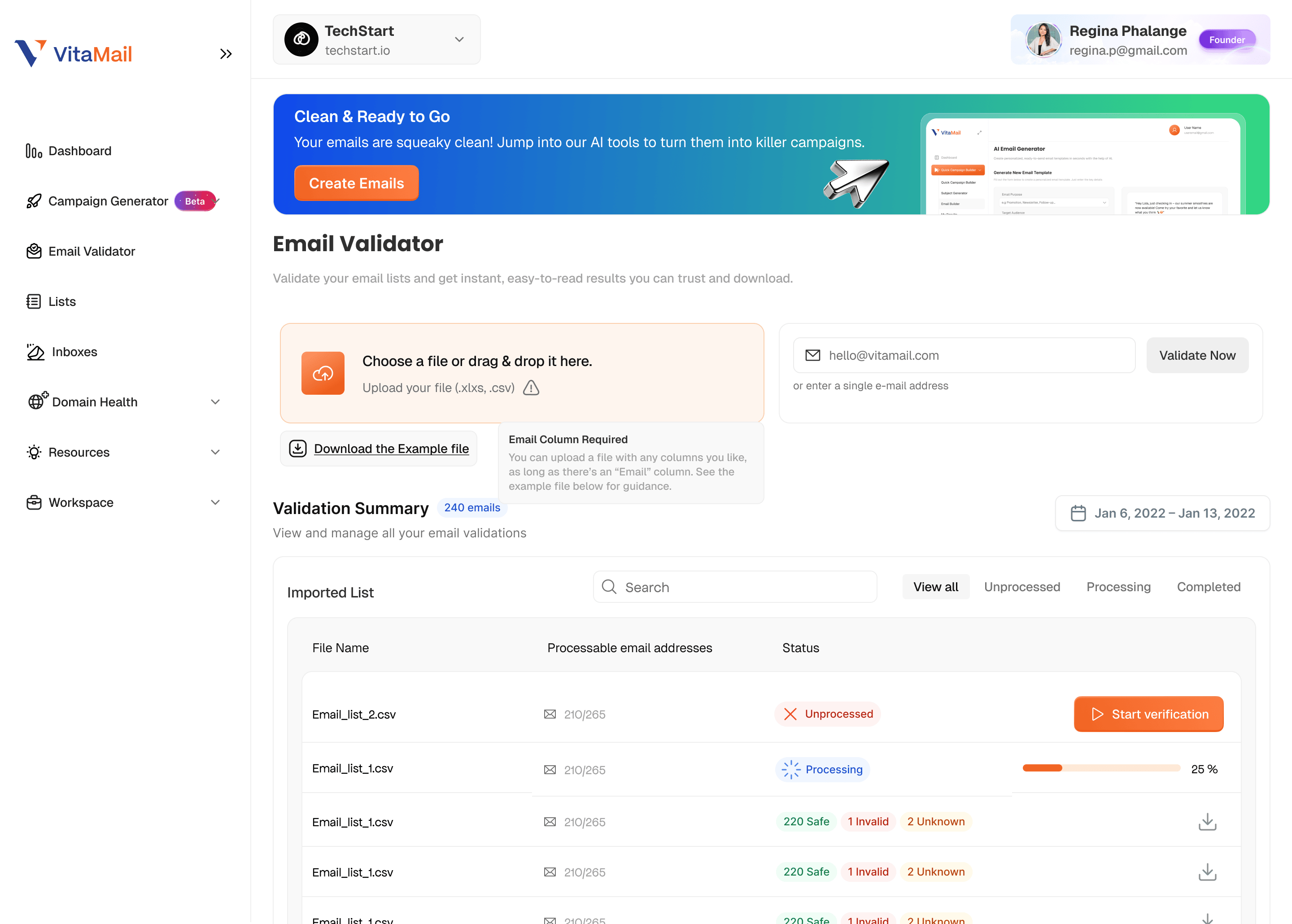
Step 2: Upload Your Email List (CSV Format Recommended)
Click on Email Validation and upload your contact list. VitaMail supports multiple formats, but CSV is the easiest for bulk validation.
Once uploaded, the system will automatically prepare your file for scanning.
Step 3: VitaMail Scans Each Email Automatically
After the file is processed, VitaMail runs a full validation sequence behind the scenes. This includes:
- syntax accuracy
- domain health
- MX record status
- server response
- mailbox existence
- temporary or risky email detection
You don’t need to adjust any settings, everything happens automatically.
Step 4: Review Your Results
VitaMail groups your results into clear categories so you can immediately see:
- Valid emails (safe to send)
- Invalid emails (bounce risk)
- Unknown emails (may hurt your reputation)
Each category includes explanations so you understand why an address is flagged.
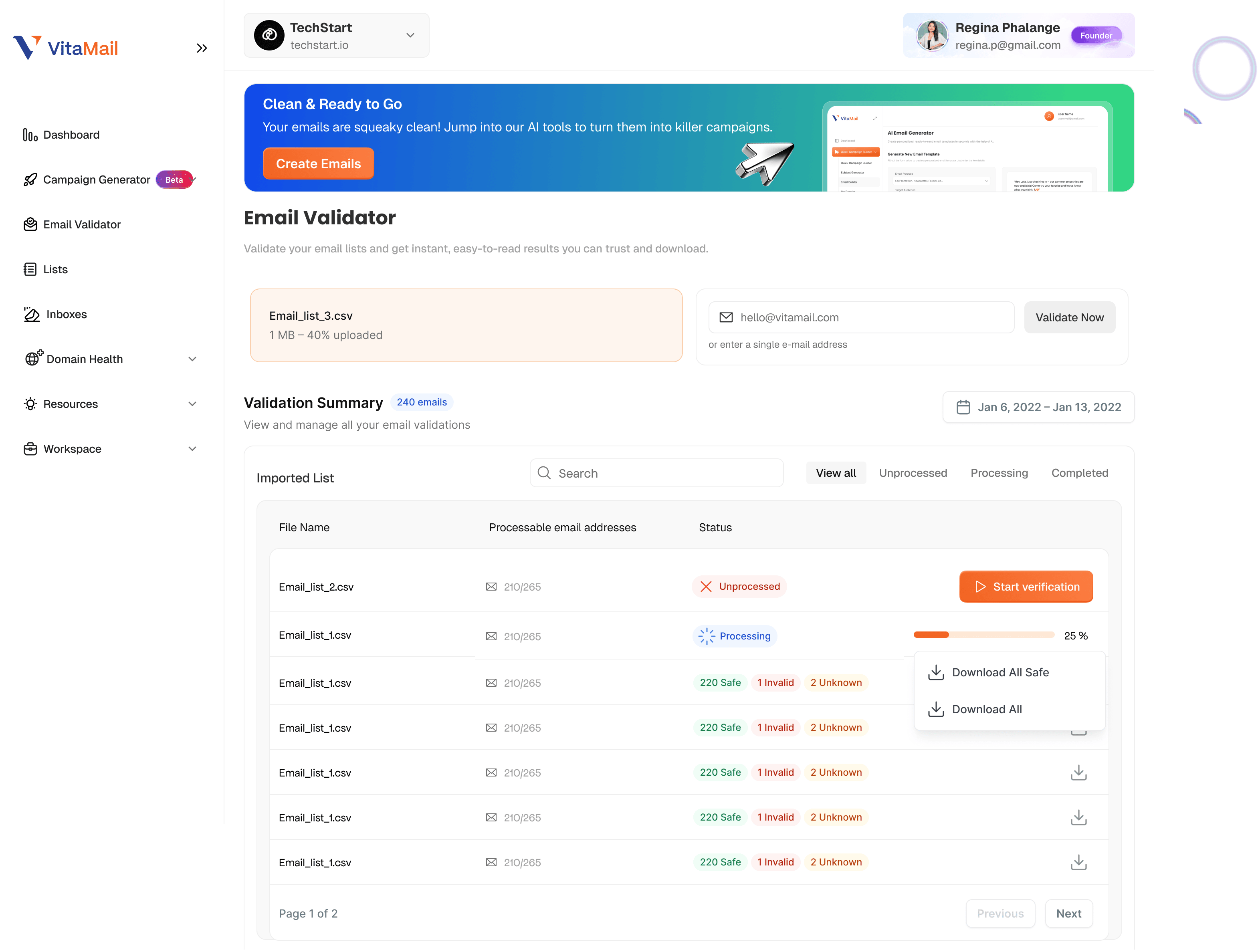
Step 5: Download Your Cleaned List
With one click, download your updated file. This file contains only the contacts that are safe to email perfect for improving deliverability and reducing bounce rates.
You can import it into your email platform right away.
Related Topic: For a deeper look at deliverability, this related topic explains how improving your email sender domain reputation score can directly impact inbox placement.
Conclusion
Email marketing works best when you start with a clean, accurate list and that’s exactly what validation gives you. By removing invalid, inactive, and risky email addresses, you protect your sender reputation, reduce bounce rates, and make every campaign more effective.

VitaMail makes this process easy. With accurate validation, domain checks, and a simple campaign builder all in one place, you save time, cut costs, and send emails that actually reach real people.

