




Email validation checks whether an email address is formatted correctly and safe to send to, while email verification confirms whether the mailbox actually exists on the receiving server. Validation happens first to filter bad inputs; verification goes deeper to reduce bounces and protect sender reputation.
Why People Confuse Email Validation and Verification
In common email marketing terminology, these terms are often used interchangeably, but they represent two distinct layers of email hygiene. Confusing the two is one of the most common email list hygiene mistakes; relying solely on validation might leave you with a list of "correct-looking" addresses that don't actually exist, leading to high bounce rates.
What Is Email Validation?
Email validation is the process of checking whether an email address is properly formatted, non-disposable, and safe to include in a mailing list. It identifies syntax errors, fake addresses, and temporary emails before campaigns are sent.
Syntax & Format Checks
The first step in any validation process is an email syntax validation. This ensures the address adheres to standard formatting rules. It flags an invalid email format, such as missing symbols, spaces, or unsupported special characters.
Disposable & Temporary Email Detection
Validation tools maintain databases of disposable email detection services. These "throwaway" addresses are often used by users to claim a one-time offer without receiving future marketing, making them low-quality leads.
Random or Auto-Generated Usernames
High-quality validation filters out fake email addresses created by bots. These often appear as a string of random characters and are a sign of low-quality lead generation.
Role-Based & Generic Addresses
Addresses like info@, admin@, or support@ are known as role-based email addresses. While technically valid, they are usually managed by groups rather than individuals, which can negatively impact engagement rates.
Webmail vs Custom Domain Emails
Validation can distinguish between webmail email addresses and business email domains. This is crucial for B2B companies that want to prioritize leads with professional custom domains.
What Is Email Verification?
Email verification confirms whether an email address can actually receive messages by communicating with the recipient’s mail server. It checks domain availability, MX records, and mailbox existence without sending an email.
Domain & MX Record Checks
The verification process starts with an MX record check. This confirms that the domain name is registered and has valid mail exchange records configured to receive incoming mail.
SMTP Handshake Explained (Without Sending Email)
SMTP email verification is the most technical phase. The verification tool initiates a "handshake" with the mail server. It asks the server if the specific mailbox exists; the server responds with a status code, and the tool terminates the connection before a message is actually sent.
Mailbox Existence Checks
This is the ultimate email address existence check. It determines if the specific inbox is active and capable of receiving mail at that exact moment.
Accept-All Domains: Risks & Limitations
Some servers are configured as catch-all email addresses. These servers claim that every email address at that domain is valid, even if it isn't. This is one of the primary email verification limitations, as it's impossible to know for sure if the specific recipient exists.
Email Validation vs Email Verification
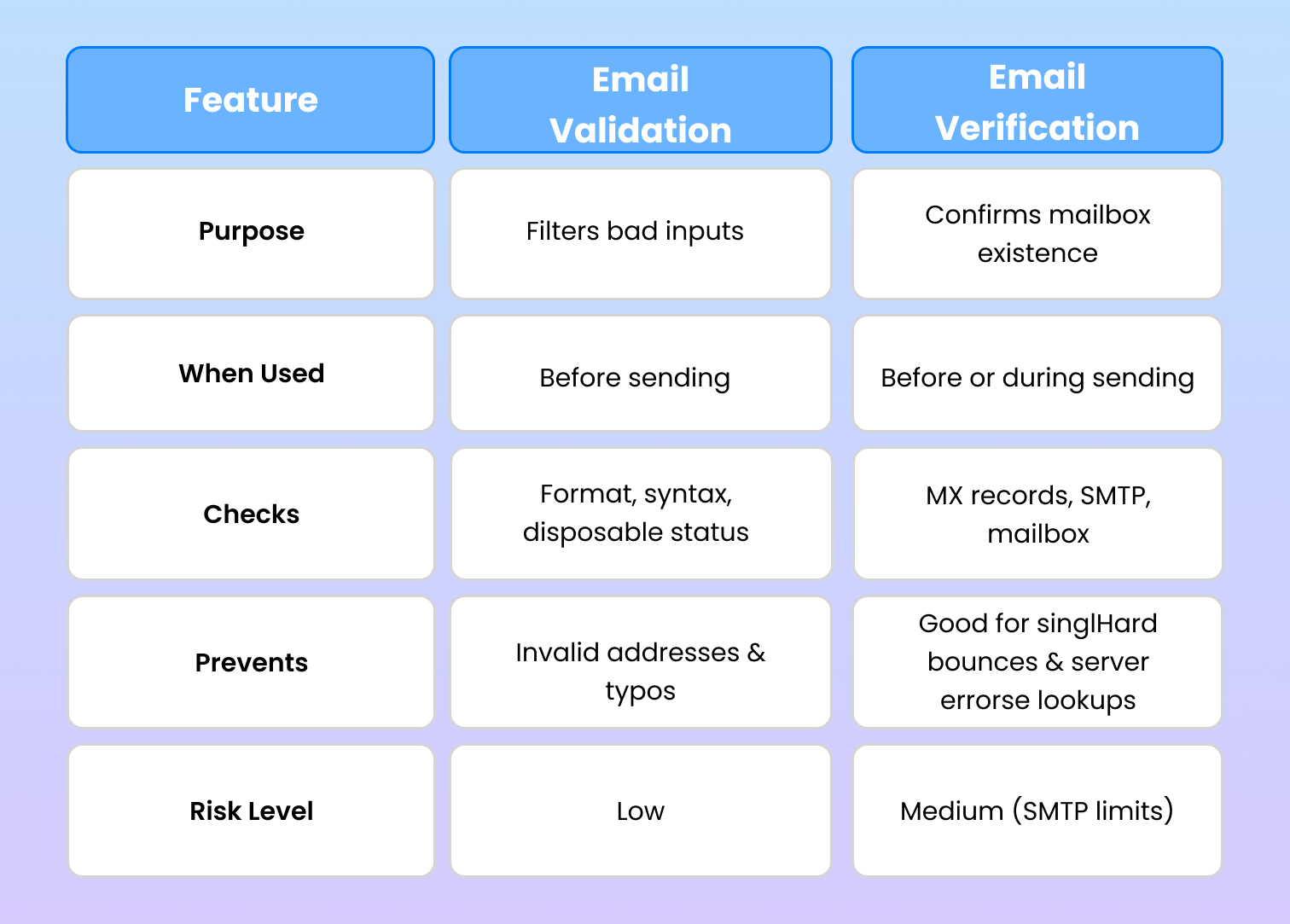
What Are Email Checkers — and How They Actually Work?
An email checker is a specialized tool that combines both validation and verification processes. A bulk email checker allows you to upload an entire CSV or connect via API to scan thousands of leads simultaneously. These tools use proprietary algorithms to cross-reference known spam traps and blacklists to ensure your list is pristine.
Why This Difference Matters for Email Deliverability
Understanding these definitions is vital for maintaining email deliverability. If you send to unverified addresses, your email bounce rate will spike. High bounce rates signal to ISPs that you are a "spammy" sender, which damages your sender reputation and causes your legitimate emails to be filtered into the spam folder.
How Email Validation Improves Deliverability
- Reduces hard bounce rates
- Prevents spam trap hits
- Protects sender reputation
- Improves inbox placement
- Lowers email marketing costs
When Email Validation Should Be Used
- Before launching any email campaign
- After importing a new email list
- Before warming a new domain
- On a recurring schedule for hygiene
Does email validation improve deliverability?
Yes. Email validation improves deliverability by reducing hard bounces, protecting sender reputation, and preventing spam traps. Clean lists send stronger trust signals to mailbox providers, increasing the chances of inbox placement.
How often should email lists be validated?
Email lists should be validated before every major campaign and regularly for ongoing programs. High-volume senders typically validate monthly, while smaller lists benefit from quarterly validation.

