




Your email address is often the first thing a potential customer, client, or partner ever sees. Think about that. Before they read your brilliant subject line or your perfectly crafted message, they see the "from" field.
And they make a judgment. Instantly.
A-non-professional email address can make you look like a spammer or a hobbyist. But a strong, professional email address builds immediate trust. It’s the digital equivalent of a firm handshake and a sharp business suit. It’s your first, best chance to prove you’re legitimate. (And if you're curious about the technical rules, you can even check out what makes a valid email address format.)
So, what makes an email address professional? And which format should you use? Let's get into it.
Key Takeaways:
- Professional email format: use firstname.lastname@yourcompany.com — the most widely accepted business standard
- 3 acceptable variants: firstname@, f.lastname@, or firstnamelastname@ (pick one and stick to it across your team)
- Avoid: nicknames, birth years, generic words like info@, or anything with cute/personal connotations
- Ditch free providers (Gmail, Yahoo, Hotmail) for business — use a custom domain like yourcompany.com
- Role-based emails (support@, sales@, hello@) are great for departments but never for personal outreach
- Format alone isn't enough — a professional address still lands in spam without proper SPF, DKIM, and DMARC setup
Quick examples:
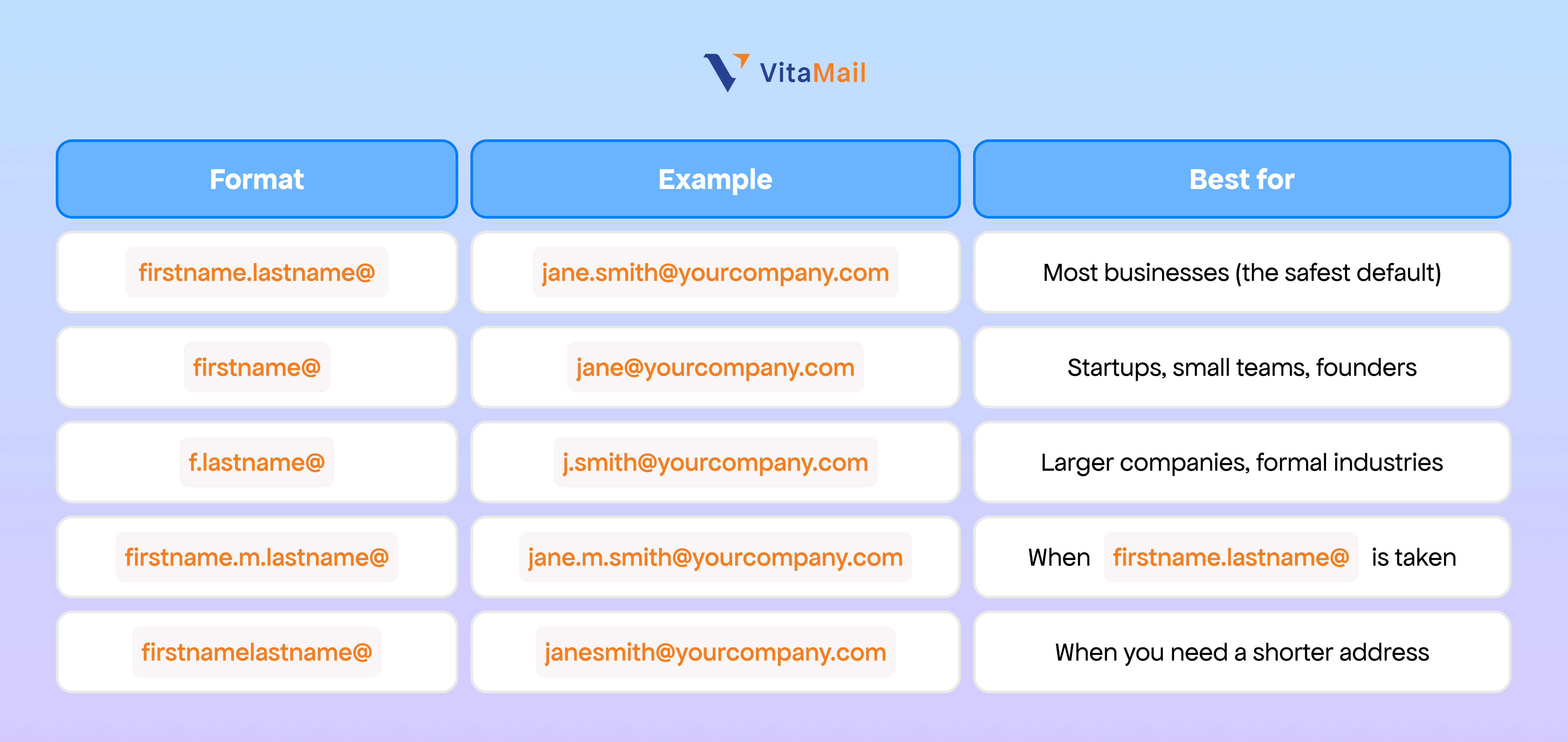
A professional email address uses your name and your company's custom domain. Common formats: • jane.smith@yourcompany.com (firstname.lastname) • jane@yourcompany.com (first name only) • j.smith@yourcompany.com (initial.lastname) • janesmith@yourcompany.com (no separator) • jane.m.smith@yourcompany.com (with middle initial)
Professional Gmail Address Examples
If you're using Gmail for business, you have two paths: a free @gmail.com account, or a custom domain through Google Workspace (e.g., you@yourcompany.com). Only one of them looks professional — and the difference shows up in every cold email, sales pitch, and job application you ever send.
Here are the most effective professional Gmail address examples used by businesses in 2026.
The 5 best professional Gmail address formats
The same naming rules apply whether you're on free Gmail or Workspace — but Workspace lets you attach those names to your own domain. Here are the formats that work best:
Each of these works inside Gmail's interface exactly like a personal Gmail account — same inbox, same labels, same shortcuts — but the address itself signals that you own a business domain.
Why a free @gmail.com address hurts you (with data)
A 2024 study by deliverability platform GlockApps found that emails sent from free Gmail addresses to business inboxes were 27% more likely to land in spam than the same emails sent from a custom Workspace domain. The reason: most B2B spam filters score free-provider addresses as lower-trust by default.
If you're sending cold email, applying for jobs, or pitching prospects, a @gmail.com address can quietly cost you opportunities you'll never know about.
Professional Gmail examples by use case
Different jobs call for different formats. Here's how to choose: Sales and outreach (B2B) — Use firstname.lastname@yourcompany.com. Prospects research the sender, and a clear name + company domain helps you pass the 3-second credibility check before they even open the email. Example: david.chen@northwindsales.com Freelancers and consultants — Use firstname@yourname.com or hello@yourname.com. If your business is your personal brand, your name is the domain. Example: maria@mariarodriguez.com Founders and small business owners — Use firstname@yourcompany.com. It's friendly, memorable, and signals "the actual person behind the company is reading this." Example: alex@brightlabs.io Customer support and help desks — Use support@yourcompany.com or help@yourcompany.com. These are role-based addresses meant to be monitored by a team, not an individual. Example: support@brightlabs.io HR and recruiting — Use careers@yourcompany.com or recruiting@yourcompany.com. Job applicants expect a department address; using a personal one feels off. Example: careers@brightlabs.io
How to set up a professional Gmail address in Google Workspace
Setting up a custom-domain Gmail address takes about 10 minutes. Here's the high-level flow:
- Sign up for Google Workspace at workspace.google.com and choose a plan (Business Starter begins at $6/user/month as of 2026).
- Verify your domain by adding a TXT record to your DNS settings. Google walks you through this with copy-paste instructions.
- Create your email addresses in the Workspace Admin Console under Directory → Users → Add user. Pick one of the formats above.
- Set up MX records so email actually routes to your new Gmail inbox. Google provides the exact records to add to your DNS.
- Configure SPF, DKIM, and DMARC to protect deliverability — without these, your emails risk landing in spam regardless of how professional your address looks.
Common mistakes to avoid with professional Gmail addresses
Even with a custom domain, you can still undermine your credibility:
- Adding numbers: jane.smith.2024@yourcompany.com looks like a spam pattern
- Using all lowercase tricks: j4n3.5m1th@yourcompany.com is unreadable and looks fake
- Mixing formats across your team: if your co-founder is mike@, you shouldn't be m.johnson@ — pick one team-wide convention
- Generic catch-alls for personal use: info@yourcompany.com is fine on your contact page, but sending personal outreach from it kills response rates
- Forgetting authentication: Even jane.smith@yourcompany.com will land in spam if you haven't set up SPF, DKIM, and DMARC — run a free SPF record check to verify your setup
The Golden Rule: Ditch the Free Account
The single most important step is to stop using a free email provider (like Gmail, Hotmail, or Yahoo) for your primary business communication.
my-cool-business@gmail.com just doesn't build confidence.
sarah.writer.84@yahoo.com looks dated and temporary.
These free accounts are fantastic for personal use! But for your business, you need to use a custom domain. That means owning yourcompany.com and having an email address attached to it, like your.name@yourcompany.com. It shows you are serious enough to invest in your own brand.
This is especially important for agencies managing client campaigns and small businesses sending outreach emails. Trust directly impacts results.
The Bad List: Formats You Must Avoid
Before we get to the good stuff, let's look at what not to do. Using these formats is a fast way to get your emails ignored or, even worse, sent straight to the spam folder.
- The Nickname: coolguydave@domain.com
- The Cutesy: sarahlovesdesign@domain.com
- The Number Jumble: johnsmith1988@domain.com
- The Vague Generic: info@domain.com (This one is fine for a general inbox, but terrible for personal outreach! People want to talk to people, not an "info" box.)
- The Confusing: s.smith.design.help@domain.com (It's just too long!)
Using these can hurt your reputation and is a key reason why emails go to spam.
The Good List: Professional Email Address Examples
So, what should you use? The best format often depends on your company size and personal preference. The key is consistency. Pick one format and stick to it for your whole team. Using a professional email provider like Neo Mail, Google Workspace, or Microsoft 365 can also make this process easier, helping you set up domain-based email addresses that look credible and consistent across your business.
Here are the most common and accepted professional formats.
1. The Classic: Firstname.Lastname
This is the gold standard for most businesses. It’s clear, personal, and scales perfectly as your team grows.
- john.smith@yourcompany.com
- jane.doe@yourcompany.com
2. The Short & Sweet: Firstname
This format is clean, modern, and very popular with startups and smaller businesses. It feels friendly and direct.
- john@yourcompany.com
- jane@yourcompany.com
3. The Formal: FirstInitial.Lastname
This is a great, professional alternative if you have a lot of employees or want a slightly more formal, traditional feel. It's also excellent for people with long first names.
- j.smith@yourcompany.com
- j.doe@yourcompany.com
What About Common Names?
What if your name is John Smith and john.smith@ is already taken by the other John Smith in your company? You have a few great options.
- Use a Middle Initial: This is the best solution. john.m.smith@yourcompany.com
- Combine Formats: Use a full first name and a last initial. john.s@yourcompany.com
- Use the Full Last Name: johnsmith@yourcompany.com (This is less readable, but still professional).
What About Role-Based Emails?
Role-based emails are great for functions, not for people. You should absolutely create these, but don't use them for personal networking or sales outreach.
Use these for your website's contact page or for specific departments.
- support@yourcompany.com (For customer help)
- sales@yourcompany.com (For new business inquiries)
- hello@yourcompany.com (A friendly, modern alternative to "info")
Just remember, these types of "catch-all" addresses can sometimes be risky. It's crucial to still verify the emails on your lists, even if they look professional.
Your Email Is More Than Just a Name
See? It's pretty simple. A clear, domain-based email address instantly makes you look more credible.
But your email's name is only half the battle.
Your reputation is the other half. You can have the best-looking email address in the world, but if your domain's health is bad, you'll still land in the spam folder.
That’s where things like domain authentication (SPF, DKIM, DMARC) and list verification come in. Your professional email address gets you in the door. A healthy, verified domain ensures your message actually gets delivered.


