





You receive a cold email from someone you've never heard of, at a company you don't recognise, with a request that sounds vaguely interesting. Before you reply, you want to know: is this person real? What's their actual role? Is the company legitimate? That is exactly what reverse email lookup is built to answer.
Reverse email lookup is the process of starting with an email address and finding the identity, employer, role, and public profile data of the person behind it. It works by cross-referencing the address against public databases, social platforms, and B2B contact providers that have indexed billions of professional emails. Sales and recruiting teams use it to verify inbound prospects, enrich existing leads, and confirm whether an unknown sender is a real person before responding.
This guide covers what these tools actually return, how they work, the free and paid options worth your time, a five-step process you can run today, and the limits no vendor advertises.
Key Takeaways:
- Reverse email lookup is a verification tool, not a prospecting strategy. It earns its place when you need to identify an unknown sender, enrich a thin lead, or clean a stale CRM. It does not earn its place when used to retrofit identities onto a list that should not have been bought.
- Coverage is strongest on professional emails at company domains. Free providers like Gmail, Outlook, and Yahoo return thin records because those providers do not publish member data. Expect depth on B2B addresses and shallowness on personal ones.
- B2B contact data decays at 25 to 30% per year (HubSpot Database Decay benchmark). The same email can return different records from different tools because their underlying sources refresh on different cadences. Neither tool is wrong, both are showing their freshest snapshot.
- The free workflow handles most one-off verification. Search the address as a quoted string in Google, cross-reference any name match on LinkedIn and the company site, then run the address through a free verifier like Hunter or EmailRep. Paid tools become necessary at scale or for phone-number recovery.
- Run a twenty-address audit before paying for any tool. Test it on emails where you already know the truth (current colleagues, past colleagues, customers) and only trust it if it scores above 80% on name, title, and current company.
What reverse email lookup actually returns
A reverse email lookup typically returns a structured record about the person behind the address. The depth of that record depends on the source data, the seniority of the person, and the type of email being queried.
For a professional email tied to a B2B company domain, expect:
- Full name
- Current job title and seniority level
- Company name, domain, and HQ location
- LinkedIn profile URL
- Public Twitter/X or GitHub handle where it exists
- Country and time zone
- Direct dial or mobile number (paid tools, regional coverage varies)
- Tenure at current company
- Past roles where the data has been indexed
For a personal email at a free provider (Gmail, Outlook.com, Yahoo, iCloud), expect significantly less. Free providers do not publish member data, and most reverse lookup coverage on personal addresses comes from people who explicitly attached the address to a public profile (a forum post, a personal site, a public LinkedIn contact field).
What lookup rarely returns: home address, household members, financial records, or any data that requires identity verification to surface. Tools that promise this for B2B email addresses are either inflating their feature list or operating at the edge of what the law allows.
The professional-versus-personal split matters because it shapes which tool you reach for. For prospect verification on a work email, B2B databases are the right starting point. For an inbound message from a Gmail address claiming to represent a company, you need to verify the claim independently rather than trust a lookup record.
A standard hygiene step regardless of tool: validate every email before you send anything to it. A clean lookup record on an undeliverable address is still an undeliverable address.
How reverse email lookup works under the hood
Behind every lookup tool is a stack of data sources stitched together by a resolver. Understanding the stack helps you predict where coverage will be strong and where it will fail.
1. Public web indexing
Crawlers index corporate websites, team pages, conference speaker lists, podcast guest pages, SEC filings, press releases, GitHub commit histories, and Twitter/X bios. Anywhere an email address appears alongside a name on a publicly accessible page, that pairing can be ingested into a lookup database.
2. Professional networks.
LinkedIn has surpassed one billion members globally (LinkedIn 2024), and a meaningful share of those profiles include enough metadata for tools to connect a guessed work email pattern (firstname.lastname@domain.com) to the correct person. Tools do not scrape LinkedIn directly without permission, but they use the public profile graph to validate a lookup once the email is matched through other means.
3. Opt-in B2B contact databases
Vendors like Apollo, ZoomInfo, RocketReach, and Lusha maintain databases that combine licensed data partnerships, browser-extension contributions from their own users, and corporate filings. These databases can include hundreds of millions of professional contact records.
4. SMTP and DNS verification
Before a lookup tool returns a high-confidence match, many run a real-time SMTP handshake against the recipient server to confirm the address is deliverable. This is also how email validation works as a standalone service. The same MX-record and SPF-record checks used for check the sending domain's health feed the deliverability score on a lookup result.
5. Pattern matching for company domains
When a tool has high confidence in a company's email pattern (Marcus.Okafor@chartline.com follows a verified pattern at Chartline), it can resolve a lookup for any employee whose name appears in the company's public org graph, even when the address has not been seen in indexed text.
The resolver layer combines these sources, weights them by confidence, and returns a single record. That record is only as good as the freshest source feeding it, which is why the same email can return different results from different tools on the same day.
Five legitimate B2B use cases for reverse email lookup
Reverse email lookup is not a prospecting strategy. It is a verification and enrichment tool. Five use cases stand out for B2B teams.
1. Verifying inbound cold senders before responding. James Whitfield runs RevOps at Stackr. He gets twenty cold emails a week from vendors. Before replying to any, he runs the sender's address through a lookup tool to confirm the title and tenure match what the email claims. If the email is signed "VP of Partnerships at [Company]" but the lookup says "BDR" with a three-month tenure, James knows what kind of conversation he's actually entering.
2. Enriching event and webinar leads. When a prospect registers for a webinar with only a work email and a first name, marketing automation platforms can pass that email to a lookup provider and return a full record before sales follows up. This is the difference between a routed lead with full context and a cold call to "Sarah at gmail.com."
3. Cleaning and reassigning a stale CRM. Priya Mehta, VP Sales at Fidelio, inherited a CRM with 40,000 contacts last quarter. A batch reverse-lookup pass surfaced the contacts who had changed jobs since last touch, the ones who had been promoted into buying authority, and the ones whose companies no longer existed. The cleaned list is now her validated lead list for Q1.
4. Confirming the identity behind support, abuse, and partnership inquiries. When an inbound message claims to represent a partner, a journalist, or a regulator, the receiving team needs to verify the sender before disclosing anything. Reverse lookup is the first low-friction check, ahead of a phone or video confirmation.
5. Sales rep due diligence before a discovery call. Marcus Okafor at Chartline preps every discovery call with a five-minute lookup pass on every attendee. The pass returns titles, tenures, and any public content the attendees have published in the last ninety days. The first three minutes of every call are now better because of those five minutes.
What none of these use cases share is "I bought a list of emails and now I'm trying to figure out who they belong to." That sequence is backwards. The right starting point is a defined ICP and a built lead list, not an unknown address you are trying to identify after the fact.
Free vs paid reverse email lookup methods
Free workflows can take you a surprisingly long way for one-off lookups. Paid platforms become necessary when you need to enrich at scale, query frequently, or recover phone numbers.
The honest summary:
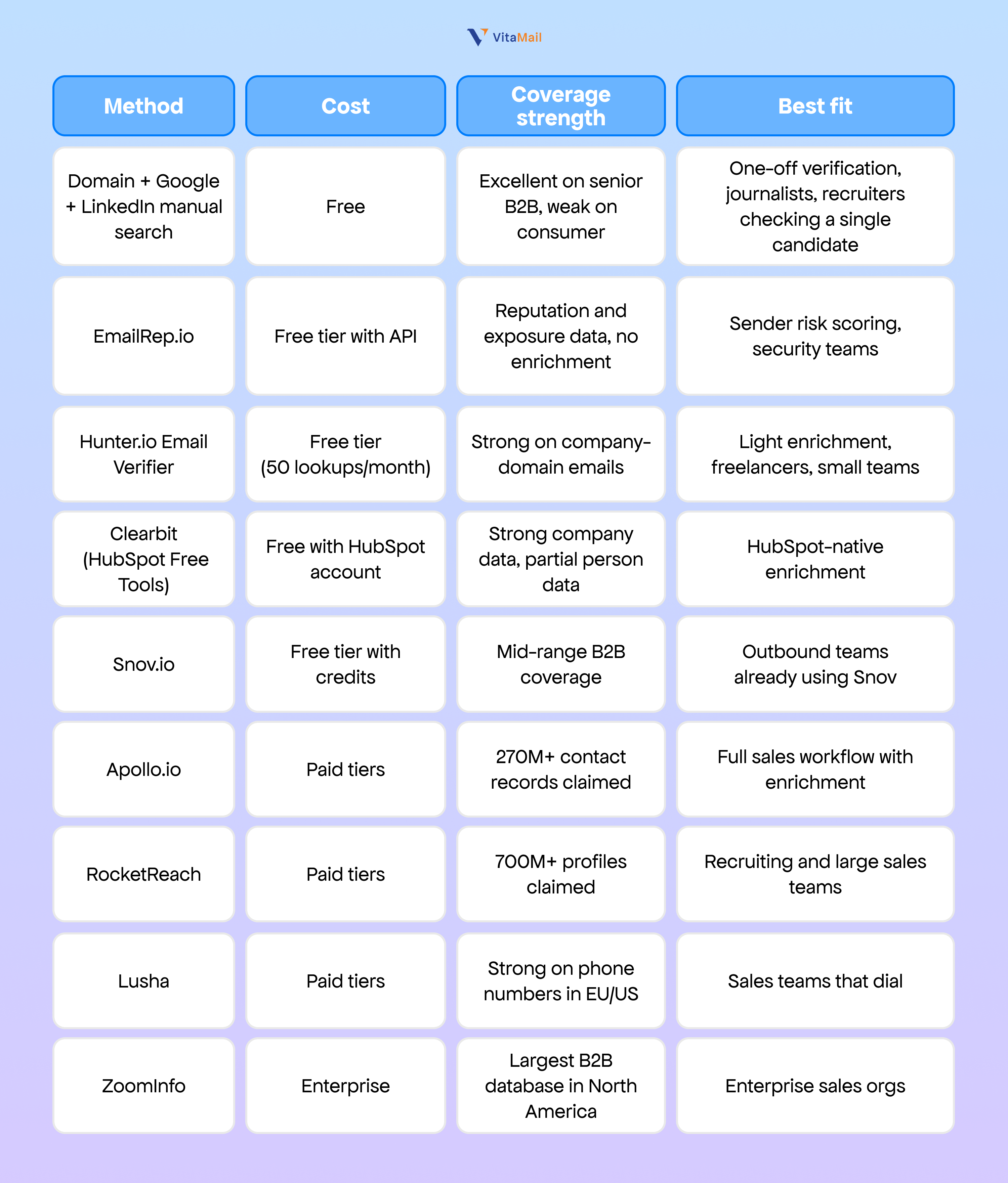
The "records claimed" numbers are vendor figures and reflect total profiles in the database, not deliverable addresses or current accuracy. A 700M-record database with 30% data decay is a 490M-record useful database (HubSpot Database Decay benchmark, 2024).
Free tools rarely beat paid tools on coverage, but they are sufficient for verification of a small number of senior B2B contacts. The break-even point is somewhere around 50 lookups per month for an individual user.
No tool is universally accurate. The right test is to run twenty addresses you already know the truth about (current colleagues, past colleagues, customers) through any tool you are evaluating, then measure how many records came back correct, partial, or wrong.
How to do a reverse email lookup in five steps
This sequence works whether you are using free tools or a paid platform. It is also how to vet a paid platform before you commit.
Step 1: Read the domain first
Before you query any tool, look at the domain. A custom company domain (chartline.com, fidelio.io) tells you the email is professional and likely indexed. A free provider domain (gmail.com, outlook.com) tells you to lower expectations on enrichment depth.
Check whether the domain has a real website, an MX record, and SPF/DMARC published. A domain with no website and no DNS records often signals a fly-by-night setup, regardless of what any lookup tool returns.
Step 2: Search the address as a literal string
Paste the full email into Google with quotes around it: "marcus.okafor@chartline.com". A surprising number of professional emails are indexed because the person posted in a public forum, signed a press release, or appeared on a company contact page. This step is free and takes ten seconds.
Step 3: Cross-reference on LinkedIn and the company site
If Google surfaces a name, search that name on LinkedIn against the company. Confirm the title, location, and tenure. Then visit the company site and check whether the person appears on a team page, a leadership page, or a published article. Two corroborating sources is the threshold for treating a match as confirmed.
Step 4: Run the address through a verification tool
Use a free verifier (Hunter, EmailRep, or any provider on the table above) to confirm the address is deliverable and the company pattern matches. A "deliverable" verdict plus a name match from steps 2 and 3 is a high-confidence record.
Step 5: Enrich with a paid provider if needed
If the lookup is for an enrichment workflow rather than one-off verification, run the address through a paid provider to pull the structured record into your CRM. This is the only step that costs money, and it is only necessary at scale.
Warning: Skipping Steps 1 to 3 and going straight to a paid lookup is the most common mistake. The paid record is downstream of the same public sources you can check yourself in two minutes. If those sources show nothing, the paid record will often be thin or wrong.
Accuracy, data decay, and what to test
Every reverse email lookup tool advertises high accuracy. The number that matters is not advertised accuracy but the rate of staleness in the data you actually receive.
B2B contact data decays at roughly 25 to 30% per year (HubSpot Database Decay benchmark). People change jobs, companies rebrand, departments restructure, and email patterns change after acquisitions. A record that was perfect twelve months ago has a one-in-four chance of being wrong today.
Two tools querying the same email on the same day return different records because their underlying sources refresh on different cadences. Tool A may have ingested LinkedIn data from last week. Tool B may be working from a snapshot taken six months ago. Neither is lying. Both are showing you their freshest version of the truth.
The honest test for any tool is the twenty-record audit: run twenty addresses where you already know the answer, score the results, and only trust the tool for live work if it scores above 80% on basic fields (name, title, current company). If you are about to commit to a year of seat licences, do this before you sign.
Accuracy also depends on geography. Most B2B databases are strongest in North America and the UK, mid-strength across the rest of Europe, and significantly weaker in Asia, Latin America, and Africa. Plan your tool selection around the regions where you actually sell, not the regions where the vendor's marketing site claims coverage.
The other side of accuracy is intent: even an accurate record does not tell you that the person wants to be contacted. That part requires a properly built ICP and a campaign that respects the recipient's context, which is why how to define your ideal customer profile sits upstream of any enrichment workflow.
Legal and ethical considerations
This section is informational and is not legal advice. Anyone running enrichment or outreach at scale should review their workflow with a qualified data protection lawyer in their jurisdiction.
Reverse email lookup sits inside a body of regulation that varies by region.
1. GDPR (EU and UK)
A professional email address is personal data when it identifies a natural person. Processing that data, including looking it up and storing the resulting record, requires a lawful basis. The most common basis for B2B sales is legitimate interest, which requires a documented balancing test, a clear purpose, transparent notice in your privacy policy, and a process to honour deletion and access requests. Buying lists, scraping LinkedIn, or storing enriched records indefinitely without review fails this test.
2. CAN-SPAM (US)
CAN-SPAM does not regulate lookup itself. It regulates the email you send afterwards. Required elements include a valid physical postal address, an accurate from line, and a working unsubscribe mechanism on commercial email.
3. CASL (Canada)
Canadian recipients require either express consent or a documented business relationship before commercial email is sent. Lookup data is not consent.
4. CCPA/CPRA (California)
California residents have the right to know what data you hold on them and to request deletion. If your CRM holds enriched B2B records on California residents, you need a process to respond.
The ethical line, separate from the legal one, is the difference between verification and surveillance. Verifying that a sender is who they claim to be is reasonable. Building a profile of a private individual from their personal email, with no business purpose, is not. Most B2B teams will never approach this line. The teams that do tend to find it through tooling that gathers more than the workflow needs.
How VitaMail fits into prospect verification
VitaMail does not run reverse email lookup as a standalone feature, and the workflow rarely needs it. The VitaMail process starts from a defined ICP, not from an unknown email address.
VitaMail reads your website, extracts your product and positioning, defines your ICP, and produces a validated lead list of companies and decision-makers matched to that ICP. Each lead enters the system with a verified email, a current title, a tenure record, and the public context (LinkedIn, company news, job postings, intent signals) needed for AI-personalised cold email. The verification work that reverse lookup tools perform on a single email is built into the lead list step before any campaign sends.
Where VitaMail does not help: identifying inbound senders. If a stranger emails you and you want to know who they are, V5 is not the tool. A dedicated reverse lookup tool from the table above is the right fit for that workflow.
The best mental model: reverse lookup is a verification utility.

Conclusion
Reverse email lookup is a verification utility, not a prospecting strategy. It earns its place in the B2B workflow when you receive an inbound email from an unknown sender, when you need to enrich a thin lead, or when you are cleaning a stale CRM. It does not earn its place when it is being used to retrofit identities onto a list that should never have been bought in the first place.
The better starting point is a defined ICP, a built lead list, and a campaign system that handles validation, enrichment, and personalisation as connected steps. That is the complete cold outreach system every modern B2B team needs, and it is what VitaMail V5 is built to deliver.
If you spend more time looking up unknown emails than running clean campaigns to known prospects, the lookup tool is not your problem. The list is.

